
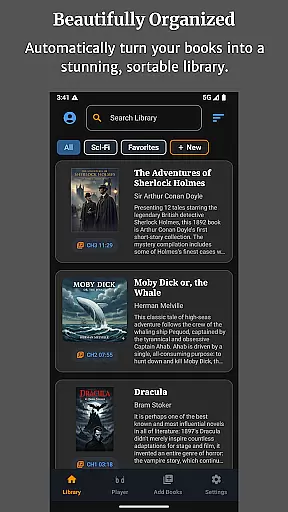
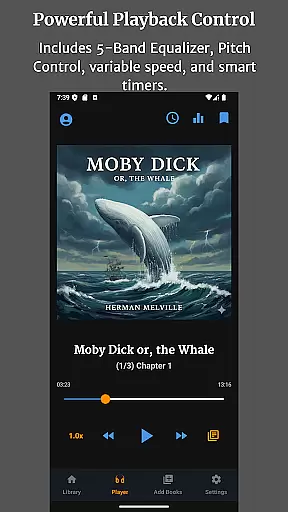
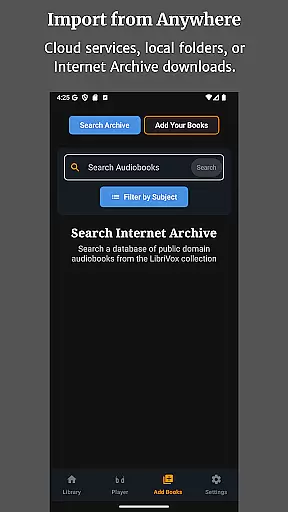
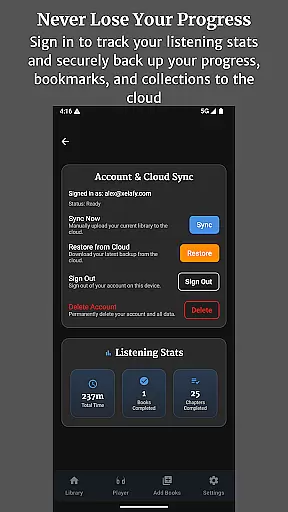
Audiobook Buddy is a comprehensive audiobook management app that transforms scattered files into an organized library. It supports syncing from local folders and cloud services like Google Drive, OneDrive, and Dropbox, creating a unified listening experience.
The app offers advanced playback features including a 5-band Equalizer, Pitch Control, and per-book speed settings. With support for background playback, lock-screen controls, and customizable themes, Audiobook Buddy provides a seamless user experience across devices.
Audiobook Buddy stands out with its smart library organization and extensive file format support. Users can create Collections to group related audiobooks, similar to playlists, and access public domain books from LibriVox.
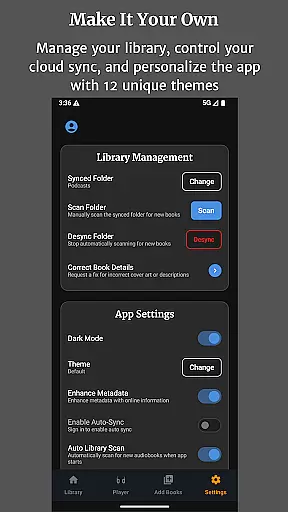
The app includes practical features like sleep timer, full lock-screen controls, and an optional home screen widget. With 11 customizable themes and multi-language support, users can tailor the app to their preferences while enjoying smooth playback of various audiobook formats.
Audiobook Buddy offers an extensive library of public domain audiobooks sourced from LibriVox, providing users access to a vast collection of titles. These audiobooks are free from copyright restrictions, ensuring that users can enjoy them without legal concerns.
In addition to the public domain library, Audiobook Buddy allows users to import their own audiobook files and ZIP archives. This feature enables the creation of a personalized library, accommodating a wide range of audio formats such as MP3, M4A, FLAC, and more.
The app reads metadata formats like CUE, NFO, and TXT, enhancing the organization and presentation of the user's personal collection. By supporting these formats, Audiobook Buddy ensures that users' libraries are not only extensive but also rich in detail and properly cataloged.
One of Audiobook Buddy's strengths is its comprehensive file format support, which includes popular audio formats such as MP3, M4A, M4B, AAC, OGG, FLAC, WAV, and WMA. This wide-ranging compatibility ensures that users can enjoy audiobooks in their preferred format without conversion hassles.
Beyond audio files, the app supports various metadata formats including CUE, NFO, and TXT files. This allows for detailed tagging and organization of audiobooks, making it easier for users to search and manage their collections efficiently.
Audiobook Buddy also supports multiple cover art formats such as JPEG, PNG, and WebP, allowing users to personalize their library's appearance with high-quality artwork. The combination of robust audio, metadata, and cover art support makes Audiobook Buddy a versatile tool for audiobook enthusiasts.
User-friendly interface
Extensive file support
Smart library organization
Customizable themes
Cross-device syncing
No DRM support
Limited language options
Cloud storage costs
Occasional bugs
Learning curve

7 Languages, Google, Wiki, Vocabulary.com, Cambridge & Urban Dictionary!
 4.50
4.50
The favorite Christmas story comes to life!
4.80
Offline translator from english to spanish, and from spanish to english.
4.50
Shop over 13 million new and used books at up to 80% off list price
4.20
A wonderful reader for good time spend.
4.20
Prime novels await! Fantasy & Romance on JoyRead. Immersive reads!
4.20
Manage collectibles, survey and treasure maps in Elder Scrolls Online.
4.40
The Original & Authentic Crystals, Gemstones, Rocks & Minerals Encyclopedia.
4.60
A story reading app: Read stories, novels and books, or write your own.
3.90
Daily thoughts, meditations, and prayers for living a sober life in recovery.
4.90
A lightweight reader for comics and mangas files (.cbr, .cbz, .cbt, .pdf, ...)
4.80
Enjoy daily devotionals, Bible verses, audio courses, and more.
4.80
Contains the 365 daily readings and everything other thing needed for catholics
4.70
Find, discuss, and organize your world of books and shows.
4.60
Build family tree & discover DNA, family history heritage, origins and ancestors
4.60
Master AKC Rally signs with in-depth hints, diagrams, and expert guidance.
4.50
The ultimate military vehicle identification (Equipment ID) guide.
4.40
Cute bedtime story for kids
4.30
KJV Bible works offline with Audio, Hebrew & Greek lexicon (concordance) & more!
4.20


User Reviews