
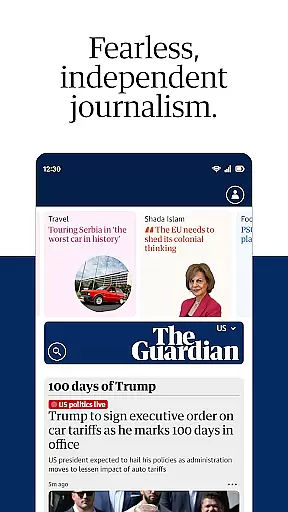



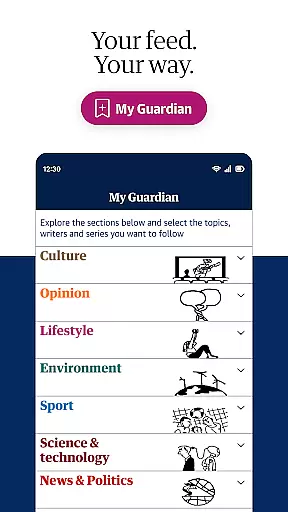

The Guardian app delivers fearless, independent journalism covering breaking news, politics, business, sports, and more. Its redesigned interface allows users to personalize their news feed through the My Guardian tab, ensuring they stay updated on topics that matter most to them. The app also features a dedicated podcast section with an in-app audio player, offering hands-free access to award-winning content.
For those seeking entertainment during downtime, the app includes a puzzles hub with popular games like Sudoku and Wordiply. While the app is free to download with a limited number of articles available, subscribing unlocks unlimited ad-free reading, offline access, and an enhanced experience without interruptions. By subscribing, users directly support independent journalism while enjoying premium content anytime, anywhere.
The Guardian app stands out with its comprehensive features designed for modern news consumption. The My Guardian tab enables personalized news tracking, allowing users to follow specific topics or stories that align with their interests. This feature ensures readers never miss updates on subjects they care about, from global events to niche areas of interest.
In addition to written content, the app offers a robust audio experience. Through the dedicated podcast tab, users can explore all Guardian podcasts using the integrated audio player. Furthermore, the text-to-speech functionality lets users listen to articles hands-free, making it ideal for multitasking or accessibility needs. The inclusion of a puzzles hub adds another layer of engagement, providing fun activities such as On the ball and Film reveal to complement the news experience.
In today's digital age, the credibility and diversity of news sources are more crucial than ever. The Guardian app addresses this by providing fearless, independent journalism from both the United States and around the globe. This ensures that users receive a wide spectrum of perspectives, which is essential for forming well-rounded opinions.
The app aggregates content from numerous reputable contributors and journalists worldwide. This diverse pool of writers brings stories from various regions and backgrounds, ensuring comprehensive coverage on global events. By doing so, The Guardian app not only informs but also educates its readers on different cultural and political landscapes.
For users, this means access to breaking news, in-depth analyses, and live blogs across multiple domains such as world news, politics, business, and sports. Such extensive and varied content allows readers to stay updated with minute-by-minute developments in areas that matter most to them personally or professionally.
Ultimately, The Guardian app empowers its audience by delivering trustworthy information through a multitude of voices. This approach fosters an informed public capable of critical thinking and making decisions based on reliable data.
Accuracy in reporting and rigorous fact-checking processes form the backbone of credible journalism. The Guardian app excels in these areas by employing award-winning journalists who adhere to strict editorial standards. These professionals work tirelessly to verify facts before publication, ensuring that every piece meets high-quality benchmarks.
Moreover, The Guardian employs a dedicated team responsible for reviewing articles post-publication. This ongoing scrutiny helps maintain content integrity over time, correcting any inaccuracies swiftly. As part of their commitment to transparency, corrections are clearly marked within articles, demonstrating accountability towards readers.
Subscribers benefit significantly from these practices as they gain unrestricted access to meticulously researched reports without encountering disruptive subscription messages or advertisements. Additionally, features like offline reading enhance user experience by allowing uninterrupted access to accurate information anytime, anywhere.
By prioritizing content accuracy and robust fact-checking protocols, The Guardian app sets itself apart as a beacon of reliability amidst an ocean of misinformation online. Readers can trust that each story has been vetted thoroughly, reinforcing the importance of supporting independent media outlets committed to truth-seeking journalism.
Personalized news feed
Award-winning podcasts
Text-to-speech facility
Offline reading option
Ad-free experience
Limited free articles
Subscription required
No video content
Occasional bugs
Heavy data usage

Go beyond the breaking new
 4.90
4.90
Breaking News, Politics & Award-Winning Journalism
4.40
The latest news, weather, and sports from Detroit's news leader, ClickOnDetroit.
4.40
Stay informed. Get all your world and local news with AP News!
4.30
OneWire News: Real-time news, local updates, and weather at your fingertips.
4.00
Stream & watch 3000+ live channels, TV shows, series, movies, news & sports
4.60
Local stories, live news coverage, weather forecasts, radar, and daily updates
4.10
See every side of every story
4.70
A podcast, audiobook, radio player. Listen and subscribe to all podcasts.
4.80
Follow the latest world news, headlines and developing stories with live alerts.
4.80
Crime map, police scanner & alerts
4.80
Read millions of expert stories on business, tech, design, and current events
4.70
Daily last -minute news alerts for local headlines
4.60
WSJ: Award-winning business & markets coverage, breaking news & global headlines
4.30
400+ News Channels. Local, Live & World Coverage. All the News in Just One Click
4.30
Watch Local News & Weather
4.30
Local NYC news and weather alerts. Watch NBC 4 New York live 24/7.
4.00
Stream Local News, Weather & Entertainment, with 1000s of Movies & TV Shows
3.80
Live, Sport, Podcasts & Video
3.60


User Reviews