

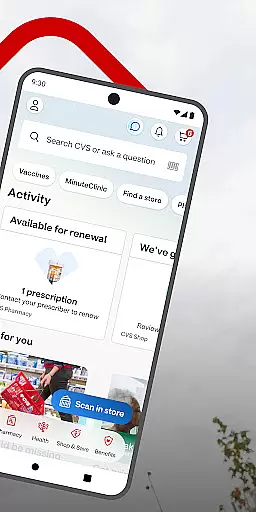
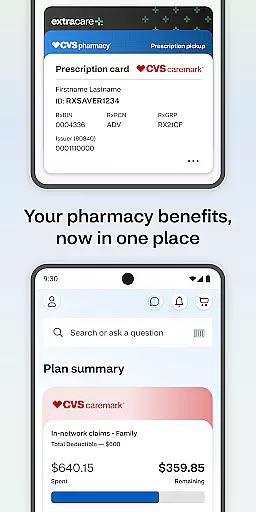
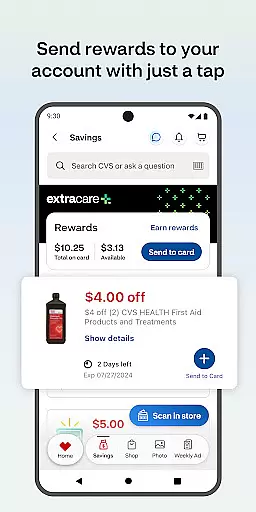
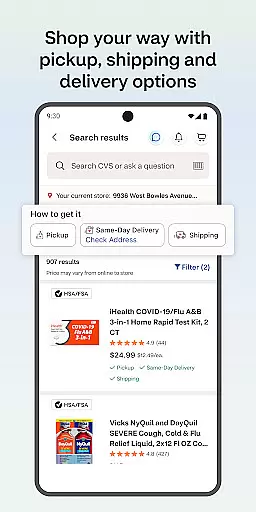
CVS Health® is a comprehensive medical app designed to simplify healthcare and shopping experiences. The app enables users to easily check out using ExtraCare® benefits, access exclusive deals, manage prescriptions, and schedule health services. With features like prescription delivery, medication information lookup, and telehealth consultations, it creates a one-stop solution for personal and family healthcare needs.
A key advantage of CVS Health® is its integration of multiple services into one platform. Users can order prescription refills, check drug interactions, and view medical history while also accessing weekly store ads and managing photo printing services. This makes the app particularly useful for families who need to coordinate various healthcare services and want to save both time and money while doing so.
The true value of CVS Health® lies in its ability to streamline everyday health-related tasks. Whether you're looking to save on purchases, manage medications more effectively, or access virtual healthcare services, this app provides practical solutions that enhance convenience and promote better health management.
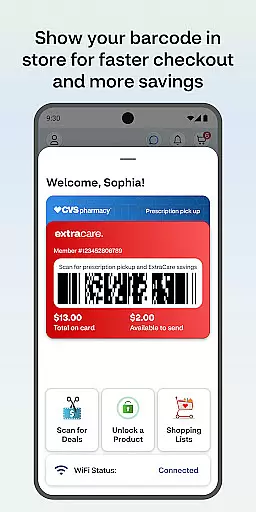
CVS Health® offers an extensive range of features tailored to improve healthcare accessibility and efficiency. One standout feature is the single-scan checkout option through ExtraCare®, which allows users to save money and pick up prescriptions seamlessly. Additionally, the app supports push notifications for deals, prescription updates, and order statuses, ensuring users never miss important alerts.
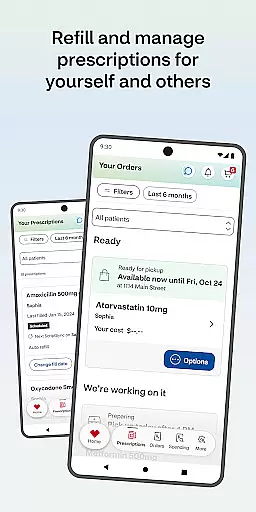
Another significant aspect is its robust prescription management system. Users can order refills, pay for medications, and opt for home delivery. The app also includes tools for checking drug interactions and maintaining detailed medication histories. For families, the ability to consolidate all pharmacy needs under one account proves invaluable.
Telehealth services further distinguish CVS Health® from other medical apps. Through 24/7 video consultations with healthcare providers, users can receive timely medical advice without leaving their homes. Integration with MinuteClinic® locations adds another layer of convenience by allowing users to book appointments, view wait times, and explore available services based on insurance coverage.
In the realm of digital health solutions, the credibility of medical content is paramount. The CVS Healthu00ae app excels in this area by providing users with verified information and expert-reviewed healthcare services. This ensures that every piece of content, from drug interactions to health care service details, is accurate and reliable.
The app offers an extensive library of medication information, all reviewed by healthcare professionals. Users can check drug interactions and get detailed insights into their prescriptions, which empowers them to make informed decisions about their health regimen. This level of detail and verification is crucial for managing personal and family health effectively.
Furthermore, the ability to schedule vaccines and medical care through the app adds another layer of trust. Each service is backed by CVS Pharmacyu00ae or MinuteClinicu00ae professionals, ensuring high standards of care. Video consultations are available 24/7, connecting users with licensed healthcare providers who deliver expert advice and treatment options.
Overall, the emphasis on expert-reviewed content and services within the CVS Healthu00ae app not only enhances user confidence but also promotes better health outcomes. By prioritizing accuracy and professional endorsement, the app establishes itself as a trustworthy companion in personal healthcare management.
Teleconsultation has become a cornerstone of modern healthcare, offering convenience without compromising quality. The CVS Healthu00ae app sets a high standard in teleconsultation services by providing seamless video chat capabilities with healthcare providers around the clock. This ensures users receive timely medical advice and treatment whenever needed.
One of the standout features is the accessibility it offers. With just a few taps, users can connect with licensed healthcare professionals for a wide range of issues, from general inquiries to specific medical concerns. This ease of access significantly reduces the barrier to obtaining professional medical opinions, making healthcare more inclusive and efficient.
Moreover, the integration of teleconsultation services within the broader ecosystem of the CVS Healthu00ae app enhances its utility. Users can manage prescriptions, view health records, and even schedule in-person visits at nearby clinics directly through the platform. This holistic approach streamlines the healthcare experience, allowing for comprehensive care management from home.
By focusing on delivering high-quality teleconsultations, the CVS Healthu00ae app not only meets current healthcare demands but also anticipates future needs. Its commitment to maintaining rigorous standards in virtual care delivery positions it as a leader in the field, ensuring users consistently receive top-notch medical support regardless of location.
User-friendly interface
Comprehensive health tools
Integrated payment options
Real-time prescription tracking
Wide service availability
Battery consumption issues
Limited customization settings
Occasional notification delays
Requires latest OS version
Some features are location-specific

One app to unlock your health
 4.30
4.30
The official DSM-5-TR® app
4.50
Zepbound & Mounjaro support & resources for savings, tracking & more
3.90
Save up to 80% on your pharmacy prescriptions & medications with free Rx coupons
4.70
Remote, medical-grade heart care at your fingertips
4.70
700 questions, 2 full exams, Predictive Scoring—your key to NREMT success!
3.90
Anthem/Wellpoint and other health insurance plans
4.60
Tap & save. Coupons that fit in your pocket. Find low prices on prescriptions.
4.80
MyChart for Android
4.50
myVCA is your tailor-made guide to raising a healthy and happy pet.
4.90
A comprehensive 3D atlas of the human body
4.80
Want to make it easier to manage your health? We’re with you, wherever you are.
4.70
Take your aphasia therapy to the next level with 4 evidence-based advanced apps
4.70
Download the PulsePoint app and use your CPR skills to save a life!
4.60
Log your symptoms in the MyZio app — the perfect companion to the Zio monitor!
4.60
Download OctaApp for easy access to your plasma donation info
4.40
A rapid reference for healthcare professionals caring for pediatric patients.
4.30
Master AEMT with 1,400+ study items, TEIs, practice tests, and scoring.
4.10
Donating plasma just got easier with the BioLife Plasma Services mobile app.
3.90


User Reviews