
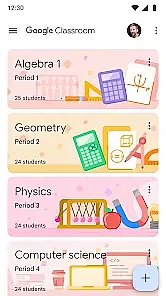
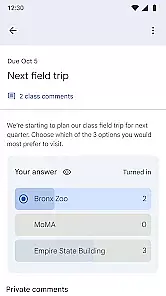
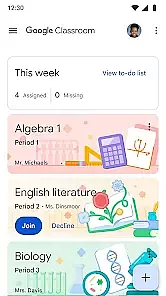
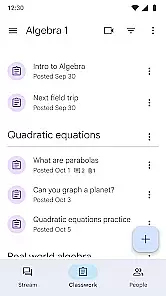
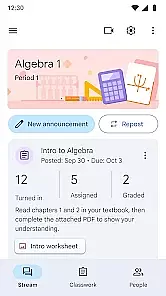
Google Classroom is an educational app designed to simplify teaching and learning processes. It enables educators to create, distribute, and grade assignments in a paperless environment. The app seamlessly integrates with Google's suite of productivity tools like Docs, Sheets, and Drive, making it easy to organize class materials and collaborate with students.
The platform allows teachers to communicate directly with students, send announcements, and provide feedback on assignments. Students can access course materials, submit their work, and participate in class discussions from any device. This makes the app particularly useful for remote learning environments or blended classrooms where digital resources are essential.
With its focus on streamlining classroom management tasks and enhancing communication between teachers and students, Google Classroom has become an indispensable tool for modern education. Its intuitive interface and robust integration capabilities ensure that both educators and learners can focus more on content delivery and engagement rather than administrative tasks.
One of the standout features of Google Classroom is its seamless integration with other Google services. Teachers can easily attach files from Google Drive, assign quizzes through Google Forms, and schedule meetings via Google Meet directly within the app. This interconnected ecosystem simplifies workflow and reduces the need for switching between multiple applications.
Another key feature is the ability to organize classes into separate folders, each containing relevant materials such as lecture notes, assignments, and reading resources. This helps keep everything structured and accessible. Additionally, the app supports real-time collaboration, allowing students to work together on projects simultaneously using shared documents.
Google Classroom also offers a grading system that lets teachers provide detailed feedback on student submissions. With options to highlight text, add comments, and assign grades, educators have all the tools they need to assess performance effectively. Furthermore, the mobile version ensures accessibility, enabling users to stay connected and productive even when they're not at their desks.
In the realm of educational applications, content accuracy and alignment with established curricula are paramount. Google Classroom ensures that all educational materials provided are vetted by educational experts to guarantee they meet current educational standards.
The app integrates seamlessly with other Google services like Google Docs and Google Drive, allowing educators to distribute assignments that align perfectly with their teaching goals. This creates a cohesive learning environment where students can easily access resources that are directly tied to their coursework.
For users, this means that every assignment or resource shared through Google Classroom is not only reliable but also structured to fit within recognized educational frameworks. This helps in maintaining a consistent pace with the academic calendar and syllabus requirements.
Ultimately, the authority of content and its alignment with curriculum standards ensure that both teachers and students have a trustworthy platform for managing classroom activities effectively while staying aligned with educational objectives.
Gamification in learning introduces game-like elements into educational settings to enhance engagement and motivation among learners. Google Classroom incorporates these principles by offering features that reward participation and track progress in an interactive manner.
Through functionalities such as assignment deadlines, grading systems, and feedback loops, the application fosters a competitive yet supportive environment. Students receive badges or points for completed tasks, which incentivizes continued involvement and effort in their studies.
This approach benefits users by transforming routine educational tasks into engaging challenges. As students complete assignments and earn recognition for their efforts, they become more invested in their learning journey, leading to improved outcomes and satisfaction.
By integrating gamification elements thoughtfully, Google Classroom not only makes learning more enjoyable but also supports better retention of knowledge through active participation and regular reinforcement of achievements.
User-friendly interface
Seamless Google integration
Real-time collaboration
Efficient grading system
Accessible on multiple devices
Limited offline functionality
Dependent on Google services
No advanced analytics
Basic assignment types
Occasional sync issues

Pro Doctor Dentist for PetsGame
 4.60
4.60
Magical girl game where dreams come true. Collect & care for cute princesses!
3.80
Dress up, Makeover, and Party! Design a Wonder World!
3.90
Fun baby care game for kids with dinosaur friends. Enjoy the fun kids game.
4.00
Fun dentist game with Cocobi friends!
4.10
A speed-learning English vocabulary game designed for user to reach proficiency
4.2
A cube building game for small (and large) builders.
4.40
Featuring the Numberblocks
3.60
Games, music, crafts and coloring with cats
4.10
Explore Dopples World, build your avatar life & create endless stories!
4.70
Cute coloring games for girls! Draw, paint & decorate with endless colors.
4.70
Amazing learning and educational games for children of all ages.
4.70
Enjoy coloring with wide variety of 1000+ coloring games for kids & drawing game
4.50
Math Games For Kids To Learn Addition, Subtraction, Multiplication and Division.
4.30
Fun drawing games with coloring book, glow and paint by numbers! Color for kids.
4.20
Animal games! Adopt virtual pet dog, cat & rabbit to create your pet world!
4.10
Imagine, build and ride your own Rollercoaster!
3.90
Create, design & explore Mia’s avatar game world! Dress up a dreamhouse you love
3.80
A game to memorize
4.5


User Reviews