
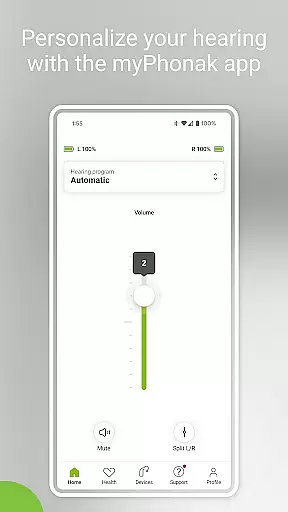
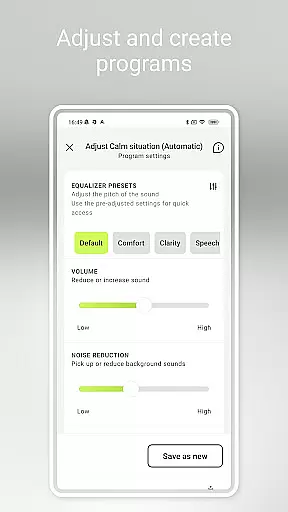
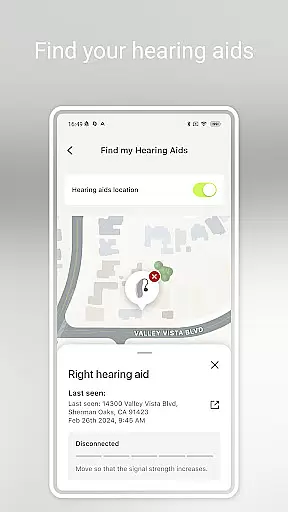
myPhonak is a comprehensive hearing aid management application designed for users of Phonak hearing aids. The app offers advanced remote control features, allowing users to adjust volume, noise reduction, microphone directionality, and equalizer settings to suit different listening environments. With personalized presets and detailed slider controls, users can fine-tune their hearing experience with precision.
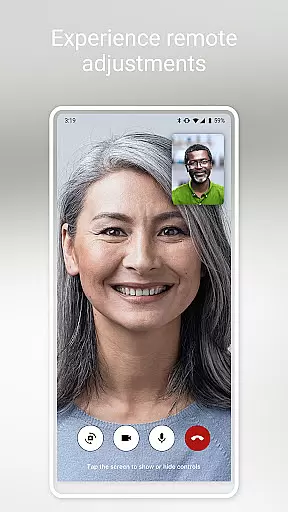
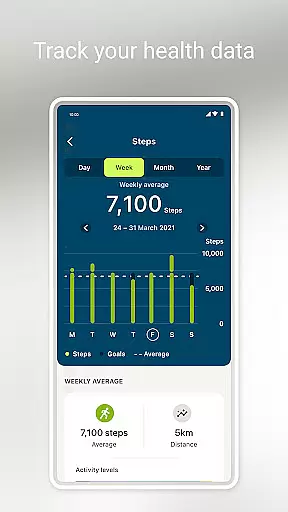
In addition to its core functionality, myPhonak provides remote support through live video consultations with hearing care professionals, enabling remote adjustments to hearing aids. The app also includes health tracking features such as step counting, activity levels, heart rate monitoring, and more, depending on the device model. These features collectively enhance both hearing performance and overall well-being.
The app's compatibility extends to various Phonak hearing aid models with Bluetooth connectivity, including Audéo Fit, Lumity, and Paradise series. It supports iOS devices like iPhone 6s and newer, ensuring seamless integration with modern smartphones. By combining advanced hearing controls, professional support, and health tracking, myPhonak delivers a tailored and convenient solution for managing hearing health.
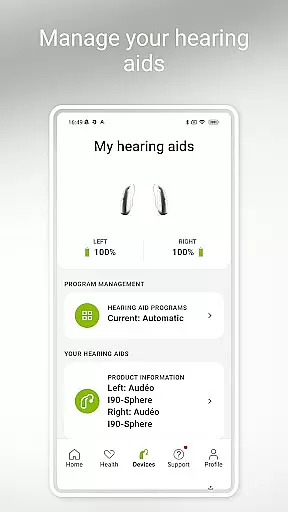
myPhonak stands out with its diverse feature set tailored specifically for hearing aid users. One of its primary features is the Remote Control functionality, which allows users to make precise adjustments to their hearing aids. This includes modifying volume levels, switching between pre-defined programs, and customizing sound characteristics using an equalizer with preset options or manual sliders for bass, middle, and treble ranges.
Another significant feature is Remote Support, which facilitates direct communication with hearing care professionals via live video calls. During these sessions, professionals can remotely adjust hearing aid settings, ensuring optimal performance without requiring in-person visits. Additionally, the Health section provides valuable insights into physical activity, offering metrics such as steps taken, wearing time, heart rate, and distance traveled, depending on the connected device's capabilities.
myPhonak also includes practical tools like Tap Control configuration, cleaning reminders, and real-time status updates for battery levels and connected accessories. These features collectively create a holistic ecosystem that not only enhances hearing aid usability but also promotes better health management and maintenance practices.
In the realm of medical applications, content credibility is paramount. myPhonak stands out by offering users access to enhanced hearing controls and personalization options for Phonak hearing aids, all reviewed and approved by hearing care professionals. This ensures that every feature, from noise reduction to microphone directionality, meets high medical standards.
The app includes Remote Support functionality, allowing users to connect with their hearing care professionals via live video calls for remote adjustments. This feature not only enhances convenience but also guarantees that any changes made are overseen by experts, maintaining a high level of professional oversight and reliability.
Additionally, myPhonak provides numerous health tracking features such as step counting, activity levels, and heart rate monitoring. These functions are especially valuable as they are integrated within a medically-oriented application, ensuring data accuracy and relevance for users focused on both hearing health and overall wellness.
Teleconsultation has become an essential aspect of modern healthcare, and myPhonak excels in this area by facilitating high-quality remote interactions between users and their hearing care professionals. Through the Remote Support feature, users can engage in live video calls, ensuring personalized attention and precise adjustments to their hearing aids without needing to visit a clinic physically.
This teleconsultation service is appointment-based, providing structured and dedicated sessions that enhance the user experience. By integrating professional oversight into the digital space, myPhonak ensures that each consultation is productive, addressing individual needs effectively while upholding stringent medical standards.
Moreover, the ability to adjust hearing aids remotely through expert guidance adds a layer of assurance for users. They can be confident that their device settings are optimized according to professional advice, thus improving their overall hearing experience and quality of life.
User-friendly interface
Comprehensive hearing controls
Remote professional support
Integrated health tracking
Wide device compatibility
Limited Android support
Advanced features require specific models
Health data varies by device
Dependent on Bluetooth connectivity
Professional support by appointment only

Leafly is a weed app for finding dispensaries, cannabis strains, & more.
 4.70
4.70
Amplify surrounding sounds, conversations, TV or lectures for louder hearing.
4.70
Be more confident prescribing homeopathy at home for your family.
4.80
Remote, medical-grade heart care at your fingertips
4.70
Over 1,200 review questions and 5 exams—pass the NREMT with EMT Review Plus!
4.10
A comprehensive 3D atlas of the human body
4.80
Manage your health care in one easy place
4.40
Continuous Glucose Monitoring
3.40
MyChart for Android
4.50
The Better Pharmacy Experience
4.90
Search by insurance, see real-time openings & verified reviews, get care fast.
4.80
Discover the source of pain with Muscle Trigger Point Anatomy.
4.70
Hear far away sounds, conversations, TV and surrounding sounds more clearly.
4.70
Blue Cross and Blue Shield of Texas member information
4.60
Check and Track your Blood Pressure & Heart Rate.
4.50
Get your lab results on your smartphone with MyQuest.
4.40
Molina Members: My Molina. Manage your health anytime, anywhere!
4.30
MHealth is the mobile version of MEDITECH’s Patient and Consumer Health Portal.
3.10
A fantastic 3d reference that includes over 300 structures and a quiz function.
3.00


User Reviews