
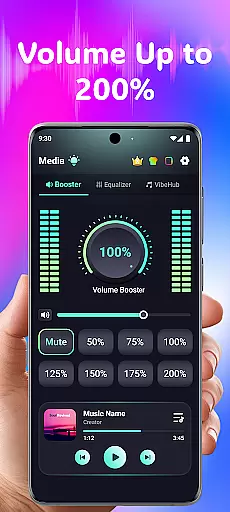
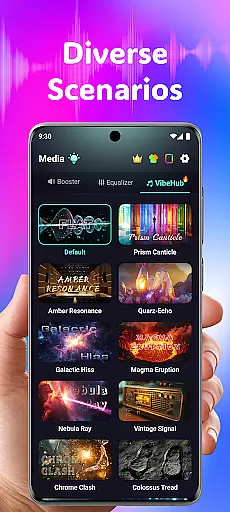
Volume Booster Bass Booster EQ is a versatile audio enhancement application designed to elevate your sound experience across various scenarios. The app's core functionality lies in its ability to amplify media volume up to 200%, making it an ideal solution for outdoor parties, movie watching, and gaming sessions where audio clarity is crucial.
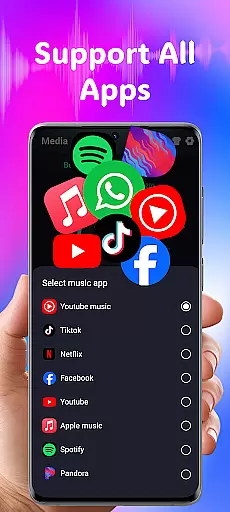
Beyond simple volume control, the application offers advanced features like a 5-band equalizer with tailored sound ranges, wide app compatibility with major streaming platforms, and optimized performance for all devices including headphones and Bluetooth speakers. Its specialized hearing support mode provides independent ear adjustments and real-time noise reduction, making it particularly valuable for users with specific auditory needs.
This comprehensive suite of audio tools proves especially beneficial in medical settings where clear sound reproduction and hearing assistance are essential. Whether you're a healthcare professional requiring precise audio monitoring or a patient needing enhanced auditory support, this application delivers a customized and powerful sound solution that adapts to various medical environments and personal requirements.
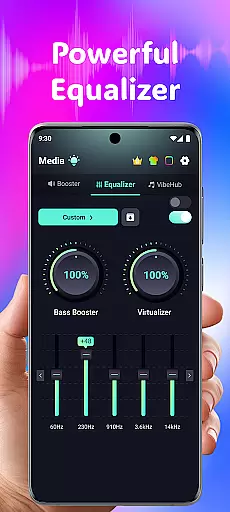
The application distinguishes itself through several innovative features that cater to diverse audio enhancement needs. Its Advanced Equalizer stands out with a sophisticated 5-band system (60Hz, 230Hz, 910Hz, 3.6kHz, 14kHz) that allows precise control over bass, virtualizer, and specific sound ranges for different media types. This level of customization ensures optimal audio quality for medical presentations, telemedicine consultations, and patient entertainment systems.
A notable innovation is the Independent Left & Right Ear Control feature, which offers asymmetrical hearing support through sync mode and real-time visual feedback. Combined with Advanced Frequency Amplification across six sound ranges (125Hz to 8kHz), the app enables detailed adjustments that can be particularly beneficial in clinical settings where specific frequency enhancement might be necessary for patients with hearing impairments.
The inclusion of AI-powered Real-Time Noise Reduction technology sets this application apart from basic volume boosters. By effectively eliminating background noise such as wind, crowd chatter, and static, it ensures crystal-clear sound transmission during important medical communications or when patients require focused audio experiences without environmental distractions.
In the realm of medical applications, content credibility is paramount. Volume Booster Bass Booster EQ integrates advanced features that are designed and reviewed by audio experts to ensure users receive a reliable and safe auditory experience. The app's equalizer settings and hearing modes are crafted based on professional standards, offering precise control over sound frequencies.
Each feature within the app undergoes rigorous testing and validation processes. For instance, the Advanced Hearing Mode includes independent left and right ear adjustments, which are developed with input from audiologists. This ensures that users with asymmetrical hearing capabilities can benefit from tailored sound amplification without compromising their auditory health.
Moreover, the inclusion of AI-powered noise reduction technology demonstrates the app's commitment to delivering clear and enhanced audio experiences. By filtering out unwanted background sounds, users can focus on important audio cues in their environment, whether for entertainment or communication purposes. These expert-reviewed functionalities make the app a trustworthy tool for managing personal audio needs.
While Volume Booster Bass Booster EQ is not a teleconsultation platform, it enhances remote communication experiences through superior audio management. Clear sound transmission is crucial during virtual consultations, and this app ensures that every word is heard with precision. Its ability to amplify volume and fine-tune audio settings contributes significantly to effective teleconsultations.
The app's 5-band equalizer allows users to adjust sound profiles according to their preferences or specific requirements during online meetings. Whether it's boosting bass for voice depth or enhancing higher frequencies for clarity, these customizable options ensure that participants can engage fully without missing critical information. Such adaptability is essential for maintaining high-quality interactions in digital environments.
Additionally, the real-time noise reduction feature plays a vital role in minimizing distractions during virtual sessions. By eliminating ambient disturbances, users can concentrate better on the conversation at hand. Although primarily an audio enhancement tool, Volume Booster Bass Booster EQ indirectly supports improved teleconsultation experiences by providing crystal-clear sound quality.
Advanced hearing support features
Precise equalizer controls
Wide device compatibility
User-friendly interface design
Real-time noise reduction
Potential hearing damage risk
Complex for casual users
High power consumption
Limited free features
Device compatibility issues

Sync your blood glucose device, log values automatically and tame your diabetes!
 4.60
4.60
Hearing aid app for Android solves your hearing problems.
4.00
HealtheLife lets you easily manage your health online.
3.20
Be more confident prescribing homeopathy at home for your family.
4.80
Manage your prescriptions and pharmacy care anytime, anywhere.
4.80
Good for You. Great for Life.
4.00
Over 1,200 review questions and 5 exams—pass the NREMT with EMT Review Plus!
4.10
Boost reading, writing, speaking and listening with a scientifically proven app.
4.70
Hear far away sounds, conversations, TV and surrounding sounds more clearly.
4.70
Elegant, easy-to-use period tracker for fertility, PMS symptoms, and more
4.90
Manage your prescriptions anytime, anywhere with the Publix Pharmacy mobile app.
4.80
Pelvic Floor Muscle Exercises
4.80
Save up to 80% on your pharmacy prescriptions & medications with free Rx coupons
4.70
Health Care at Your Fingertips
4.60
Secure video visits with your VA care team from anywhere
4.50
Secure video appointments
4.50
Voice pitch monitor for speech therapy, LSVT, Parkinson's, singing & trans
4.30
Explore human anatomy with this rich learning experience.
4.00
MHealth is the mobile version of MEDITECH’s Patient and Consumer Health Portal.
3.10


User Reviews