

SeatGeek is a premier ticketing platform that provides users with a smart and secure way to buy and resell tickets for a wide range of live events. With access to thousands of sporting events, concerts, festivals, and theater shows, SeatGeek ensures tickets are backed by a 100% buyer guarantee. Whether you're looking to attend an NFL game or a Broadway show, SeatGeek offers a seamless experience from purchase to entry.
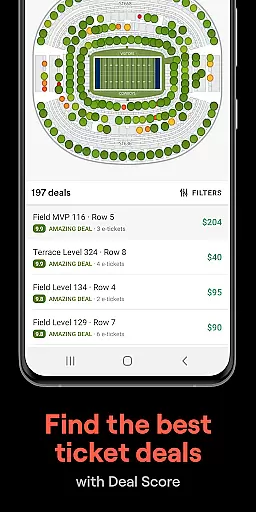
The app stands out with its interactive seating charts and Deal Score feature, which helps users find the best value tickets. Additionally, mobile ticketing allows for easy access to venues without the need for printing. Users can also send tickets to friends directly through the app, making group outings more convenient than ever.
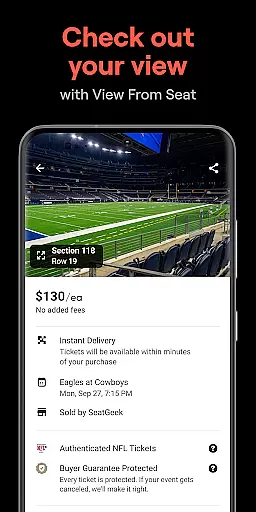
SeatGeek offers a comprehensive set of features designed to enhance the ticket buying and selling experience. The interactive seating charts provide panoramic views from every section, ensuring users know exactly what their view will be before purchasing. The innovative Deal Score system color-codes deals to indicate the best value, protecting users from overpaying.
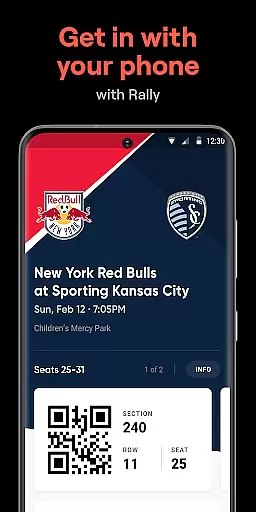
Mobile functionality is at the core of SeatGeek's offerings. Users can store e-tickets in the app and use them for venue entry, eliminating the need for physical tickets. The app also facilitates sending tickets to friends instantly, either for free or for a fee. For those needing to resell tickets, SeatGeek simplifies the process with one-tap listing and pricing recommendations.
Furthermore, discovering nearby events is effortless with filters for teams, artists, venues, genres, and sports. Payment options are flexible, supporting both Google Pay and credit cards. And with The Daily Tap feature, users have a chance to win free tickets to local events, adding an element of excitement to the ticketing process.
Creating and customizing event tasks within SeatGeek allows users to tailor their event-going experience with precision. This feature is crucial for ensuring that every detail of your event planning is exactly as you envision.
SeatGeek's platform offers an intuitive interface where users can explore a myriad of events, from sports to concerts, and customize their tickets with specific seating preferences. The interactive seating charts provide panoramic views, allowing users to select the best seats according to their needs.
Users benefit from this feature by having complete control over their event plans. Whether it's choosing the perfect seat for a basketball game or securing front-row tickets for a concert, SeatGeek ensures that each ticket purchase aligns perfectly with the user's expectations.
The value lies in the ability to fine-tune every aspect of the event attendance, making sure that each visit is as enjoyable and memorable as possible. With SeatGeek, users are not just buying tickets; they're crafting personalized experiences.
Setting reminders for upcoming events is essential for ensuring that users never miss out on their favorite activities. In today's fast-paced world, having reliable reminder settings can make all the difference in managing one's schedule effectively.
SeatGeek provides flexible reminder options that allow users to set alerts for their purchased events. These reminders can be customized to notify users at various intervals before the event, whether it's a day prior or just an hour before showtime.
This functionality benefits users by keeping them well-informed and prepared for their planned events. By receiving timely notifications, users can organize their time efficiently, ensuring they arrive at venues promptly and without stress.
Ultimately, SeatGeek's reminder settings enhance the overall user experience by providing peace of mind and convenience. Users can enjoy seamless event management, knowing they have reliable alerts to keep them on track with their entertainment plans.
User-friendly interface
Interactive seating charts
Deal Score value rating
Mobile ticket access
Secure resale marketplace
Limited international support
Occasional service fees
Event availability varies
Requires account creation
Some features US-only

An App for Bhutanese
 4.2
4.2
Fantasy of Lights Event App
5.00
Community for Mods, Addons, Melsaves, Melmods for Melon Playground
4.5
Listen Full Quran MP3 Offline - Qibla Compass, Salah Timing & 99 Names of Allah
4.60
Digital Income Wallet of the Final Libertadores 2025
4.4
Text message invitations for birthday party, wedding, graduation, baby shower +
4.60
TV Garden - World Live TV : Play & cast your videos seamlessly!
3.20
Buy tickets for any event!
3.90
Discover events & experiences in NYC, LA, Chicago, DC, Miami and more!
4.70
Save money on concert, sport, and theater tickets, and discover upcoming events.
4.80
Here you can choose tickets for films, performances, concerts and other events
4.60
Octrober 2025: We've updated the MyGenMobile App with a new look and feel!
4.40
Manage all your events, leads, ticketing, payments and check-ins.
4.30
Get live football here
4.30
The calendar app in this 2026 year see all dates.
4.20
Microsoft Build is an annual developer conference hosted by Microsoft
4.20
No invest, Easy way to earn USDT through crypto cloud mining
3.80
Audio guide companion APP for SEE's Michelangelo's Sistine Chapel
3.50
The Official Football Ticketing App for Fans in Qatar
4.4


User Reviews