
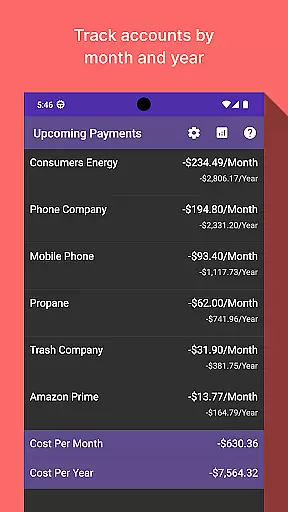
Bill Manager is a comprehensive financial management application designed to help users stay on top of their bill payments. The app's core functionality revolves around tracking upcoming bills, providing detailed payment information, and keeping users informed about their financial obligations between pay periods.
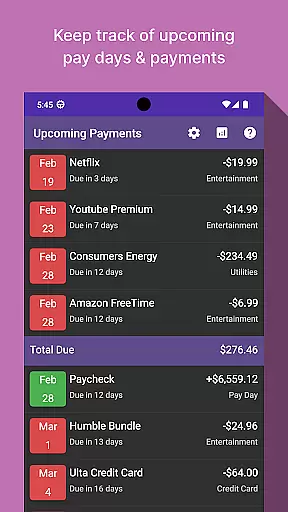
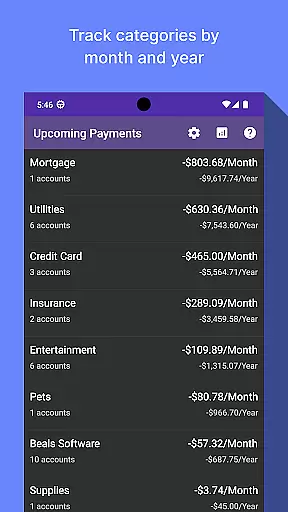
A key feature of Bill Manager is its ability to display which bills are still pending payment from the current date up to the next payday. It provides essential details such as payment amounts and due dates, ensuring users never miss a payment deadline again. Additionally, the app includes an analytics view that allows users to examine their spending patterns by category and account, broken down by month and year.
This makes Bill Manager particularly useful for individuals who want to maintain better control over their monthly expenses and cash flow. By having a clear overview of upcoming financial commitments and historical spending data, users can make more informed financial decisions and avoid late payment penalties.
Bill Manager offers several notable features that set it apart in the finance app category. First and foremost is its intuitive bill tracking system, which automatically calculates which bills are due based on the user's current date and next payday. This feature not only lists pending payments but also provides detailed information about each bill, including amount due and exact due date.
The app's analytics capabilities are another standout feature. Through the analytics view, users can access detailed breakdowns of their expenses by category and account. This data is presented in both monthly and yearly formats, allowing for comprehensive financial analysis. The ability to visualize spending patterns over time helps users identify areas where they can potentially save money or adjust their spending habits.
Additional features include customizable notifications that remind users of approaching due dates, integration with various financial institutions for automatic bill detection, and secure cloud backup for financial data. These features work together to create a robust financial management tool that empowers users to take control of their financial obligations while providing valuable insights into their spending behavior.
In the realm of personal finance management, securing your financial data is paramount. Bill Manager takes this responsibility seriously by implementing top-tier encryption protocols to safeguard your sensitive information. Every transaction and personal detail stored within the app is encrypted, ensuring that your data remains confidential and protected from unauthorized access.
Furthermore, the app incorporates multi-factor authentication, adding an extra layer of security to your account. This means that only you can access your bill details and payment schedules, even if someone else gets hold of your password. Such stringent security measures provide peace of mind, allowing users to focus on managing their bills without worrying about potential security breaches.
The value of using Bill Manager extends beyond mere convenience; it lies in its commitment to protecting what matters most to you. With features designed to prevent fraud and unauthorized transactions, users can trust that their financial well-being is in good hands. This dedication to security empowers users to take control of their finances confidently.
A seamless transaction experience is crucial for any finance application, and Bill Manager excels in providing just that. The app offers a user-friendly interface where upcoming bills are displayed clearly, showing due dates, amounts, and categories. This clarity helps users understand their financial obligations at a glance, making bill management less daunting and more efficient.
Beyond displaying bill information, Bill Manager provides timely reminders and notifications. These alerts ensure that users never miss a payment deadline, helping them avoid late fees and maintain a good credit score. Additionally, the analytics view allows users to track spending patterns over months and years, offering insights into their financial habits and aiding in better budget planning.
By combining intuitive design with practical features like reminders and analytics, Bill Manager transforms the often stressful task of bill tracking into a smooth and manageable process. Users benefit not only from staying organized but also from gaining valuable insights into their spending behaviors, ultimately leading to improved financial health.
User-friendly interface
Comprehensive bill tracking
Detailed analytics reports
Customizable notifications
Secure data storage
Limited free version
No investment tracking
Occasional sync issues
Subscription fees apply
Learning curve for beginners

BA Financial Calculator PRO – Perfect for CFA/FRM/CPA and finance professionals
 4.90
4.90
Early payday & cash advances with no-fee mobile banking!
4.60
Manage and cancel subscriptions, lower bills, track expenses, create budgets.
4.60
Simple & secure international money transfers - for personal & business needs.
4.80
Put crypto to work & earn rewards. Stake crypto like Ethereum, Solana & Cardano
4.40
All expenses at a glance.
4.80
Read and extract public data on NFC Contactless banking card (VISA, MasterCard
4.30
Keep track of your subscriptions with no limitations
4.80
Powerful Money Manager, Expense & Savings Tracker, Budget Planner - Pro Version
4.70
The Citi Mobile® App lets you manage your accounts virtually anytime, anywhere
4.80
Companies owe you money.
4.80
No credit checked needed.
4.80
Easy budgeting planning on a calendar!
4.80
Get 250$ Cash Advance to solve emergencies instantly in loan app called LendMe
4.70
No credit check, no interest, no worries.
4.70
The all-in-one app to save, earn, travel, and put more money in your pocket
4.50
Save, spend & get paid faster²
4.50
Expenses, Bills, Budget and Accounts - All seamlessly integrated in one app!
3.80
Bank better with our new app
3.80


User Reviews