
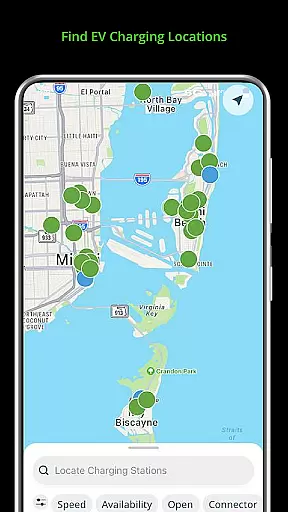
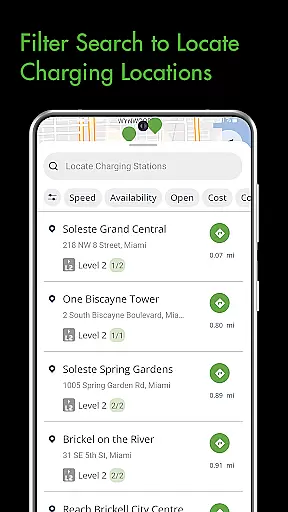
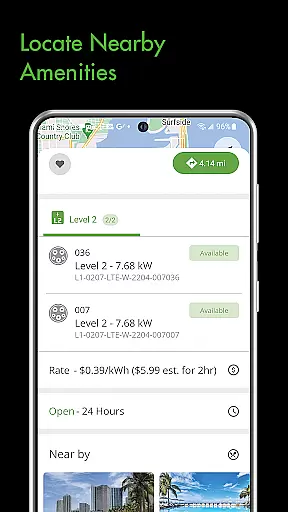
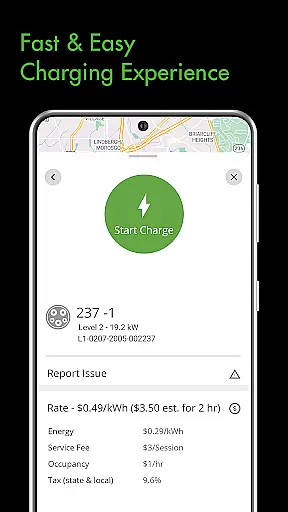
The Blink Charging Mobile App is a comprehensive solution for electric vehicle (EV) owners, designed to simplify and enhance the charging experience. With this app, users can easily locate EV charging stations, manage charge sessions, and receive real-time status updates. Whether charging at home or at public locations, the app provides seamless control over the entire process.
One of the standout features is the ability to setup and manage the HQ 200, Blink's home charging station. This allows users to conveniently charge from home while tracking their charging history and configuring station settings. Additionally, the app supports an expanded network that now includes SemaConnect charging stations, offering drivers more options and greater flexibility when charging their EVs.
This app is particularly useful for EV drivers who frequently travel and need reliable access to charging stations. By providing detailed information about each charging session and enabling users to manage their charging preferences, the Blink Charging Mobile App ensures a smooth and efficient charging experience, ultimately promoting the adoption of electric vehicles.
The Blink Charging Mobile App offers a variety of robust features tailored to meet the needs of EV owners. One of the primary functionalities is the ability to locate EV charging stations effortlessly. Users can search for chargers by zip code, city, business name, location category, or physical address, ensuring they can find a charging station no matter where they are.
Another significant feature is the management of charge sessions. The app provides real-time information during a charging session, including occupancy time, estimated cost, energy delivered, and current charging speed. Users can also set up notifications to receive updates on their charging status, such as when charging is completed or if a fault occurs. This level of detail and control helps users optimize their charging sessions efficiently.
Additionally, the app supports the setup and management of the HQ 200 home charging station, allowing users to charge from home with ease. It also integrates with the expanded Blink Network, which now includes SemaConnect stations, giving users access to even more charging options. These features collectively ensure that EV drivers have a reliable and convenient charging experience, whether at home or on the go.
Understanding detailed vehicle information is crucial for electric vehicle (EV) owners to optimize their charging experience. The Blink Charging mobile app provides comprehensive details about your EV's charging sessions, ensuring you have all the necessary data at your fingertips.
The app allows users to monitor real-time information during a charging session. This includes specifics such as occupancy time, estimated charge session cost, energy delivered, and current vehicle charging speed. Such granular data empowers users to make informed decisions regarding their charging habits.
By offering insights into charging stations' information and energy metrics, the app ensures that EV drivers can effectively manage their vehicleu2019s power consumption. This functionality not only enhances user convenience but also contributes to better energy management and cost savings.
Ultimately, the ability to access detailed vehicle information through the Blink Charging app translates into a seamless and efficient charging process. Users can enjoy peace of mind knowing they have complete control over their EV's charging parameters, leading to an improved overall ownership experience.
Price transparency in EV charging is essential for users to understand the costs involved and to budget accordingly. The Blink Charging mobile app excels in providing clear and upfront pricing information, ensuring users are never caught off guard by hidden fees.
Through the app, users can view detailed estimates of charging session costs before initiating a charge. This feature includes information on pricing structures, potential additional fees, and even comparative costs across different charging stations. Such clarity helps users choose the most economical and convenient charging options available.
In addition to cost estimates, the app supports managing payment wallets, making transactions smoother and more transparent. Users can easily track their expenditures and see where their money is going, which adds another layer of financial control and accountability.
By prioritizing price transparency, the Blink Charging mobile app builds trust with its users. Drivers can confidently plan their charging sessions, knowing exactly what they will pay, thus enhancing their overall satisfaction and confidence in using the platform.
User-friendly interface
Real-time charging data
Comprehensive station locator
Home charging management
Expanded network access
Limited to EV owners
Occasional connectivity issues
Requires account setup
Notifications may be delayed
Some features are subscription-based

OBD1 ECMs application. Data log or tune directly from your phone or tablet!
 4.60
4.60
Practice the drills within MotoJitsu Master Riding Program Volume 1 & 2!
4.80
Better fuel to help keep you on the road
3.20
DMV Test Pro offers all the updated FREE DMV tests online.
4.60
Get your personalized financing options and shop for used cars today!
4.20
Boost profits and hit your goals faster with GigU's amazing tools for gigworkers
4.00
Control maps, media and messaging, with the Google Assistant while you drive
4.10
By enthusiasts, for enthusiasts
4.00
O'Reilly Pro will streamline your parts lookup and ordering process!
3.20
Get more out of your AAWireless adapter with this companion app | aawireless.io
4.80
Buy and sell your boat
4.70
CVT diagnostics with ELM327 for Nissan-based vehicles
4.40
Automotive Electrical Wiring Diagrams
4.40
Your car is talking. Start listening.
4.30
AlfaOBD software for Fiat Group cars native diagnostic
3.70
Earn and save with Fuel Rewards®
3.20
Easily notify car owners in urgent situations, safe, fast, multilingual.
4.3
Attention! This is the theme for the Car Launcher app
4.2
DIY Vehicle Wheel Alignment
4.0


User Reviews