
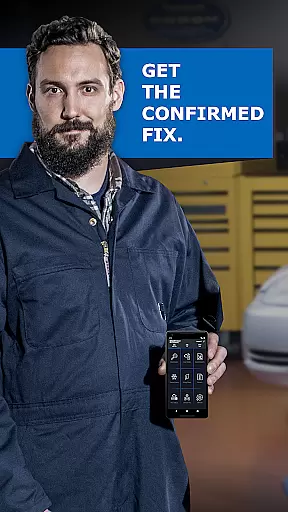
BlueDriver OBD2 Scan Tool is a leading automotive diagnostic application that transforms your smartphone or tablet into a professional-grade scan tool. Designed for both professional mechanics and DIY enthusiasts, this app pairs seamlessly with the BlueDriver Bluetooth Sensor (sold separately) to provide comprehensive vehicle diagnostics.
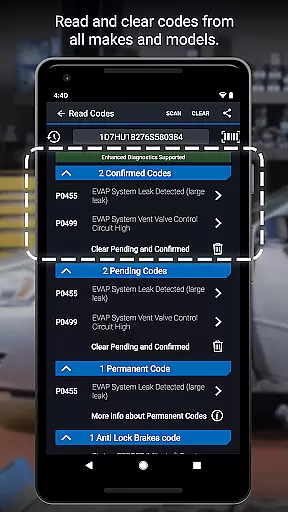
The app's core functionality lies in its ability to read and clear diagnostic trouble codes across multiple systems including engine, ABS, airbag, and transmission modules. What sets BlueDriver apart is its extensive database of real-world fixes and detailed Repair Reports tailored to your specific vehicle's make, model, and year. Users can access advanced features such as Mode 6 test results, live data graphing, and smog readiness checks, all through a wireless Bluetooth connection.
This application proves particularly valuable when addressing check engine lights or preparing for emissions tests. The clear, professional-grade reports help users understand their vehicle's condition and make informed repair decisions, potentially saving hundreds in unnecessary repairs while ensuring proper maintenance.
BlueDriver distinguishes itself through several innovative features that enhance the diagnostic experience. The app provides comprehensive coverage across multiple vehicle manufacturers including GM, Ford, Toyota, and Nissan, with enhanced support for newer models from Mitsubishi, Hyundai/Kia, and BMW/Mini.
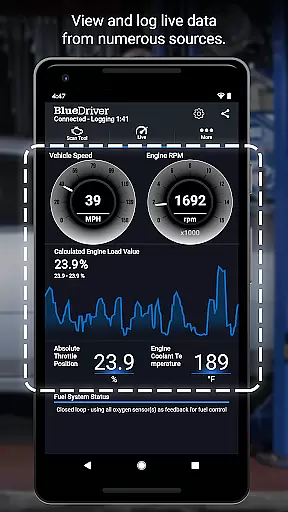
One of the standout capabilities is its multi-PID interactive graphing feature, which allows users to view live data streams from various vehicle sensors simultaneously. The app's sophisticated algorithms interpret raw sensor data and translate it into easy-to-understand information. Additionally, the built-in database of millions of real-world fixes offers practical solutions rather than just theoretical possibilities.
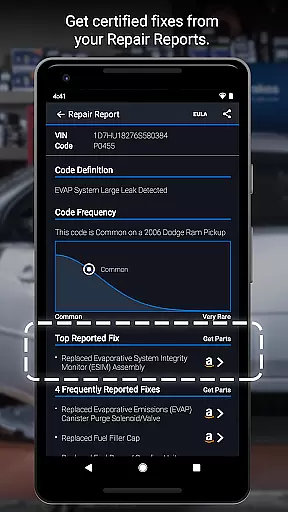
The wireless Bluetooth connectivity eliminates cumbersome cables while maintaining reliable communication with the vehicle's onboard systems. Users can generate detailed Repair Reports containing specific fix recommendations, technical service bulletins, and maintenance procedures - all customized to their exact vehicle specifications. The app's metric/imperial toggle and VIN-based report preview further demonstrate its thoughtful design and user-centric approach.
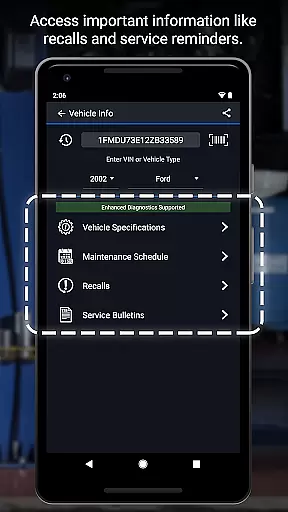
Accessing detailed vehicle information is crucial for effective diagnostics and maintenance. BlueDriver OBD2 Scan Tool provides comprehensive data about your vehicle's health, including trouble codes from various systems like ABS, airbag, transmission, and more.
The app generates professional-grade Repair Reports tailored to your specific vehicle's year, make, and model. These reports not only list the issues but also suggest likely fixes in plain language, making it easier for both professional mechanics and DIY enthusiasts to understand and address problems.
With features like Mode 6 on-board monitoring test results, smog readiness checks, and freeze frame data, users can dive deep into their vehicle's performance metrics. This level of detail ensures that you have all the necessary information at your fingertips to make informed repair decisions.
By offering enhanced diagnostics coverage for a wide range of car models and brands, BlueDriver stands out as an indispensable tool for anyone looking to maintain their vehicle efficiently and accurately.
Price transparency is essential when choosing diagnostic tools, and BlueDriver offers this by providing a free-to-install app that works with the separately sold BlueDriver Sensor. This approach eliminates hidden costs and subscriptions, allowing users to pay only for the hardware while enjoying full software functionality.
BlueDriver's cost-effectiveness extends beyond its initial purchase. By offering access to a database of millions of real-world fixes without any recurring fees, it ensures long-term savings. Users can generate, save, and share Repair Reports based on their exact vehicle and trouble code, further enhancing value.
In addition to financial benefits, the app provides clear information on what each feature entails, such as reading and clearing trouble codes or viewing live data with multi-PID interactive graphing. Such clarity helps users understand exactly what they are getting, ensuring there are no surprises.
Overall, BlueDriveru2019s transparent pricing model combined with its robust feature set makes it an attractive option for those seeking reliable automotive diagnostics without breaking the bank.
User-friendly interface
Comprehensive code coverage
Wireless connectivity
Detailed repair reports
No subscription fees
Sensor sold separately
Limited free features
Device compatibility issues
Occasional connection problems
Advanced features require premium sensor

Easily notify car owners in urgent situations, safe, fast, multilingual.
 4.3
4.3
Practice the drills within MotoJitsu Master Riding Program Volume 1 & 2!
4.80
Wonder how much horsepower and torque your car/truck makes? Look no further.
3.40
Automotive Electrical Wiring Diagrams
4.40
DMV practice test 2025: Driver License permit test & written test for all states
4.70
MySubaru: Download. Connect. Love.
4.70
Your go-to app for car, truck & SUV parts, DIY tools, and expert repair help.
4.70
Find Your Local Store or Shop Online for the Car, Truck, or SUV Parts You Need
4.70
PayByPhone: A quick and easy way to pay for parking.
3.80
Take Control of Your Car
4.80
Buy and sell your boat
4.70
OBD1 ECMs application. Data log or tune directly from your phone or tablet!
4.60
Your Path to Driving Licensing Success Begins Here! Develop your driving skills.
4.40
AI Powered - Automotive Mechanic Assistant
4.30
Control maps, media and messaging, with the Google Assistant while you drive
4.10
By enthusiasts, for enthusiasts
4.00
Monitor specific TOYOTA parameters by adding this plugin to Torque Pro.
2.00
Theme for Car Launcher
4.3
Theme for Car Launcher
4.0


User Reviews