
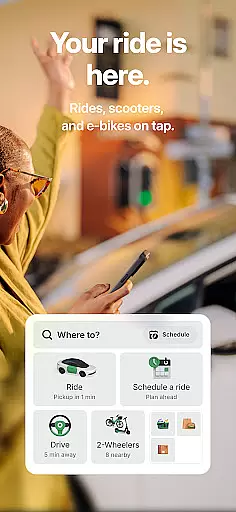

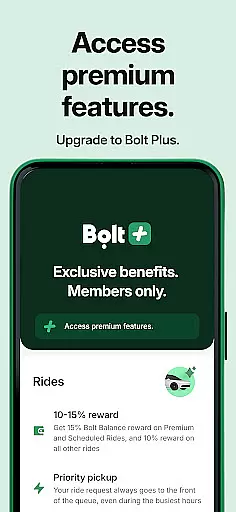
Bolt is a comprehensive transportation app that simplifies urban mobility with its diverse ride options and safety features. The app allows users to book rides across town, schedule airport transfers, or rent scooters and e-bikes for short commutes. With transparent pricing, multiple payment methods, and real-time driver tracking, Bolt ensures convenience and reliability.
One of the standout aspects of Bolt is its commitment to safety and sustainability. The app includes features like emergency assist, audio trip recording, and private phone details to protect user privacy. Additionally, Bolt Drive promotes eco-friendly travel by offering electric and hybrid cars as part of its car-sharing service. Whether commuting daily or traveling occasionally, Bolt provides a seamless experience tailored to modern transportation needs.
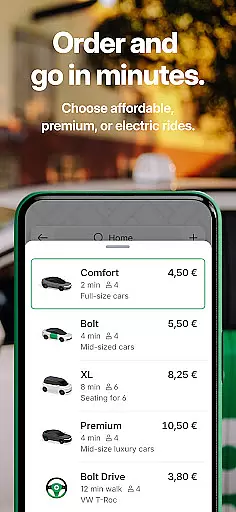
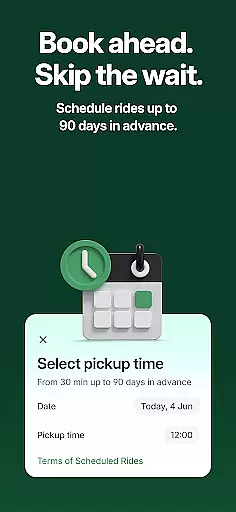
Bolt stands out due to its wide array of features designed to enhance user experience. The app offers various ride types such as Comfort, Premium, Electric, and XL, catering to different preferences and budgets. Users can schedule rides in advance, ensuring timely pickups for important events or early morning commutes.
Safety is prioritized with discreet emergency assist buttons, audio trip recordings, and private contact details when interacting with drivers. Furthermore, Bolt's dedication to sustainability is evident through Bolt Drive, which increases the availability of eco-friendly vehicles. The 'Send' feature also enables fast parcel delivery within cities, adding versatility to its services. These innovations make Bolt a reliable choice for modern commuters seeking convenience and security.
Map accuracy is a fundamental feature for any navigation app, and Bolt excels in this area. The application provides precise location data, ensuring that users can navigate urban landscapes with confidence. This precision is achieved through advanced GPS technology and real-time updates, which help maintain the relevance of map information.
Bolt's mapping functionality supports various transportation modes, including cars, scooters, and bikes. Users benefit from detailed street views and points of interest, making it easier to locate destinations and plan efficient routes. Whether commuting or traveling, the app ensures that maps are not only accurate but also comprehensive.
The importance of map accuracy cannot be overstated when it comes to ride-hailing services. With Bolt, drivers and passengers alike can trust the app to guide them safely and efficiently to their destinations. This reliability enhances the overall user experience, reducing travel time and increasing convenience.
Moreover, Bolt continuously refines its mapping algorithms to adapt to changing urban environments. By integrating user feedback and leveraging machine learning, the app improves its geolocation capabilities over time. This commitment to accuracy ensures that Bolt remains a top choice for those seeking dependable navigation solutions.
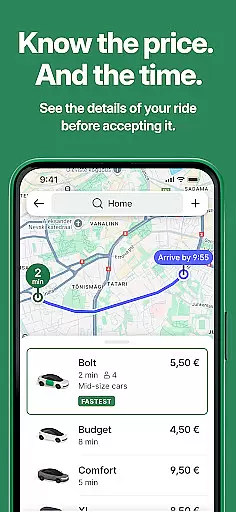
Route planning is an essential component of the Bolt app, designed to optimize travel efficiency for users. The app offers multiple route options based on current traffic conditions, estimated travel times, and user preferences. This flexibility allows riders to choose the most suitable path, whether prioritizing speed, cost, or scenic value.
Bolt's route planning feature incorporates real-time data analytics to provide dynamic routing suggestions. As traffic patterns shift throughout the day, the app adjusts recommended paths accordingly. This responsiveness helps prevent delays and ensures timely arrivals, enhancing the reliability of scheduled rides.
For drivers, effective route planning translates into increased earnings potential and reduced fuel consumption. By following optimized routes suggested by Bolt, drivers can complete more trips within shorter timeframes. Passengers, on the other hand, enjoy smoother journeys with fewer detours or unexpected stops along the way.
In addition to standard vehicle routes, Bolt also caters to alternative transportation methods such as scooters and bicycles. The app considers specific requirements like bike lanes and pedestrian zones when calculating optimal paths. This inclusive approach demonstrates Bolt's dedication to serving diverse mobility needs while maintaining high standards of route planning excellence.
User-friendly interface
Transparent pricing model
Multiple payment options
Strong focus on safety
Eco-friendly initiatives
Limited service areas
Occasional surge pricing
Dependence on driver availability
Inconsistent ride quality
Feature disparity by location

This app is military GPS coordinate systems helper. (MGRS, UTM & DMS Maps)
 4.80
4.80
Fully offline 1:50k New Zealand topographical map North Island
4.5
CamSam PLUS - The speed and red light camera warning system!
4.40
America’s largest public fast charging network, with over 500 charging stations.
4.50
GPS Speedometer & Odometer: Track car, bike, truck speed & distance in real-time
4.70
Drive safe with real-time speed camera radar, police, and traffic alerts
3.80
Live Satellite view app for find GPS navigation Direction and live location map
3.70
Get route, find shortest path, near by places and weather update
3.90
Get matched with a nearby driver — you’ll be on your way in minutes.
4.30
Track friends in real-time and explore worldwide live cameras.
4.60
Find trails, organize your locations and navigate with offline maps.
4.60
Neshan: map & navigation app with 20M+ monthly active users
4.50
Turn your Android device into a real off-road GPS using off-line topo maps!
4.40
ParkWhiz, an Arrive Mobility brand, part of the Arrive Network
4.30
Phone Tracker and GPS Location Sharing
4.20
Use GPS Maps and GPS Voice Navigation to find your way and get directions
4.10
TACNAV-X: Precision MGRS navigation, built specifically for the military.
4.00
Play in the outdoors with Android as your Handheld GPS and offline topo maps!
3.50
Ride CTA, Metra & Pace: Manage your fares, buy Metra tickets, get arrivals.
3.00


User Reviews