





DiDi Rider is a comprehensive mobility and food delivery app that offers users the ability to book rides and order meals conveniently. As the world's largest mobility platform, it provides various ride options including DiDi Express, Economy, Taxi, Moto, and Flex, catering to different budgets and preferences. The app also features DiDi Food for food delivery and DiDi Delivery for package transportation.
The application stands out with its robust safety measures, multiple payment options, and real-time tracking of drivers. Whether you need a ride across town or want to order your favorite pizza, DiDi ensures a seamless experience. Its user-friendly interface allows quick booking in just three taps, making daily commutes and food orders easier and more comfortable.
DiDi Rider is particularly useful in urban areas where traffic congestion is common and finding a reliable ride can be challenging. With special discounts and promotions, it provides an economical solution for frequent travelers while ensuring safety through driver verification and live trip sharing.
DiDi Rider boasts an array of features designed to enhance user convenience and safety. One of its key functionalities is the ability to choose from multiple ride services such as DiDi Express for standard trips, DiDi Economy for budget-friendly options, and DiDi Moto for faster rides. Each service is tailored to meet specific needs, whether it's cost-saving or time efficiency.
In addition to transportation, DiDi Rider offers DiDi Food, allowing users to order meals from local restaurants with fast delivery times. The app supports diverse payment methods including credit/debit cards and cash (in select cities), providing flexibility for all users. Real-time GPS tracking enables passengers to monitor their driver's location and estimated arrival time, enhancing transparency and reliability.
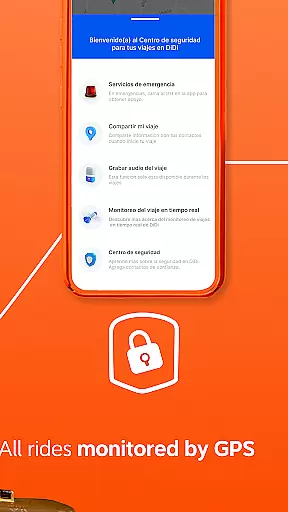
Security is prioritized with stringent driver selection processes and in-app safety features like emergency buttons and live trip sharing. These innovations ensure peace of mind for users who prioritize safety during their travels. Furthermore, DiDi frequently updates its platform with new features and improvements based on user feedback, maintaining high standards of service quality.
Map accuracy is essential for any navigation app, and DiDi Rider excels in this area. The application provides precise location data, ensuring that users can find their current location and destinations with ease. This precision is achieved through advanced GPS technology and constant updates to the map database.
DiDi Rider's maps are regularly updated to reflect the latest road changes, new routes, and points of interest. This ensures that users always have access to the most current information when planning their trips. Whether traveling through bustling city streets or quieter rural roads, DiDi's accurate mapping helps drivers and passengers navigate confidently.
The benefit of such accuracy is clear: users experience fewer missed turns, reduced travel time, and an overall smoother journey. For those who rely on DiDi for food delivery as well, precise maps mean faster deliveries and fresher meals upon arrival. Trust in DiDiu2019s map accuracy reassures users they will reach their destination efficiently and safely.
Effective route planning is a cornerstone of DiDi Rider's service offering. By analyzing real-time traffic data, the app suggests optimal routes that minimize travel time and avoid congestion. Users can select from multiple route options based on their preferences, such as the shortest distance or avoiding tolls, enhancing their travel experience significantly.
In addition to standard route planning, DiDi incorporates predictive algorithms that anticipate potential delays due to accidents or roadworks. This proactive approach allows drivers to adjust their routes dynamically, ensuring timely arrivals even under unpredictable conditions. Moreover, the integration of public transit data aids users relying on mixed-mode commutes.
Ultimately, DiDiu2019s sophisticated route planning not only saves time but also reduces fuel consumption and stress for both drivers and passengers. With reliable guidance at their fingertips, users enjoy peace of mind knowing they are taking the best possible path. Such efficiency underscores DiDiu2019s commitment to providing top-tier navigation solutions within its comprehensive mobility platform.
User-friendly interface
Multiple ride options
Real-time GPS tracking
Flexible payment methods
Comprehensive safety features
Limited cash payment availability
Service inconsistencies in rural areas
Occasional long wait times
Dependence on internet connectivity
Variable driver quality

Easy, Moderate and difficult offroad adventures.
 4.00
4.00
Fully offline 1:50k New Zealand topographical map North Island
4.1
Complete offline 1:50k South Island topo map including DOC Hunting Permit Areas
4.60
CamSam PLUS - The speed and red light camera warning system!
4.40
TACNAV-X: Precision MGRS navigation, built specifically for the military.
4.00
Number locator, real connection map
4.10
Navigate via GPS Maps of GPS Voice Navigation, driving directions to find routes
3.60
Explore with GPS Navigation with GPS offline, voice GPS, speed camera radar
4.60
Explore offline maps with radar, satellite view, and real-time alerts.
3.60
Airport parking, with airport shuttle (TPS shuttle), reservations, and Spot Club
4.80
Truck Safe GPS Navigation & Maps: Parking, Fuel, Diesel, Weight Station
4.80
America’s largest public fast charging network, with over 500 charging stations.
4.50
The fastest and most convenient way to pay for parking on our lots.
4.40
Instant diesel discounts - save big with each fill up!
4.40
Explore a light pollution map to find suitable dark sky locations for observing.
4.30
Find routes fast with GPS Maps, GPS Navigation & driving directions.
4.10
Use GPS Maps and GPS Voice Navigation to find your way and get directions
4.10
Get real-time bus and train schedules for easy, hassle-free city transportation.
3.90
Explore the world with Live Satellite View, 3D Maps, GPS Navigation & Earth Map.
2.90


User Reviews