

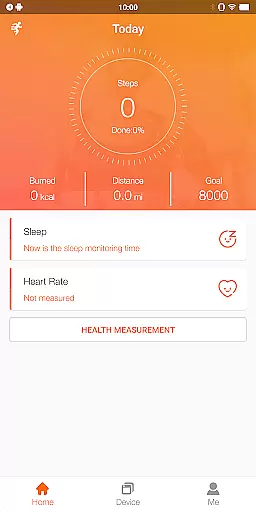
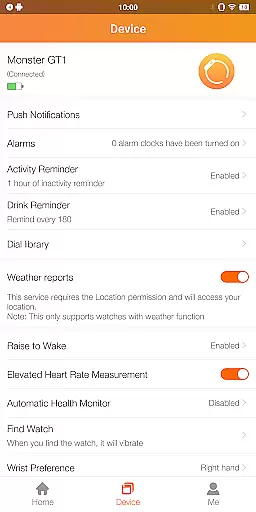
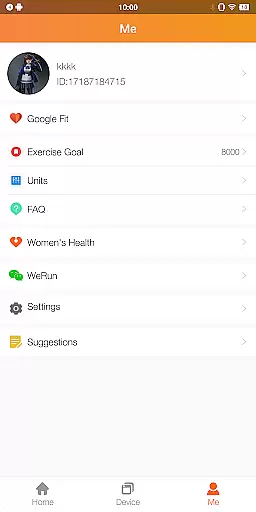
FitCloudPro is a comprehensive health and fitness application designed to seamlessly connect your smartwatch with your mobile device. The app supports various Kumi smartwatch models, including the KUMI GT6 Pro, GW16T Pro, KU3 Max, and KU3 Meta.
This powerful tool allows users to monitor and record essential health metrics such as steps, calories burned, sleep patterns, heart rate, and blood oxygen levels. Additionally, FitCloudPro offers rich message reminders for calls, SMS, and social media notifications, along with features like sedentary reminders, hydration alerts, and customizable watch faces to match personal style.
FitCloudPro stands out with its extensive feature set tailored for health-conscious individuals. The app provides real-time health tracking, enabling users to stay informed about their physical activity and wellness metrics throughout the day.
Beyond health monitoring, FitCloudPro enhances user convenience with robust notification systems. Users can receive timely alerts for incoming calls, messages, and social media updates, ensuring they never miss important communications. The app also includes practical lifestyle features such as sedentary reminders and brightness settings, contributing to overall well-being.
Personalized planning in health and fitness applications refers to the ability to tailor workout and wellness plans according to individual user needs and goals. FitCloudPro excels in this area by offering features that adapt to your personal health metrics.
The app connects with Kumi smartwatches to monitor and record essential health data such as steps, calories burned, sleep patterns, heart rate, and blood oxygen levels. This information is crucial for creating a personalized plan that evolves with your progress.
Users benefit from customized feedback and suggestions based on their real-time data. Whether aiming to improve cardiovascular health or enhance physical endurance, FitCloudPro ensures each plan aligns with personal objectives.
This personalized approach not only enhances motivation but also optimizes the path to achieving fitness milestones, making health management more effective and engaging.
Progress visualization is an integral feature of any fitness application, providing users with clear insights into their health journey. FitCloudPro offers comprehensive tools to track and display various health metrics visually.
By integrating with Kumi smartwatches, the app gathers data on steps taken, calories consumed, sleep quality, heart rate, and blood oxygen levels. This data is then transformed into easy-to-understand graphs and charts within the app.
Visual representations allow users to quickly grasp trends and patterns in their health data. For instance, observing improvements in sleep quality over time can be highly motivating and informative.
Ultimately, FitCloudPro's progress visualization empowers users to make informed decisions about their health routines, celebrate milestones, and maintain long-term engagement with their fitness goals.
User-friendly interface
Comprehensive health tracking
Versatile smartwatch support
Customizable watch faces
Rich notification system
Limited to specific smartwatch models
Requires multiple permissions
No medical-grade accuracy
Potential battery drain
Background app restrictions

Weight loss app: home workout for women to lose weight & burn calories.
 4.80
4.80
Personal Measurements - Track your gains!
4.50
The OFFICIAL Couch to 5K® running training app! A 9 week walk-run workout plan.
4.50
Eat smarter with Eato, your personal calorie counter and nutrition tracker!
4.40
Track heart rate & HRV in 30s! Get live health insights and anomaly alerts
4.40
Monitor, analyze, track, and convert blood sugar & help you control diabetes.
4.10
Blood Pressure Log, HRV & Heartbeat Tracker. Pulse Checker.
4.40
Fast Body building & Weight Loss. Home Workouts with Daily Coach, No Equipment.
4.30
Focus on BP & Health
3.80
Home workouts for fitness & fast bodybuilding at home - no equipment needed.
4.90
Drink water reminder app. Track water intake. Smart simple hydration tracker.
4.70
Build Healthy Habits!
4.60
Chair Workout: Women's Edition for safe, flexible, and personalized fitness.
4.40
For Absolute Novices to Strength Training. Simple. Effective.
4.40
Interval timer for High Intensity Interval Training, Tabata and Circuit Training
4.20
“Overcoming pain based on EMDR” helps you to alleviate chronic pain and stress.
4.10
Control your sleep in real-time wearing Garmin device
3.60
Sync your activities of the most popular sports tracking services
2.70
Transform your body and soul with DBFFitness, with a 40-day fitness journey.
4.4


User Reviews