
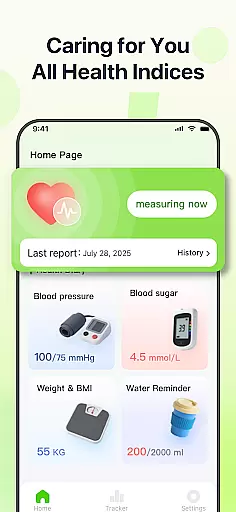
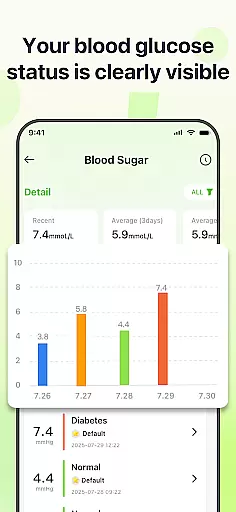
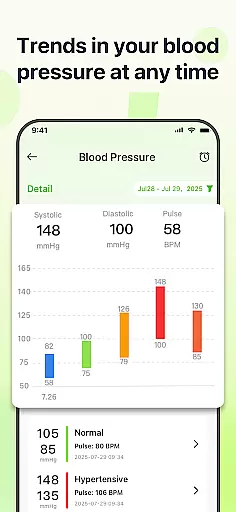
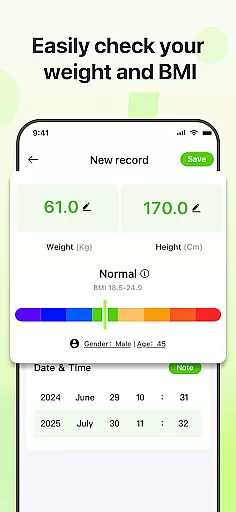
PulseSense is a comprehensive health tracking application designed to simplify wellness management. It allows users to effortlessly log key metrics such as blood pressure, glucose levels, and heart rate while offering intelligent reports tailored to personal data. With sleek trend visualizations spanning days to years, the app helps uncover patterns and track progress over time.
Designed for individuals managing chronic conditions, pursuing fitness goals, or seeking a private health journal, PulseSense ensures complete data privacy. All records remain on-device with end-to-end encryption, making it a secure and dependable health companion.
PulseSense stands out with its effortless logging system, enabling users to input health metrics like blood pressure, glucose, and heart rate seamlessly. Its intelligent reporting feature provides personalized lifestyle recommendations based on logged data, helping users gain actionable insights rather than just raw numbers.
The app offers sleek visualizations that display trends across days, weeks, months, and years, empowering users to monitor their progress effectively. Additional functionalities include customizable reminders to reinforce healthy habits, personal notes for contextual details, and full offline functionality ensuring privacy without requiring cloud storage or account creation.
Personalized planning in health applications refers to the app's ability to create tailored health strategies based on individual user data. PulseSense excels in this area by offering intelligent health reports and personalized lifestyle recommendations.
The application analyzes logged metrics such as blood pressure, glucose levels, and heart rate to identify trends and patterns unique to each user. This analysis forms the basis for creating customized plans that guide users toward their wellness goals.
Users benefit from actionable insights rather than just raw numbers. For instance, if the app detects a consistent rise in blood pressure at certain times, it can suggest specific lifestyle changes or adjustments to daily routines.
This feature empowers individuals living with chronic conditions like hypertension or diabetes to manage their health proactively. By receiving personalized advice, users can make informed decisions and take control of their wellness journey.
Progress visualization is a crucial component of any fitness or health app, providing users with graphical representations of their progress over time. PulseSense offers sleek trend visuals spanning days, weeks, months, and years.
These visualizations are not just simple graphs; they are designed to uncover patterns and track progress in an intuitive manner. Users can easily see how their health metrics, such as blood pressure or glucose levels, change over time.
By consolidating all health metrics into one app, PulseSense eliminates the need to switch between different tools for tracking various aspects of health. This consolidation makes it easier for users to stay informed and consistent in their health monitoring.
Ultimately, these visual aids help users gain a clearer understanding of their health trends, reinforcing healthy habits through reminders and consolidated data, which is essential for those working towards fitness milestones or managing chronic conditions.
User-friendly interface
Advanced trend analysis
Personalized health insights
Strong data encryption
No cloud dependency
No direct measurement tools
Limited medical support
Premium features locked
Requires manual entry
Fewer integrations

Control your sleep in real-time wearing Garmin device
 3.60
3.60
Using Recognise™ has been shown to reduce pain and improve performance.
4.4
Beauty Care, Makeup & Skin Care Scanner | Pregnancy App For A Mom | Healthy Baby
5.00
Using Recognise™ has been shown to reduce pain and improve performance
4.0
Walk. Earn: Get rewarded for every step! Walk, move, and earn real rewards.
4.70
Wall Pilates at home & Pilates workout for beginners for core and weight loss.
4.80
Find Paid Clinical Trials In Your Area
3.70
Pilates, Calisthenics, Yoga
4.50
Manage your and your family's health information.
4.60
When the night comes, we prepare your eyes for deep, sweet dreams
4.70
Period Tracker, the easiest way to track your periods!
4.50
Relax to calm sounds, white noise, music, guided meditation and bedtime stories
4.40
The most accurate heart rate app to monitor and track your heart rate & pulse.
4.40
Get alert about getting out of desired heart rate zone.
4.10
Understand your body’s most meaningful messages and transform your health.
3.90
Track sleep cycle, relax with white noise, sleep sounds & smart alarm clock
3.80
Focus on BP & Health
3.80
The Sleep Miracle Sound Machine: Soothes baby to sleep with a gentle "Shhh"
3.00
Sync your activities of the most popular sports tracking services
2.70


User Reviews