
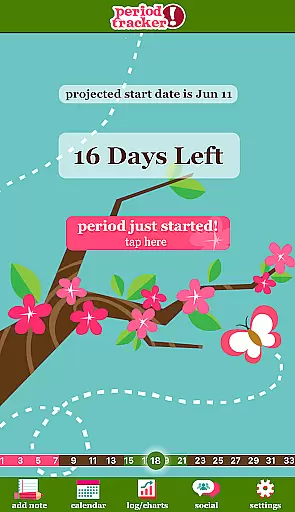
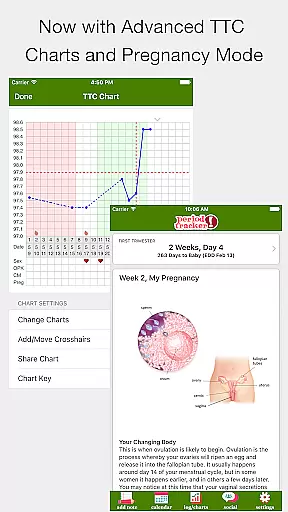
Period Tracker Deluxe is a comprehensive health and fitness application designed specifically for menstrual cycle tracking. This app allows users to effortlessly log their period start dates, providing accurate predictions of future cycles based on the average of the last three months' data. The intelligent forecasting system not only predicts period start dates but also identifies ovulation and fertile days, making it an invaluable tool for family planning.
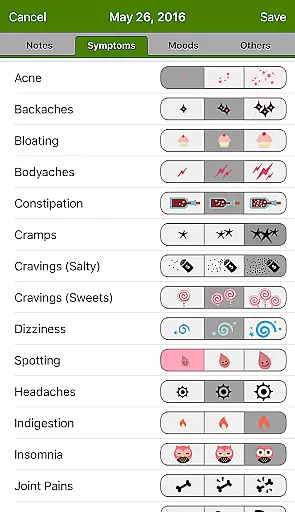
Beyond basic cycle tracking, the app offers advanced features that cater to women's overall health monitoring needs. Users can maintain detailed daily logs of moods, symptoms, and intimacy patterns. The customizable interface includes discreet home screen widgets and various skin options, allowing personalization while maintaining privacy. With its pregnancy mode feature and data visualization through charts, Period Tracker Deluxe serves as a complete women's health companion.
The app's practical value extends to its ability to help users understand their body's patterns and changes over time. By providing clear visual representations of cycle data and fertility windows through flower icons, it empowers users to make informed decisions about their reproductive health. The inclusion of advanced fertility tracking features such as cervical mucus monitoring and position tracking makes this app particularly valuable for those actively trying to conceive or avoiding pregnancy naturally.
Period Tracker Deluxe distinguishes itself through its extensive feature set tailored for women's health management. The app's core functionality revolves around its sophisticated period prediction algorithm, which analyzes historical data to forecast future cycles with increasing accuracy. Its unique flower icon system provides visual cues for ovulation and fertile windows, offering eight days of heightened fertility awareness directly on the home screen.
A key differentiator is the app's comprehensive tracking capabilities. Users can maintain detailed records of various health indicators including mood swings, physical symptoms, and intimate activities. The app's widget functionality enables quick access to countdowns for upcoming periods, while its charting system provides visual analysis of cycle trends over time. The pregnancy mode feature adds another layer of utility by converting the app into a due date tracker once conception occurs.
What sets Period Tracker Deluxe apart from competitors is its attention to user experience and privacy. The discreet "P Tracker" icon maintains confidentiality while the customizable skins allow personal expression. Advanced features like cervical mucus tracking and position logging cater to serious fertility trackers, while the simple one-touch logging system remains accessible for casual users seeking basic cycle monitoring.
Personalized planning in health applications refers to the ability to tailor features and predictions based on individual user data. For Period Tracker Deluxe, this means analyzing past menstrual cycles to accurately forecast future period start dates.
The application achieves personalized planning by allowing users to log their period start dates with a simple button press. It then calculates the average cycle length from the past three months to predict the next period's start date. This feature is crucial for users who want to anticipate their menstrual cycle with precision.
Users benefit from this functionality by gaining insights into their reproductive health. They can plan activities, vacations, or important events with the knowledge of their predicted cycle dates. Additionally, understanding one's cycle can help identify irregularities that may need medical attention.
This personalized approach adds significant value by empowering users with knowledge about their bodies. The app's ability to adapt predictions based on ongoing user input ensures that the forecasts remain relevant and accurate over time.
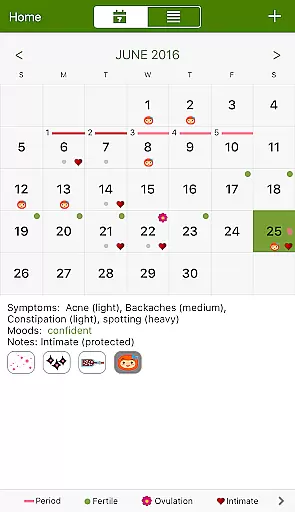
Progress visualization involves presenting user data in an easily digestible graphical format. In the context of Period Tracker Deluxe, this feature allows users to view their menstrual data through various visual tools such as calendars and charts.
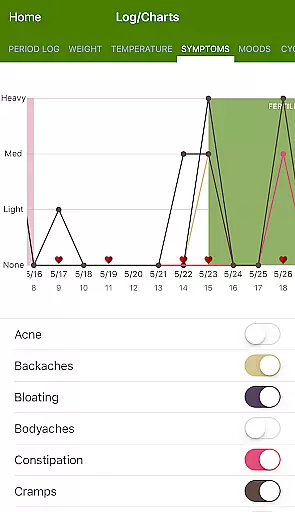
The app provides a month-view calendar where users can see their current and future period dates, ovulation days, and fertile windows. Additionally, it offers chart views to display logged information like moods, symptoms, and intimacy over time. These visual aids make it easier for users to interpret complex data at a glance.
By utilizing progress visualization, users can better understand patterns and trends in their menstrual cycles. Visual representations help in recognizing correlations between different factors such as mood swings and symptom occurrences, leading to more informed health decisions.
This feature enhances user engagement by making data tracking not only informative but also visually appealing. The ability to see personal health data presented clearly contributes significantly to maintaining consistent use of the application.
User-friendly interface
Accurate predictions
Comprehensive tracking
Discreet design
Customizable features
Premium pricing
Feature complexity
Data sensitivity
Learning curve
Occasional bugs

Easy access to health benefits
 4.70
4.70
Your plan in your pocket 24/7
3.00
sobriety counter app to help and motivate people to stop drinking alcohol.
4.90
Memory, mind & logic exercises. Puzzle games, IQ & brain test for kids & adults
4.50
Your portable blood pressure tracker. Record, monitor, and analyze BP anytime.
4.30
Pilates, Calisthenics, Yoga
4.50
Drink water reminder app. Track water intake. Smart simple hydration tracker.
4.70
Monitor blood sugar, gain insights, and manage diabetes with ease.
3.20
Scan food & cosmetic products and evaluate their impact on your health
4.80
Personal step counter for you, private and accurate
4.50
Relax. Sleep Better. Feel Better.
4.50
Your personal BP tracking companion, focus on helping you achieve wellness goal.
4.10
SportWerks - Workout Tracker for Wear OS Watches
3.90
Focus on BP & Health
3.80
Enjoy the Gluten Free living with the best app. SCAN the barcodes & SEARCH.
3.60
GloryFit is a companion app for the smart bracelet.
3.60
Live Heart Rate Pro - Real Time Heart & Workout Data For Wear OS & Bluetooth BLE
3.20
The Wear OS BeechBand app is designed to alleviate anxiety and other conditions
4.0
Insanity blocks of intense physical activity, short breaks of 30 seconds.
4.0


User Reviews