
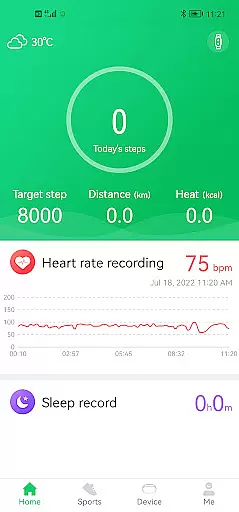
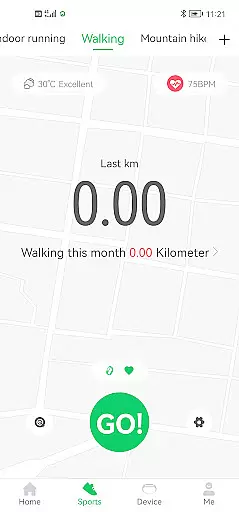
GloryFit is a comprehensive health and fitness application designed to work seamlessly with the Q18 smartwatch. This app excels in tracking various aspects of your daily activity, including step counting, sleep monitoring, and heart rate tracking. By integrating advanced health metrics with practical lifestyle features, GloryFit provides users with a holistic view of their wellness journey.
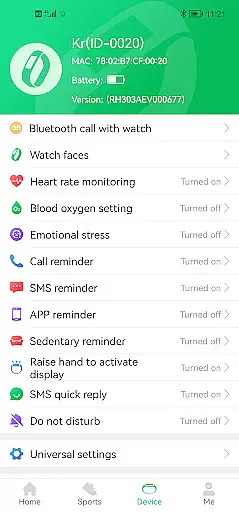
In addition to its core fitness tracking capabilities, GloryFit offers essential notification features such as SMS alerts, call reminders, and quick reply functions. These features ensure that you stay connected while maintaining an active lifestyle. Whether you're a fitness enthusiast or simply looking to improve your overall well-being, GloryFit delivers valuable insights and convenient functionality through its intuitive interface.
GloryFit stands out with its diverse range of features tailored for both fitness tracking and daily convenience. The app's primary strength lies in its ability to accurately monitor key health metrics like steps taken, sleep patterns, and heart rate fluctuations. This data is presented in easy-to-understand graphs and charts, allowing users to track their progress over time and make informed decisions about their health.
Beyond fitness tracking, GloryFit incorporates practical lifestyle enhancements. Users can receive SMS notifications, incoming call alerts, and even set up quick reply messages directly from their smartwatch. The app also supports integration with other applications, pushing important notifications to your wrist-worn device. These combined features create a powerful tool that not only helps you maintain your fitness goals but also keeps you connected throughout your busy day.
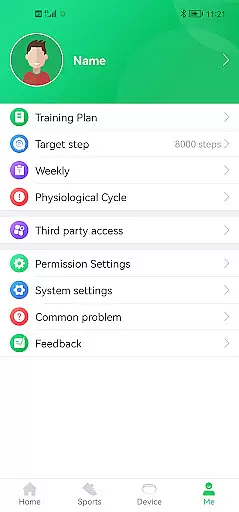
Personalized planning in fitness applications refers to the ability to tailor workout and health plans according to individual user needs and goals. GloryFit excels in this area by leveraging data collected from the Q18 smartwatch, such as step counts, sleep patterns, and heart rate metrics.
The app processes this information to offer customized insights and suggestions aimed at optimizing personal health outcomes. For instance, based on your activity levels and sleep quality, GloryFit can recommend specific adjustments to your daily routine to enhance overall well-being.
Users benefit from a more engaging and effective fitness journey with actionable advice that adapts over time as their personal metrics evolve. This ensures continuous improvement and sustained motivation towards achieving health objectives.
Progress visualization is crucial for maintaining user motivation and tracking improvements over time. GloryFit offers comprehensive visual tools that display users' fitness achievements and trends through easy-to-understand graphs and charts.
By integrating data from the Q18 smartwatch, GloryFit presents detailed analyses of various health parameters including steps taken, hours slept, and fluctuations in heart rate. These visual representations allow users to quickly grasp their progress and identify areas needing attention.
This feature not only enhances user engagement but also empowers individuals to make informed decisions about their health routines. With clear visual feedback, users can celebrate milestones and stay committed to their fitness goals.
User-friendly interface
Comprehensive health tracking
Convenient notification system
Seamless smartwatch integration
Customizable alert settings
Limited to Q18 smartwatch
Requires accessibility permissions
Notification delays possible
No standalone functionality
Health metric accuracy varies

Chair Workout: Women's Edition for safe, flexible, and personalized fitness.
 4.40
4.40
Sync your activities of the most popular sports tracking services
2.70
Easy reconstitution calc for mixing peptides and creating protocols
4.70
Using Recognise™ has been shown to reduce pain and improve performance.
4.5
The Sleep Miracle Sound Machine: Soothes baby to sleep with a gentle "Shhh"
3.00
Use your watch as a bike computer, heart rate monitor and cycling power meter
2.50
Blood Pressure Log, HRV & Heartbeat Tracker. Pulse Checker.
4.40
Fast Body building & Weight Loss. Home Workouts with Daily Coach, No Equipment.
4.30
Comprehensively record and manage your health
4.50
Medbridge GO gets you moving - get back to doing what you love, faster!
4.90
Power-lifting, weightlifting and Wendler 531 app to track your workout program.
4.90
When the night comes, we prepare your eyes for deep, sweet dreams
4.70
Personal Measurements - Track your gains!
4.50
Period Tracker, the easiest way to track your periods!
4.50
FODMAP, Gluten, Allergy, Vegan
4.50
Eat smarter with Eato, your personal calorie counter and nutrition tracker!
4.40
This is an application that serves as a companion app for smart watch.
4.20
beat yesterday.
4.00
Text notifications, button control, heart monitor & more for your Amazfit.
2.40


User Reviews