
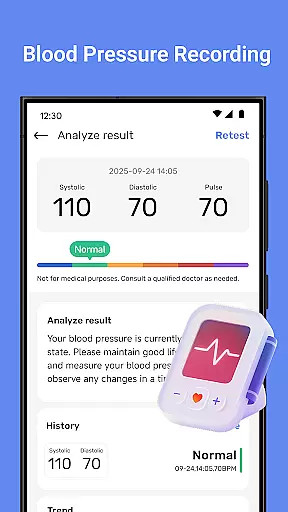
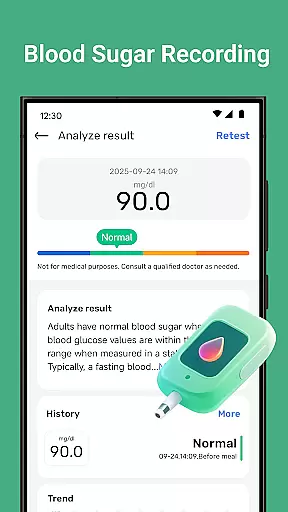
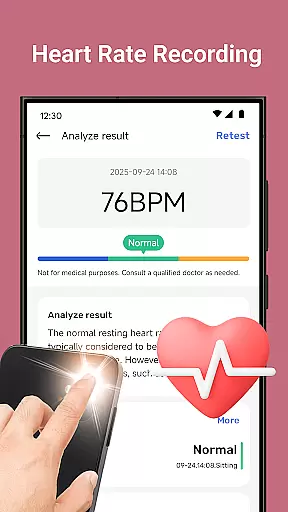
Blood Pressure Tracker is a comprehensive health companion app designed to help users monitor and manage their heart rate, blood pressure, and blood sugar levels. The app provides smart trend analysis through visual charts, allowing users to easily understand their health patterns over time.
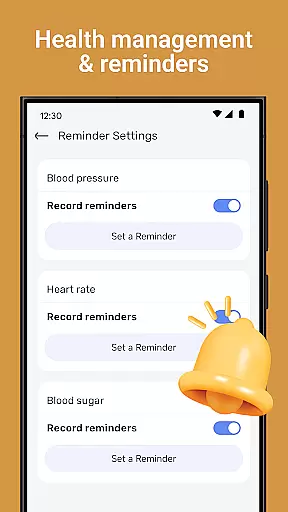
In addition to vital sign tracking, the app offers wellness reminders for hydration, exercise, and rest, along with weight management tools and nutrition tips. It also includes mindfulness features such as guided meditation and breathing exercises to help reduce stress. With personalized recommendations and intuitive data visualization, Blood Pressure Tracker empowers users to take control of their health in a user-friendly environment.
Blood Pressure Tracker stands out with its robust feature set tailored for health-conscious individuals. The app allows effortless logging of heart rate, blood pressure, and blood sugar readings, providing precise daily tracking capabilities.
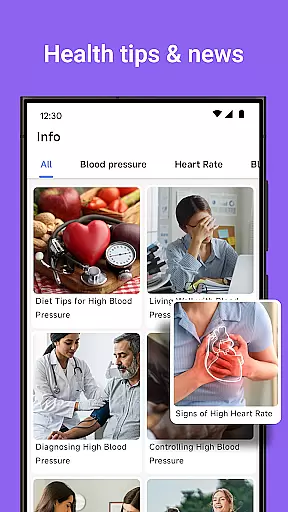
One of the key highlights is the smart trend analysis feature, which uses visual charts to give users instant clarity on their health trends. Additionally, the app offers wellness reminders, weight management tools, and curated health insights. These features work together to create a holistic health monitoring experience that is both informative and actionable.
The interface is designed to be clean and accessible, making it suitable for users of all ages. Personalized recommendations based on individual health metrics ensure that each user receives tailored advice to support their wellness journey.
Personalized planning in health applications refers to the ability to tailor health management strategies based on individual user data. Blood Pressure Tracker excels in this area by offering customized recommendations derived from your unique health metrics.
The app allows you to log heart rate, blood pressure, and blood sugar levels, providing a comprehensive overview of your health. With smart trend analysis, users can easily identify patterns and receive tailored advice aimed at improving their well-being.
By tracking daily fluctuations and long-term trends, Blood Pressure Tracker empowers users to make informed decisions about their lifestyle choices. This personalized approach ensures that each user's health plan is as unique as their fingerprint, enhancing the overall effectiveness of health management.
Progress visualization is crucial for maintaining motivation and understanding health trends over time. Blood Pressure Tracker offers intuitive data visualization tools that allow users to instantly grasp their wellness trends through visual charts.
These charts display heart rate logging, blood pressure, and blood sugar records in an easily digestible format. Users can review their health data over time, gaining insights into how different factors affect their well-being.
With clear and engaging visuals, Blood Pressure Tracker makes it simple to monitor progress and stay committed to health goals. This feature not only enhances user engagement but also supports better health outcomes by making complex data accessible and understandable.
User-friendly interface
Comprehensive tracking
Smart trend analysis
Personalized recommendations
Wellness reminders
No direct measurement
Limited medical use
Premium features cost
Data entry manual
Internet required

Control your sleep in real-time wearing Garmin device
 3.60
3.60
For Absolute Novices to Strength Training. Simple. Effective.
4.40
Pack of 66 calming lullabies for smooth fall asleep and relaxation
4.10
Histamine intolerance, low FODMAP diet and irritable bowel syndrome (IBS)
4.00
Measure your Pupil Distance for Eyeglasses and VR headsets in 3 quick steps.
4.70
Wall Pilates at home & Pilates workout for beginners for core and weight loss.
4.80
Grow with self-tests and personal routine.
4.30
Memory, mind & logic exercises. Puzzle games, IQ & brain test for kids & adults
4.50
You deserve easy access to important insurance information. Download for FREE.
4.70
Medbridge GO gets you moving - get back to doing what you love, faster!
4.90
Load the bar with this barbell & plate calculator. It's leg day, not brain day!
4.70
Step Counter, track steps when you walk or run
4.70
The simplest way to track your 21 Day Program containers, exercises, and water.
4.50
Pilates, Calisthenics, Yoga
4.50
Relax to calm sounds, white noise, music, guided meditation and bedtime stories
4.40
Eat smarter with Eato, your personal calorie counter and nutrition tracker!
4.40
Looking to take control of your health? Our psychology-based programs can help.
4.10
Dexcom G7 Continuous Glucose Monitoring
3.70
Using Recognise™ has been shown to reduce pain and improve performance
4.1


User Reviews