
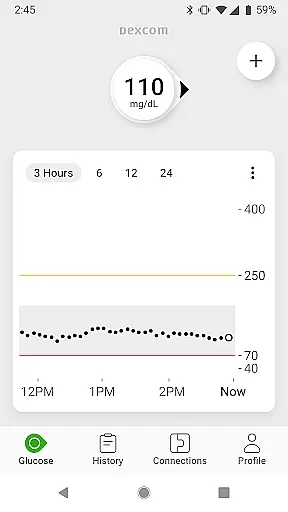
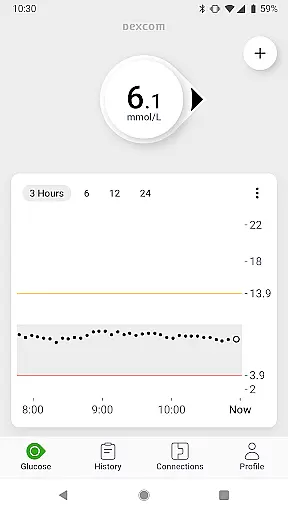
The Dexcom G7 app is a cutting-edge Continuous Glucose Monitoring (CGM) system designed to revolutionize diabetes management. This Health & Fitness application provides real-time glucose data every 5 minutes without the need for fingersticks, offering users unprecedented convenience and accuracy in monitoring their blood sugar levels.
What sets Dexcom G7 apart is its comprehensive feature set that goes beyond basic glucose tracking. The app enables customizable alerts for high or low glucose levels, remote monitoring capabilities, and seamless integration with third-party health apps. These features create an interconnected ecosystem that helps users maintain better control over their condition while staying connected with healthcare providers and loved ones.
For individuals managing diabetes, especially those who require frequent monitoring, this app serves as an essential tool. It not only tracks current glucose levels but also predicts trends, allowing for proactive management of the condition. The ability to share data with healthcare professionals and family members makes it particularly valuable for maintaining optimal health outcomes.
Dexcom G7 stands out in the Health & Fitness category through its innovative approach to diabetes management. The app's core feature is its ability to provide continuous glucose monitoring with remarkable accuracy, eliminating the need for traditional fingerstick tests. This functionality is supported by a low-profile wearable sensor that seamlessly integrates into users' daily lives.
Beyond basic monitoring, Dexcom G7 offers advanced features that enhance user experience. Customizable alerts warn users of potential glucose level issues before they become critical. The Quick Glance feature allows users to view their glucose data directly on their device's lock screen, providing instant access to vital information. Additionally, the app's integration with Dexcom Clarity and other digital health platforms creates a comprehensive view of users' health metrics.
The app's remote monitoring capabilities are particularly noteworthy. Users can share their glucose data with up to 10 followers, including healthcare providers and family members, through the Dexcom Follow app. This feature, combined with the newly integrated Clarity Clinic and enhanced trend graph visualization, creates a robust support network that empowers users to make informed decisions about their diabetes management.
Personalized planning in the Dexcom G7 app empowers users with tailored diabetes management strategies. The system's continuous glucose monitoring provides real-time data, enabling users to make informed decisions about their treatment.
The app allows for the logging of estimated fasting glucose, which helps both users and their healthcare teams identify trends in glucose levels over time. This feature supports personalized planning by offering insights into how different factors affect individual glucose patterns.
Customizable alerts serve as an essential tool for personalized planning, warning users of high or low glucose levels. These alerts can be adjusted according to personal thresholds and preferences, ensuring that each user receives notifications that are relevant to their specific health needs.
By integrating with third-party health apps and lifestyle devices, the Dexcom G7 app enhances personalized planning through a comprehensive approach to health management. Users can view their health and activity data alongside their glucose trends, allowing for a more holistic understanding of their overall well-being.
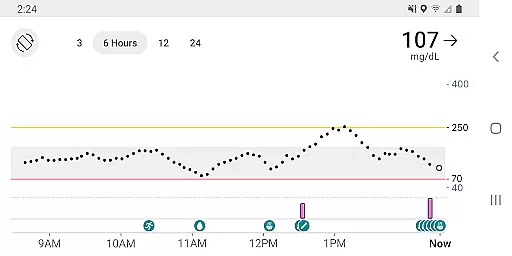
Progress visualization is a cornerstone of the Dexcom G7 app, providing users with clear graphical representations of their glucose data. The trend graph displays real-time glucose readings every 5 minutes, allowing users to see immediate changes and long-term patterns in their glucose levels.
Dexcom Clarity summary insights are integrated directly into the G7 app, enabling users to access both current and historical glucose insights without switching applications. This feature supports progress visualization by helping users understand how daily activities influence their glucose control over time.
Quick Glance functionality further enhances progress visualization by displaying glucose data on the lock screen of smart devices. This ensures that critical information is always accessible, even when the app is not actively open, keeping users informed at a glance.
Sharing capabilities extend progress visualization beyond the individual user. With the ability to share glucose data with followers and healthcare teams via compatible apps, users can receive support and guidance based on visualized progress, fostering collaborative care and better-informed treatment decisions.
Real-time glucose monitoring
Customizable alert system
Remote monitoring capabilities
Seamless third-party integrations
User-friendly interface design
Limited device compatibility
Requires internet connection
Premium pricing structure
Region-specific feature limitations
Learning curve for new users

Relax to calm sounds, white noise, music, guided meditation and bedtime stories
 4.40
4.40
For Absolute Novices to Strength Training. Simple. Effective.
4.40
sobriety counter app to help and motivate people to stop drinking alcohol.
4.90
Personal Measurements - Track your gains!
4.50
The app helps you address digestive symptoms based on the Fast Tract Diet.
3.50
Get alert about getting out of desired heart rate zone.
4.10
The OFFICIAL Couch to 5K® running training app! A 9 week walk-run workout plan.
4.50
Grow with self-tests and personal routine.
4.30
FitCloudPro takes care of your health every minute.
3.70
Beauty Care, Makeup & Skin Care Scanner | Pregnancy App For A Mom | Healthy Baby
5.00
Meditation app, head space app provides calm music to help you meditate & sleep
5.00
Show your support for the development of FitNotes - Gym Workout Log
4.90
FODMAP, Gluten, Allergy, Vegan
4.50
Your personal BP tracking companion, focus on helping you achieve wellness goal.
4.10
Control your sleep in real-time wearing Garmin device
3.60
Enjoy the Gluten Free living with the best app. SCAN the barcodes & SEARCH.
3.60
HRV4Training helps you optimize goals and improve performance. No sensors needed
3.30
Live Heart Rate Pro - Real Time Heart & Workout Data For Wear OS & Bluetooth BLE
3.20
Your plan in your pocket 24/7
3.00


User Reviews