

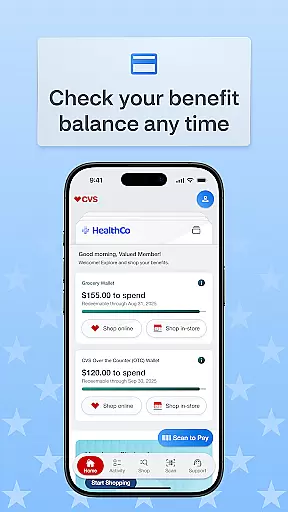
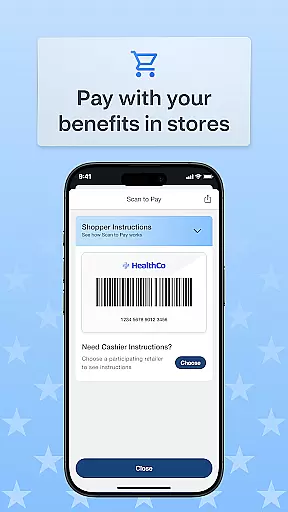
OTC Health Solutions is a comprehensive mobile application designed to help users easily access and manage their Over-the-Counter (OTC) health benefits from anywhere. The app provides secure and straightforward access to both health and OTC benefits, which can be utilized at nearby CVS stores or through online shopping. With real-time updates on fund balances and activity, users are empowered to take full control of their benefits.
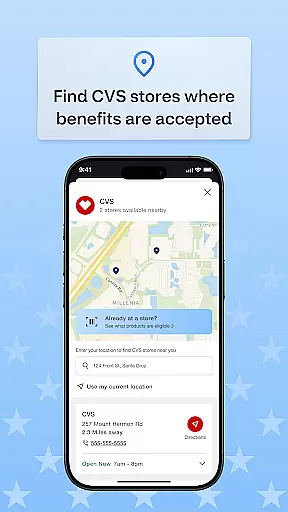
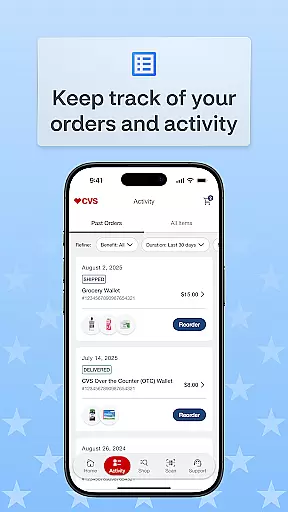
The app also offers features such as transaction history tracking, order status monitoring, and the ability to locate nearby CVS stores where benefits can be used in-store. Additionally, it supports multiple shopping options including CVS in-store purchases, online orders, and home delivery services, allowing users to shop on their own terms while maximizing their health benefits.
One of the standout features of OTC Health Solutions is its ability to provide real-time balance updates on funds and activities, ensuring that users always have accurate information about their benefits. This feature helps users make informed decisions regarding their health expenditures.
Another key feature is the detailed transaction history and order tracking system. Users can view past transactions, track current orders, and monitor the status of their benefits usage. Furthermore, the app includes a store locator function, making it easy for users to find nearby CVS locations where they can use their benefits either in-store or online, with the added convenience of home delivery options.
Personalized planning in health applications refers to the ability to tailor health and wellness plans according to individual user needs. The OTC Health Solutions app excels in this area by providing users with real-time updates on their benefits balance and activity, ensuring they have the most accurate information at their fingertips.
This app allows users to take control of their healthcare benefits effectively. By offering detailed transaction histories and order statuses, it ensures that users can track how their benefits are utilized and make informed decisions about future purchases or healthcare needs.
The value of personalized planning is evident when users can easily locate nearby CVS stores where they can use their benefits. This feature not only enhances convenience but also encourages users to utilize their benefits optimally by choosing the most suitable shopping method, whether in-store or online.
Progress visualization involves presenting data and progress in a visually engaging manner, making it easier for users to understand their health journey. The OTC Health Solutions app provides clear visual cues through its transaction history and real-time balance updates, allowing users to see exactly how their benefits are being used over time.
With features like tracking order status and viewing transaction histories, users gain a comprehensive understanding of their benefit utilization patterns. This visibility helps them manage their health budgets more efficiently and adjust their spending as needed.
Ultimately, the ability to visualize progress within the OTC Health Solutions app empowers users to make smarter choices regarding their healthcare expenditures. By having all necessary information presented clearly and accessibly, users can optimize their benefits usage and improve overall health management.
User-friendly interface
Real-time balance updates
Secure benefit management
Multiple shopping options
Convenient CVS integration
Limited to CVS stores
Requires internet access
No multilingual support
Potential privacy concerns
Dependent on benefit provider

Using Recognise™ has been shown to reduce pain, and improve performance.
 4.5
4.5
Use your watch as a bike computer, heart rate monitor and cycling power meter
2.50
The Official Blood Type Diet® App - know your categorized foods anytime.
4.50
Walk. Earn: Get rewarded for every step! Walk, move, and earn real rewards.
4.70
Pilates, Calisthenics, Yoga
4.50
Personal step counter for you, private and accurate
4.50
Make sense of your health data.
3.80
Dexcom G7 Continuous Glucose Monitoring
3.70
Your Health Assistant
3.90
Medbridge GO gets you moving - get back to doing what you love, faster!
4.90
When the night comes, we prepare your eyes for deep, sweet dreams
4.70
Load the bar with this barbell & plate calculator. It's leg day, not brain day!
4.70
Step Counter, track steps when you walk or run
4.70
Raccoon AI Calorie Counter. Intermittent Fasting & Timer. Macro, Carb, Protein
4.50
Track heart rate & HRV in 30s! Get live health insights and anomaly alerts
4.40
Blood Pressure Log, HRV & Heartbeat Tracker. Pulse Checker.
4.40
The most accurate heart rate app to monitor and track your heart rate & pulse.
4.40
Your portable blood pressure tracker. Record, monitor, and analyze BP anytime.
4.30
Histamine intolerance, low FODMAP diet and irritable bowel syndrome (IBS)
4.00


User Reviews