
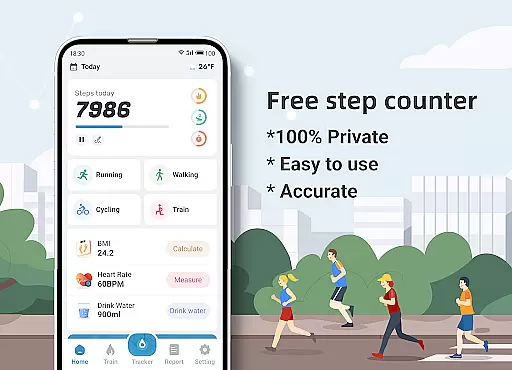
Step Counter - Pedometer & BMI is a comprehensive health and fitness application designed to track your daily steps, monitor BMI, and provide detailed activity reports. The app offers accurate step counting through your mobile device, eliminating the need for additional pedometer hardware.
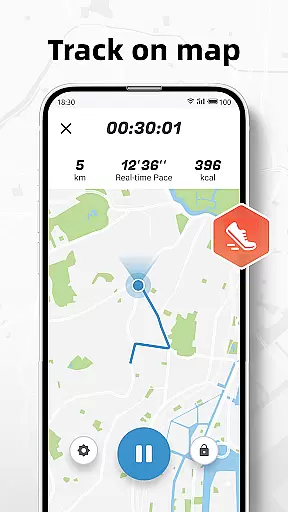
Beyond basic step tracking, the app provides advanced features like GPS-based activity mapping, customizable training plans, and health metrics visualization. Whether you're walking, running, or following structured exercise routines, this app delivers valuable insights into your fitness journey while ensuring complete data privacy.
The app boasts an array of practical features tailored for health enthusiasts. Its core functionality includes precise step counting with adjustable sensitivity settings to accommodate different phone carrying positions and movement patterns.
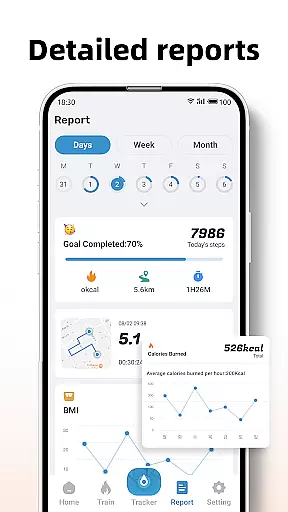
Users can access professional-grade tools such as BMI calculation and tracking, GPS-enabled activity mapping, and structured training programs. The reporting system generates comprehensive visualizations of activity data across daily, weekly, and monthly periods, helping users identify trends and measure progress in their fitness routines.
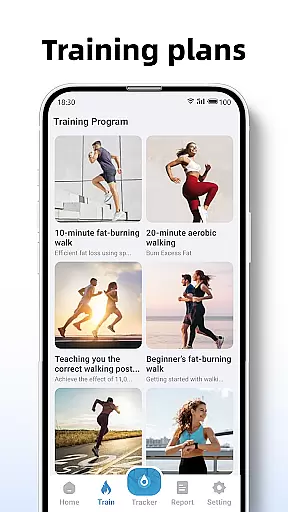
Personalized planning in fitness applications refers to the ability to tailor workout routines and health goals according to individual user needs. Step Counter - Pedometer & BMI excels in this area by offering customizable training plans that cater to different fitness levels and objectives.
The app provides various training modes, such as a 10-minute jogging plan, which users can select based on their preferences or fitness goals. These plans are not only about counting steps but also include tracking active time, distance covered, and calories burned during each session.
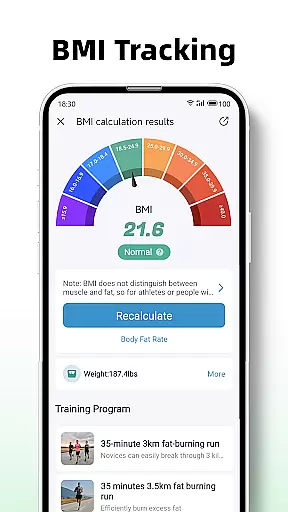
By integrating BMI tracking, the application further personalizes the fitness experience. Users can calculate and monitor their BMI, receiving insights that help maintain an optimal fitness level. This feature ensures that users are not just walking or running but doing so with specific health targets in mind.
The true value of personalized planning in Step Counter lies in empowering users to take control of their health journey. With detailed reports and graphs for daily, weekly, and monthly data, users can track progress over time, adjust their plans accordingly, and achieve better health outcomes.
Progress visualization is a critical component of any fitness app, providing users with tangible evidence of their achievements and motivating continued effort. Step Counter - Pedometer & BMI offers robust visualization tools that display users' activity data in an engaging and informative manner.
Through detailed reports and graphs, the app presents daily, weekly, and monthly statistics related to step counts, active time, distance traveled, and calories burned. This comprehensive view allows users to understand their progress across different metrics and time frames easily.
In addition to numerical data, the app tracks user movement on a map, offering a geographical representation of their activities. This feature adds another layer of engagement as users can visually trace their routes and see how far they've comeu2014literally and figuratively.
Ultimately, the progress visualization features in Step Counter serve to enhance motivation and adherence to fitness goals. By making it easy for users to see improvements over time, the app fosters a sense of accomplishment and encourages ongoing participation in healthy lifestyle choices.
User-friendly interface
Accurate step tracking
Comprehensive reports
Private data handling
Customizable settings
Requires correct setup
Device limitations exist
Sensitivity adjustments needed
No wearable integration
Limited offline features

Your Health Has Met Its App (℠)
 3.90
3.90
Chair Workout: Women's Edition for safe, flexible, and personalized fitness.
4.40
Control your sleep in real-time wearing Garmin device
3.60
Meditation app, head space app provides calm music to help you meditate & sleep
5.00
Measure your Pupil Distance for Eyeglasses and VR headsets in 3 quick steps.
4.70
Raccoon AI Calorie Counter. Intermittent Fasting & Timer. Macro, Carb, Protein
4.50
Fast Body building & Weight Loss. Home Workouts with Daily Coach, No Equipment.
4.30
GloryFit is a companion app for the smart bracelet.
3.60
Control your blood pressure, heart rate and blood sugar in a fast way.
4.00
Step Counter, track steps when you walk or run
4.70
Your AI pet BFF. Talk, play, and beat anxiety in this calming game.
4.60
Personal Measurements - Track your gains!
4.50
Binaural Beats - Fully Customizable Waves - Pure Sound - No Loops
4.50
The OFFICIAL Couch to 5K® running training app! A 9 week walk-run workout plan.
4.50
Relax to calm sounds, white noise, music, guided meditation and bedtime stories
4.40
The most accurate heart rate app to monitor and track your heart rate & pulse.
4.40
Your portable blood pressure tracker. Record, monitor, and analyze BP anytime.
4.30
Your plan in your pocket 24/7
3.00
Use your watch as a bike computer, heart rate monitor and cycling power meter
2.50


User Reviews