
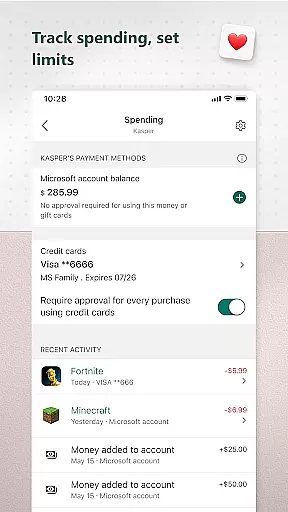
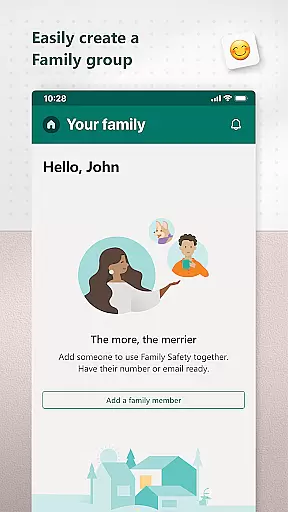
Microsoft Family Safety is a comprehensive parenting app designed to help families develop healthy digital habits while ensuring children's safety online. The app allows parents to set up parental controls, manage screen time, and filter inappropriate content across multiple devices including Android, Xbox, and Windows.
A key feature of the app is its activity reporting system, which provides parents with detailed insights into their children's digital activities through weekly email summaries. This helps facilitate meaningful conversations about responsible device usage. The app also enables kids to safely explore the digital world within the boundaries set by their parents, ensuring age-appropriate content consumption.
The app's value lies in creating a balanced digital environment where children can learn and grow independently while parents maintain peace of mind knowing their family is protected. With robust privacy protections and meaningful user choices, Microsoft Family Safety offers a reliable solution for modern digital families.
Microsoft Family Safety offers an impressive range of features that cater to both parents and children. For parents, the app provides advanced parental control options, including web filters for kid-friendly browsing on Microsoft Edge and the ability to block inappropriate apps and games. These features create a safer online environment tailored to each child's age and maturity level.
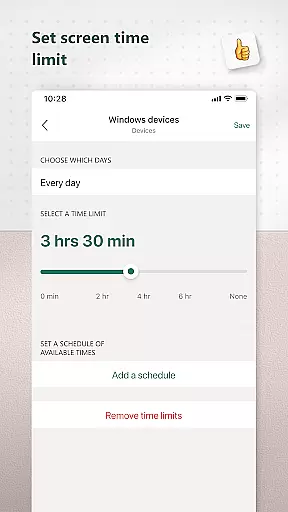
The app's screen time management tools are particularly robust. Parents can set specific time limits for individual apps and games across Android, Xbox, and Windows devices. Additionally, they can establish broader device-level restrictions and receive notifications when children request more screen time. This granular control helps families maintain a healthy balance between digital and offline activities.
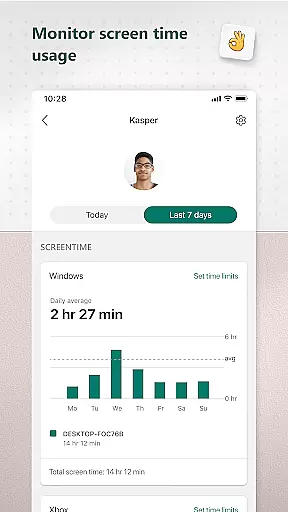
Activity reporting stands out as another valuable feature. Parents receive detailed weekly summaries of their children's screen time and app usage patterns. This data-driven approach enables informed discussions about digital habits and helps parents adjust settings based on actual usage patterns rather than assumptions.
When it comes to parenting apps, the credibility of content and expert validation are paramount. Microsoft Family Safety stands out by providing features that are designed and endorsed by child safety experts. The app ensures that all parental controls and safety measures adhere to the highest standards of digital safety.
The app's content filters are developed based on extensive research into online safety for children. These filters block inappropriate apps and games, ensuring that kids only access age-appropriate content. Additionally, the web filters for kid-friendly browsing on Microsoft Edge are regularly updated to keep up with new online threats, maintaining a safe browsing environment for young users.
Microsoft also collaborates with child psychologists and digital safety advocates to refine the app's features. This collaboration ensures that the app not only protects children but also supports their development by promoting healthy digital habits. Parents can trust that the app's activity reports and screen time management tools are crafted with expert insights to foster balanced digital consumption.
Growth tracking in digital parenting tools is essential for understanding a child's development in the online world. Microsoft Family Safety offers precise growth tracking through detailed activity reports. These reports provide an accurate log of screen time and online usage, helping parents monitor their children's digital habits effectively.
The app goes further by sending weekly email summaries that outline a child's online activities. This feature allows parents to stay informed about their children's digital interactions without constant monitoring. The accuracy of these reports ensures that parents have reliable data to discuss their children's online experiences and make necessary adjustments to their digital routines.
Moreover, the app's ability to notify parents when a child requests more screen time adds another layer of accuracy to growth tracking. This real-time data helps parents make timely decisions regarding their children's digital consumption. By combining expert-validated features with precise tracking, Microsoft Family Safety empowers parents to guide their children's growth in the digital age confidently.
Comprehensive cross-platform support
Robust parental control options
Detailed activity reporting
Granular screen time management
Strong privacy protections
Limited iOS functionality
Requires Microsoft account
Some features need premium subscription
Complex initial setup process
Occasional syncing issues

AI Motion Video Maker & Ideas
 4.1
4.1
SENSORYSOOTHE and SENSORSAFE: Making car seats smarter and families safer.
4.70
All-In-One Pregnancy Tracker, Your Baby's Milestones, Growth Stages & Parenting
4.70
Educational resource for parents to inspire creativity in their children.
4.00
Parental Control including Screen time control, GPS tracking, App/Game blocker.
3.90
Track your pregnancy, kick & contraction counter, baby & mom's heartrate monitor
4.60
Live Location, Alerts & 2-Way Voice for Kids and Adults with Special Needs
4.60
Save money on diapers. Get the Pampers Rewards app.
3.90
Screen Time, App and Web Block & Monitoring, Location Tracker
3.60
3D Baby size, Fruit comparisons, Smart Checklist, Trending Names & Training.
4.90
Track your labor contractions
4.90
Pinardin - Smart Parental Control, Online Safety & GPS Tracking!
4.80
Join over 1MM parents & professionals who've used OFW to navigate co-parenting
4.40
Speech Therapy Exercises For All!
4.40
Protect kids online safety through GPS tracking,screen time control,app blocking
4.20
The 10 development leaps of your baby | newborn milestones & leap days tracker
4.10
Discover fun videos, kids songs, bedtime stories and games
3.60
Happiest Baby App replaces the SNOO App (the mobile companion to SNOO & SNOObie)
3.20
Track pregnancy health and wellness with pregnant tracker from healthcare advice
4.5


User Reviews