
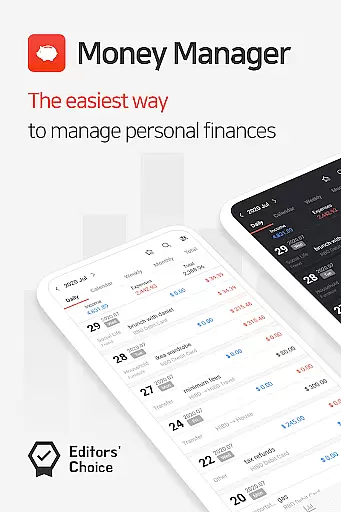
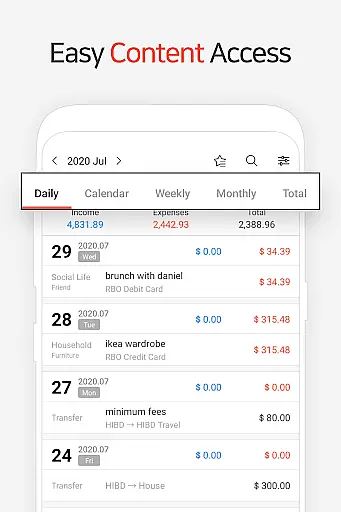
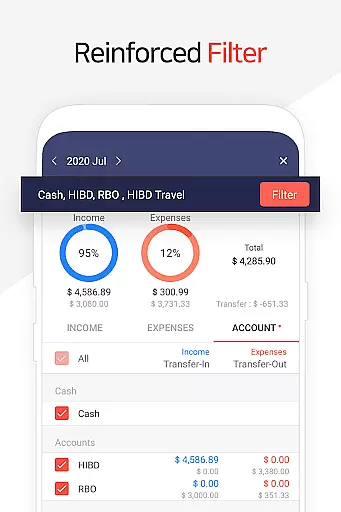
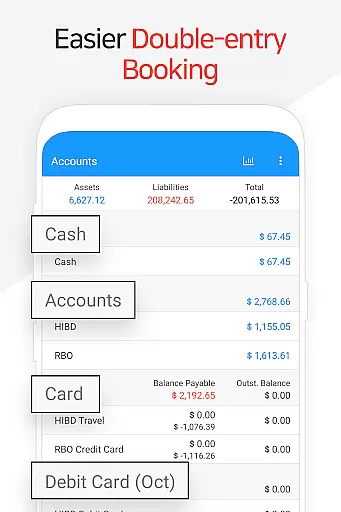
Money Manager is a comprehensive personal finance application designed to help users efficiently manage their assets and track financial activities. The app employs double-entry bookkeeping, ensuring accurate recording of both income and expenses while automatically updating account balances. This feature provides users with a clear understanding of their financial standing at all times.
The application offers robust budget management capabilities, allowing users to set spending limits and visualize their expenditure against budgets through intuitive graphs. Additionally, the card and debit card management function enables users to monitor payment schedules and outstanding balances directly from the asset tab. With passcode protection and Google Drive backup support, Money Manager ensures both security and data integrity for peace of mind.
Designed for both mobile and PC use, Money Manager allows users to conveniently edit and sort financial data on larger screens. Its instant statistics feature provides real-time insights into monthly spending patterns and category-based expenses, empowering users to make informed financial decisions. Whether tracking daily expenses or managing long-term investments, this app serves as an essential tool for maintaining financial health.
Money Manager stands out with its diverse range of features tailored to simplify personal finance management. One key highlight is its double-entry bookkeeping system, which not only records transactions but also updates accounts in real time based on income and expenses. This ensures that users always have an accurate view of their financial status without manual adjustments.
The app's budget management functionality is another standout feature, offering graphical representations of spending versus allocated budgets. Users can easily identify areas where they may be overspending and adjust accordingly. Furthermore, the inclusion of a card and debit card management tool allows users to track payment due dates and automate recurring payments by linking accounts. These practical tools streamline routine financial tasks.
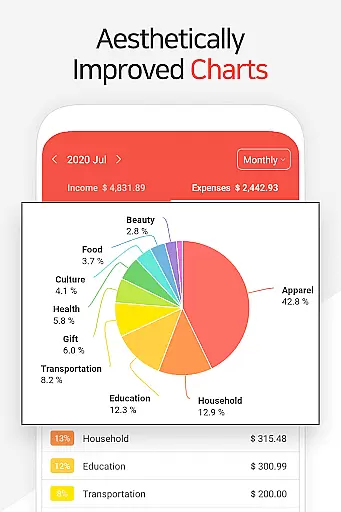
Additional notable features include instant statistics, which provide detailed breakdowns of expenses by category and month-over-month comparisons, as well as a bookmarking system for frequently logged expenses. With support for Excel backups and Google Drive integration, Money Manager ensures users can securely store and retrieve their financial data whenever needed. Such innovations make it a versatile choice for anyone seeking to take control of their finances.
Account and fund security is a critical aspect of any financial management application. Money Manager ensures the safety of user data through multiple layers of protection. The app employs advanced encryption protocols to safeguard sensitive financial information, ensuring that all transactions and account details remain confidential.
In addition to encryption, the app offers a passcode feature for an added layer of security. Users can set up a passcode to prevent unauthorized access to their financial data. This function provides peace of mind, especially when the device is shared or misplaced. Furthermore, the backup and restore functionality supports secure cloud storage options like Google Drive, allowing users to maintain control over their data backups.
The implementation of double-entry bookkeeping not only enhances the accuracy of financial records but also serves as a protective measure against errors and fraud. By automatically depositing income into accounts and withdrawing expenses immediately, the system minimizes discrepancies and maintains a transparent audit trail. These features collectively ensure that users' personal assets are managed safely and efficiently.
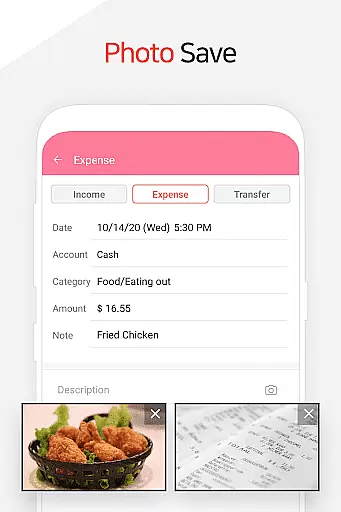
A seamless transaction experience is essential for maintaining an efficient personal asset management system. Money Manager excels in providing users with a smooth and intuitive interface for recording and managing their financial activities. The app allows users to easily input income and expenses, categorize transactions, and view real-time updates on their account balances.
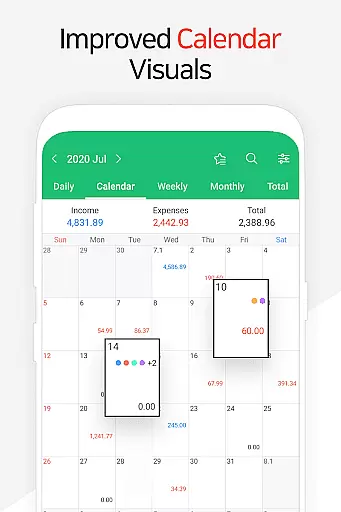
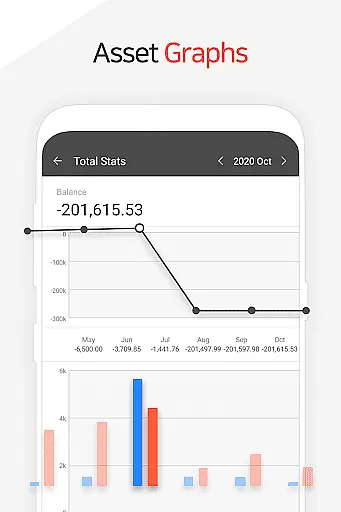
One standout feature is the instant statistics capability, which provides immediate insights into spending patterns by category and month-over-month changes. Users can quickly understand their financial behavior through visual graphs and summaries, empowering them to make informed decisions about their money. Additionally, the budget management function visually represents expenditures against budgets, helping users stay within their financial limits.
For recurring financial activities such as salary deposits, insurance payments, and loan installments, Money Manager offers automated scheduling and recurrence settings. This automation reduces manual entry efforts and ensures timely updates to the user's financial status. Overall, these functionalities contribute to a comprehensive and hassle-free transaction experience, making it easier for users to manage their finances effectively.
User-friendly interface
Real-time balance updates
Comprehensive budget tracking
Secure passcode protection
PC synchronization available
Limited free version features
Occasional syncing issues
No multi-currency support
Premium subscription required
Complex for beginners

Play for fun, earn for real. Collect rent by owning virtual land & get cashback
 4.60
4.60
Earn cash & save money daily. Access instant cash advances* - no credit check!
4.50
All your crypto & stocks in one secure and trusted app.
4.40
Car Insurance Made For You.
4.50
Change the way you money with Credit Genie
4.30
Invest, bank & save in one app. Trade stocks, earn high APY & budget smarter.
4.00
Mine Bitcoin in the cloud! Earn BTC daily with high-speed mining power.
4.30
Cash Advance, Credit Cards, Credit Lines, Score Monitoring, Saving, Budgeting
4.70
Venmo is the fun and easy way to pay and get paid.
4.10
Keep track of your subscriptions with no limitations
4.80
Early payday cash advance up to $150 a day with a max of $1,000 per pay period
4.70
Money transfer made easy. Send money to friends and family with great rates.
4.70
No credit check, no interest, no worries.
4.70
Loan Calculator, Mortgage Calculator, Compound Interest Calculator
4.70
Pay, bank & build credit.
4.70
Need help before payday? Get cash advances with no interest or credit checks.
4.60
The simplest way to budget, bank, save and invest.
4.50
Trade NFL, NBA, Crypto, Tech
4.50
Registration of your debts and Mdionatk and assembled, as well as a significant reports
4.30


User Reviews