
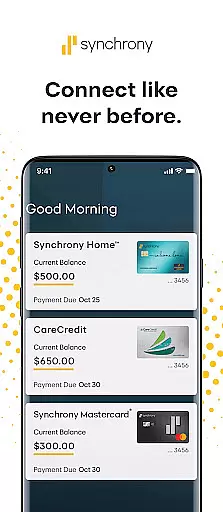

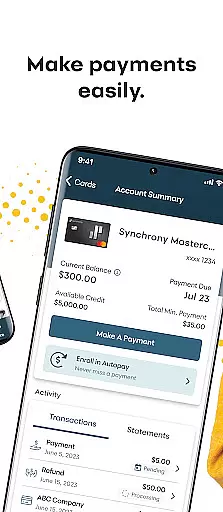

MySynchrony is a comprehensive financial management app designed for users who hold credit cards issued by Synchrony. This powerful application allows you to securely manage all your Synchrony credit card accounts in one centralized location. With features like biometric authentication, payment scheduling, balance checking, and transaction history review, the app provides a complete suite of account management tools.
The app's standout feature is its ability to provide users with real-time access to their financial information anytime, anywhere. Whether you need to view statements, explore special offers through the Synchrony Marketplace, or access financial education resources via the Finance 101 blog, MySynchrony puts essential financial tools at your fingertips. The inclusion of a 24/7 Knowledge Center ensures that help is always available when you need it.
MySynchrony distinguishes itself through its robust set of features tailored specifically for credit card management. The app supports biometric login for enhanced security, while offering comprehensive payment management options including scheduling and multiple bank account integration. Users can easily monitor their balances, credit limits, and review detailed transaction histories.
Beyond basic account management, the app provides value-added features such as customizable statement delivery preferences and access to exclusive deals through the Synchrony Marketplace. The inclusion of educational resources like the Finance 101 blog demonstrates the app's commitment to financial literacy. Additionally, the built-in feedback mechanism allows users to directly communicate their experience and suggestions to the development team.
What sets MySynchrony apart is its holistic approach to credit card management, combining essential banking functions with educational resources and customer support tools. The app's focus on security, convenience, and financial education makes it an invaluable tool for anyone managing Synchrony credit card accounts.
Account and fund security is a critical aspect of any financial application, ensuring that users' sensitive information remains protected. MySynchrony employs advanced security measures to safeguard your credit card accounts and personal data. The app offers secure login options through Biometric Authentication, adding an extra layer of protection against unauthorized access.
Beyond secure login, the app allows you to manage multiple bank accounts safely for bill payments. This feature ensures that your financial transactions are conducted in a secure environment, minimizing the risk of fraud or data breaches. With these robust security protocols in place, users can confidently perform their banking activities without worrying about potential threats.
The peace of mind that comes with knowing your financial information is secure cannot be overstated. By prioritizing account and fund security, MySynchrony not only protects your assets but also enhances your overall user experience. This commitment to security empowers users to take full advantage of the app's features, from managing payments to exploring exclusive deals, with confidence.
A seamless transaction experience is essential for any finance app, and MySynchrony excels in providing users with intuitive tools to manage their credit card transactions efficiently. The app enables users to schedule and manage payments, check balances, and review transaction histories at any time, offering unparalleled convenience and control over their finances.
One standout feature is the ability to view statements and manage statement delivery preferences directly within the app. This functionality streamlines the process of staying informed about your financial status, allowing for better budgeting and financial planning. Additionally, users can securely add or delete multiple bank accounts for bill payments, further enhancing the ease of managing their funds.
By integrating practical features such as the Finance 101 blog and a 24/7 Knowledge Center, MySynchrony goes beyond basic transaction management to educate and support its users. These resources contribute to a holistic transaction experience that not only simplifies financial tasks but also promotes financial literacy and empowerment among its users.
User-friendly interface
Comprehensive account management
Robust security features
24/7 customer support
Financial education resources
Limited to Synchrony cards
No Venmo/PayPal support
Requires registration
Occasional bugs
Marketplace limitations

BA Financial Calculator PRO – Perfect for CFA/FRM/CPA and finance professionals
 4.90
4.90
Managing your money just got easier. Get the new Mobile app.
4.70
Get, Earn, and Save Money
4.30
Earn cash back. Build credit.
4.60
Manage your credit card account with the Credit One Bank mobile app.
4.70
Check EBT, SNAP, WIC balances, manage food stamps, and save money with benefits
4.80
View BSC Transactions for multiple accounts
3.90
Keep track of your subscriptions with no limitations
4.80
SuperQi, Your all-in-one Super App.
1.30
PayMe helps you claim money from settlements on companies that harmed you.
4.80
Get 250$ Cash Advance to solve emergencies instantly in loan app called LendMe
4.70
Cash Advance, Credit Cards, Credit Lines, Score Monitoring, Saving, Budgeting
4.70
Navigate your unique financial path confidently with help from Credit Karma.
4.70
Manage your prepaid cards and add to Google or Samsung Wallet.
4.60
Our Chase Mobile App makes it easy for you to bank on the go 24/7.
4.60 4.50
4.50
Read and extract public data on NFC Contactless banking card (VISA, MasterCard
4.30
Venmo is the fun and easy way to pay and get paid.
4.10
Retirement plan, IRA, retail and HSA customers serviced by Empower.
3.10


User Reviews