
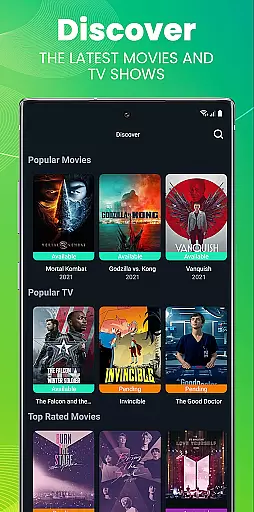
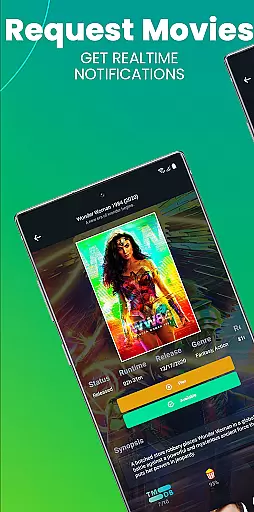
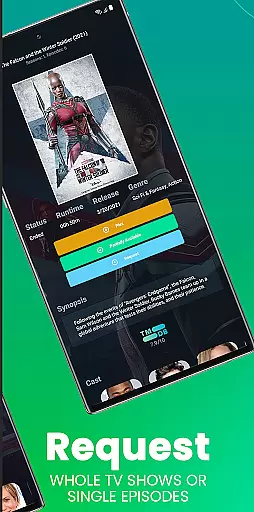
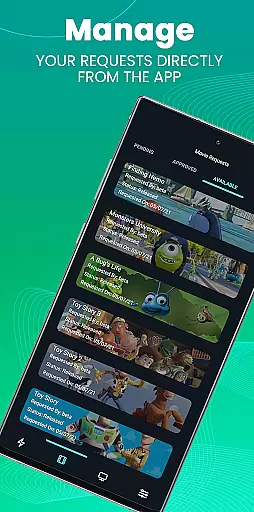
Ombi is a self-hosted entertainment management app that allows users to request content for Plex, Emby, or Jellyfin libraries. Designed for seamless integration, it empowers shared users to independently suggest TV shows and movies, which are then automatically added through connected DVR tools. This ensures an efficient, collaborative media experience.
The app's core functionality lies in its ability to streamline content requests while linking multiple services into one cohesive system. By scanning a QR code from the user's Ombi profile, they can access mobile functionality. With version v4.0.13XX or later required on your server, Ombi provides a modern solution for managing entertainment libraries with ease.
Ombi stands out with its automated request system, enabling users to submit content requests without manual intervention. It supports integration with popular media servers like Plex, Emby, and Jellyfin, as well as various TV show and movie DVR tools, creating a unified workflow. The app also features a secure login process via QR code authentication, ensuring only authorized users can interact with the platform.
Another notable feature is its evolving design and functionality. As updates roll out, Ombi continues to improve its interface and expand its capabilities. This commitment to innovation ensures that users benefit from cutting-edge technology tailored for optimal performance in entertainment management.
In the realm of digital entertainment, having access to a diverse and regularly updated content library is crucial. Ombi shines in this aspect by enabling users to request their desired TV shows and movies directly through the platform. This self-service feature ensures that your shared Plex, Emby, or Jellyfin libraries are always stocked with the latest content that users want.
Ombi's integration with multiple DVR tools further enhances its ability to deliver fresh content consistently. By linking these services, users can enjoy an end-to-end experience where requested content is automatically added to their libraries. This seamless process not only keeps the content varied but also saves time for administrators who no longer need to manually manage requests.
Moreover, as user preferences evolve, so does Ombi. The application is designed to adapt and grow alongside its community, ensuring that the available content remains relevant and engaging. With each update, more features are introduced, expanding the range of media that can be requested and enjoyed by users.
User engagement and retention are key metrics for any successful entertainment platform. Ombi addresses these factors by providing a dynamic interface that encourages continuous interaction. Users can easily log in, navigate to their profile, and use the Mobile Tab to scan a QR code, which facilitates a smooth onboarding process and ongoing access to the service.
The ability to request content directly contributes to prolonged user engagement. When individuals have control over what gets added to their shared libraries, they are more likely to remain active participants within the community. This sense of ownership and personal investment leads to higher satisfaction rates and increased retention over time.
Additionally, as Ombi evolves with regular updates and added functionalities, it maintains user interest by offering new ways to interact with the platform. These enhancements ensure that there is always something novel for users to explore, keeping them engaged and invested in the long term.
User-friendly interface
Seamless integrations
Automated workflows
Secure authentication
Regular updates
Requires hosting setup
Limited offline use
Dependent on server version
No standalone functionality
Initial configuration needed

The OFFICIAL PeeWee Purpdrank Soundboard!
 4.80
4.80
Triple A is a highly complex, kinetic, and interactive visualizer.
4.50
Stream videos to VIDAA & VEWD TVs from Hisense, Sharp, Skyworth, Vestel & TiVo
3.00
Watch everything you want.
2.90
Wodfix Air aggregates popular online content for you.
4.80
Stream Live TV, News & Documentaries. Watch Full Seasons with PBS Passport.
4.80
The Xbox app keeps you connected to your gaming community.
4.50
Realistic Baby Simulator App
4.00
Raise Christmas Magic with daily missions, magical scanners, and kindness.
4.1
Exclusive creator communities
4.70
Live TV, sports & holiday movies — stream on phone, tablet & TV
4.60
Unleash Your AI Imagination
4.60
Atomus is a 10-finger multi-touch interactive visualizer.
4.30
Official KennysGifs Stickers
4.20
Catch the latest episodes of The Voice or live stream NFL games with The NBC App
4.20
Real ghost box scanner with echo, reverb, EMF, & multi-stream channels.
3.80
Connect. Discover. Control.
3.60
Explore the unknown!
3.00
A wonderful collection of the most beautiful sounds of animals and birds
4.1


User Reviews