
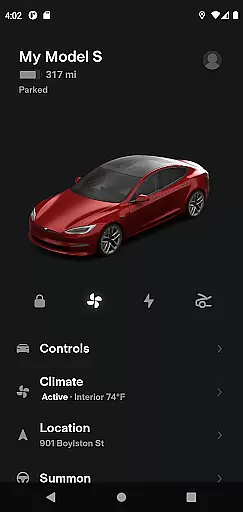
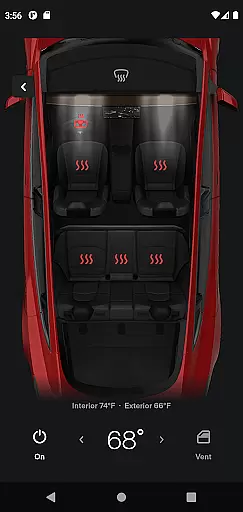
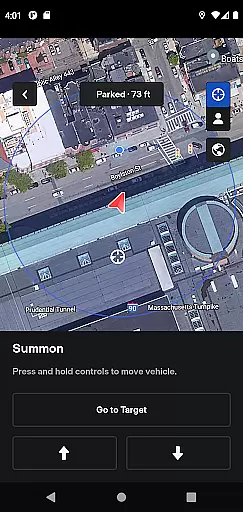
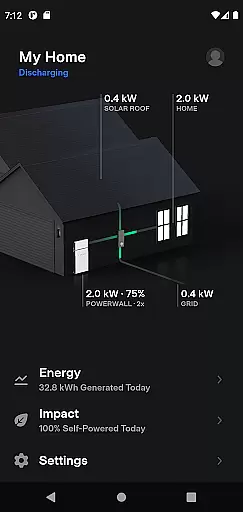
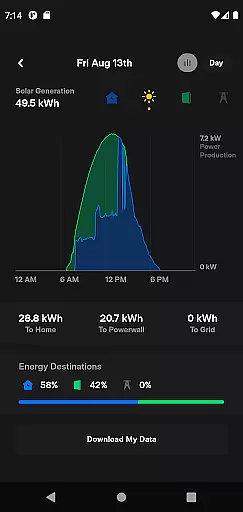
Tesla is a comprehensive lifestyle app that connects vehicle owners with their Tesla cars and Powerwalls. The app allows users to remotely monitor charging progress, control temperature settings, lock or unlock the vehicle, and locate it with directions. Additionally, Tesla app supports advanced features like summoning the car from tight spaces for vehicles equipped with Autopilot. It also provides detailed energy monitoring for Powerwall 2 users, making it an essential tool for modern, tech-savvy Tesla owners.
With its intuitive interface, Tesla app delivers seamless integration between mobile devices and Tesla products. Users can send navigation destinations directly from their phone, manage media playback for passengers, and even operate the panoramic roof. These features collectively enhance convenience, security, and overall driving experience, establishing Tesla app as a pivotal element in the connected car ecosystem.
The Tesla app boasts an impressive array of features designed to maximize convenience and control. One standout capability is real-time charging management; users can check the charging status and start or stop the process at will. The remote climate control feature lets you heat or cool your car before use, ensuring comfort regardless of parking conditions. Security is enhanced through remote locking and unlocking functions, while vehicle location tracking provides peace of mind.
For entertainment and ease of use, Tesla app allows sending navigation addresses from other apps directly to the car's GPS system. Passengers can quickly adjust media settings, and drivers can easily find their vehicle by flashing lights or honking the horn. Advanced functionalities include operating the panoramic roof and using Summon feature to navigate out of tight parking spots. Powerwall 2 owners benefit from detailed energy usage statistics, enabling better management of solar energy production and consumption.
The Tesla app offers an extensive range of features that cater to various aspects of a user's lifestyle. From vehicle management to energy monitoring, it ensures that owners are well-connected with their Tesla products at all times.
With capabilities such as remote vehicle temperature control, charging management, and GPS location services, the app provides comprehensive tools for vehicle owners. Additionally, its integration with Powerwall systems allows users to monitor solar energy storage and usage, making sustainable living more accessible.
By including functionalities like media control, navigation, and software updates, the Tesla app demonstrates a commitment to covering multiple facets of a modern, tech-savvy lifestyle. This holistic approach enhances convenience and efficiency in everyday tasks.
Authenticity and credibility are at the core of the Tesla app's offerings. Each feature is developed based on genuine Tesla vehicle and Powerwall functionalities, ensuring that users receive accurate and reliable information about their products.
The app's content is curated by experts in automotive and energy technologies, providing assurance that the information and controls available are both precise and beneficial. Users can confidently manage their vehicles and energy systems knowing that the data comes from authoritative sources.
Furthermore, Tesla's reputation as an industry leader in innovation and sustainability adds an extra layer of trust. The app not only reflects the company's expertise but also reinforces its dedication to delivering high-quality, dependable solutions to its customers.
User-friendly interface
Comprehensive vehicle control
Real-time energy monitoring
Advanced security features
Seamless device integration
Requires Tesla ownership
Limited to Powerwall 2
Dependent on internet connection
Premium feature costs
Occasional software bugs

Countdown to Christmas 2025 with festive games & activities in a virtual village
 4.80
4.80
Turn your watch into a key fob for your Tesla
2.90
Big bold weather watch face with dynamic backgrounds and 3 complications
4.1
Daily lessons from A Course in Miracles with scheduled reminders
4.80
Duo Watch Face (animated)
4.0
Immerse yourself in the serenity of lavender fields and white butterflies
4.4
A uniquely designed isometric digital watch face made for Wear OS
4.1
Smart & Healthy Living
4.60
PARAVOX 4 is a professional ITC paranormal research application.
4.50
Made To Order Faves
4.70
Stay connected with your loved ones & vehicles | Share live GPS location updates
4.60
The App can control Roborock vacuum cleaners from anywhere with rich features.
4.60
The go to app for taking unlimited notes!
4.50
Fly your Solo like a boss.
4.10
Digital watch face design. Modern looking, hi-res & battery friendly.
4.00
Unique informative Dial with Live Moon Phase at a glance!
3.60
Going above and beyond known spirit communication
3.60
Easily manage your child's playtime, spending messaging and more.
3.50
Big bold hybrid watch face with 30 colors, 5 fonts & 5 complications.
4.1


User Reviews