
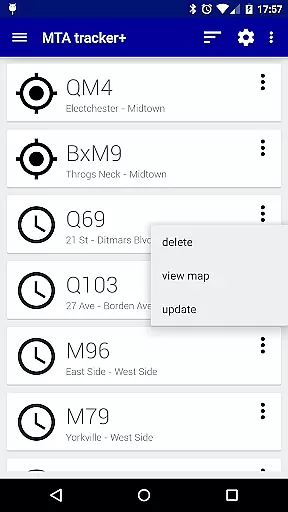
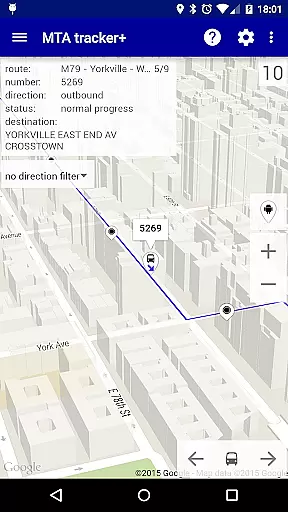
Transit Tracker+ - NYC is a comprehensive transportation app designed for commuters relying on the Metropolitan Transportation Authority (MTA) services. This ad-free version offers advanced features beyond its free counterpart, including real-time vehicle tracking, route schedules, and proximity alerts. The app leverages MTA's public APIs to provide accurate data on bus and train movements across supported routes in New York City.
Key functionalities include the ability to track specific vehicles by route or stop number, view detailed schedules on a map interface, and receive notifications when vehicles approach designated stops. Additionally, users can customize their experience with light or dark themes, traffic data overlays, and adjustable update intervals. These features collectively enhance the daily commute by providing timely and relevant transit information.
The app proves particularly useful during unexpected schedule changes or disruptions, ensuring that users stay informed about the status of their routes. By delivering precise arrival predictions and service updates directly to users' devices, Transit Tracker+ - NYC empowers commuters to plan their journeys more effectively, ultimately saving time and reducing uncertainty in their travel routines.
Transit Tracker+ - NYC distinguishes itself through a robust set of features tailored to improve the commuting experience. One standout capability is the real-time tracking system, which allows users to input route numbers, stop IDs, or individual vehicle numbers to monitor the exact location of buses and trains. This granular level of detail ensures that users have up-to-the-minute information about their transit options.
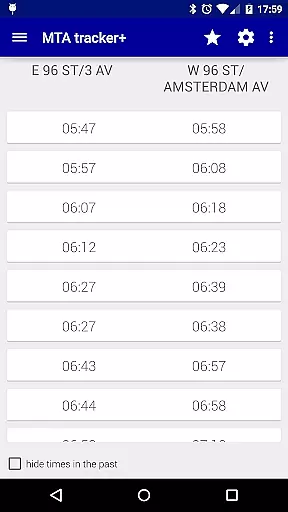
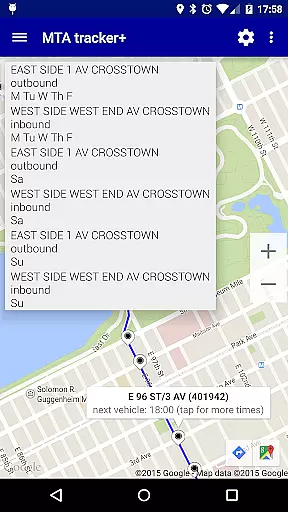
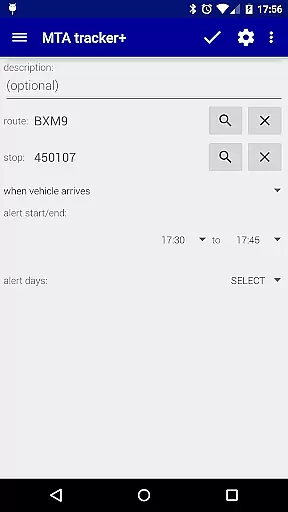
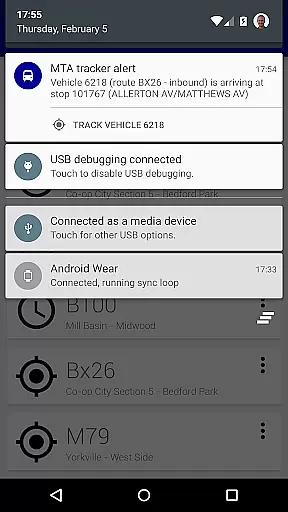
In addition to live tracking, the app provides downloadable route schedules that can be viewed as origin/destination tables or interactively on a map. Users can tap on specific stops to see upcoming arrival times, making it easier to coordinate connections. Another notable feature is the alert system, which notifies users when a vehicle is approaching or arriving at a selected stop based on predefined distance parameters. While these alerts depend on adherence to standard routes, they offer significant convenience for regular commuters.
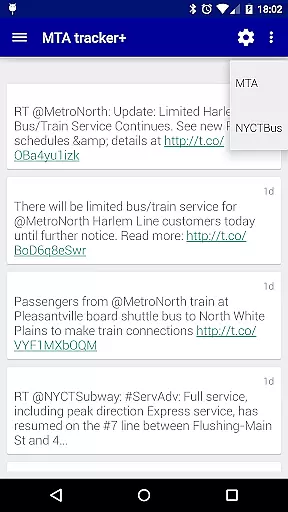
Customization is another hallmark of this app. Users can personalize their interface with themes, toggle satellite imagery, and enable continuous screen activity to prevent dimming during use. Furthermore, integration with Twitter delivers the latest updates from @MTA, keeping users informed about broader service changes. Collectively, these features create a versatile tool that adapts to various user needs while maintaining ease of use.
Map accuracy is crucial for any navigation app, and Transit Tracker+ - NYC excels in this area by leveraging the Metropolitan Transportation Authority's vehicle monitoring service, MTA Bus Time. This ensures that users receive precise information about bus locations and routes.
The app uses data feeds provided for free by the MTA, which are updated regularly to reflect real-time changes in transportation schedules. Users can input specific route numbers or stop numbers to see all vehicles serving those stops, ensuring they get the most accurate location data available.
Transit Tracker+ also includes features like satellite imagery and color-coded traffic data on the map, enhancing the user's ability to navigate effectively. These tools help users make informed decisions about their travel plans based on current conditions.
By providing detailed maps with accurate transit information, Transit Tracker+ empowers users to plan their journeys efficiently, reducing wait times and improving overall travel experiences within New York City.
Effective route planning is essential for commuters, and Transit Tracker+ - NYC offers robust tools to assist with this task. The app allows users to request route schedules for any MTA route by entering its number, providing comprehensive origin/destination tables and visual representations on a map.
Users can tap on a stop within the app to see when the next bus or train is scheduled to arrive, offering convenience and flexibility in planning commutes. Additionally, the app supports alerts for when an MTA vehicle is approaching or arriving at a particular stop, helping users manage their time better.
For those looking to explore nearby options, the Close Stops feature helps identify MTA stops close to a specified location, complete with filters for maximum stops and optional route preferences. This ensures users have access to multiple transit possibilities.
Overall, Transit Tracker+ enhances route planning by integrating real-time data with user-friendly interfaces, making daily commutes smoother and more predictable for New Yorkers.
User-friendly interface
Real-time tracking
Customizable alerts
Ad-free experience
Comprehensive route data
Limited route coverage
Occasional inaccuracies
No offline functionality
Paid version only
Dependent on MTA data

Start your next adventure confidently using our Accurate Compass App
 3.70
3.70
Play in the outdoors with Android as your Handheld GPS and offline topo maps!
3.50
Navigate confidently with our precise Digital Compass app & Direction Compass!
4.70
Ride CTA, Metra & Pace: Manage your fares, buy Metra tickets, get arrivals.
3.00
ParkWhiz, an Arrive Mobility brand, part of the Arrive Network
4.30
Explore Earth with live GPS, satellite view & street navigation
3.60
Live Satellite view app for find GPS navigation Direction and live location map
3.70
Track friends in real-time and explore worldwide live cameras.
4.60
Navigate MTA, NJ Transit, MBTA, SEPTA, BART, MARTA, CTA & 900+ cities
4.60
Truck Safe GPS Navigation & Maps: Parking, Fuel, Diesel, Weight Station
4.80
LIRR and Metro-North tickets and trips
4.80
Find AI powered cameras, ALPRs, and other surveillance infrastructure near you
4.70
GPS Speedometer & Odometer: Track car, bike, truck speed & distance in real-time
4.70
Ride or drive at YOUR price
4.70
Navigate with your watch and keep the phone in your pocket!
4.60
Explore with GPS Navigation with GPS offline, voice GPS, speed camera radar
4.60
The fastest and most convenient way to pay for parking on our lots.
4.40
Phone Tracker and GPS Location Sharing
4.20
Discover over 800 points of interest along the canal.
3.70


User Reviews