
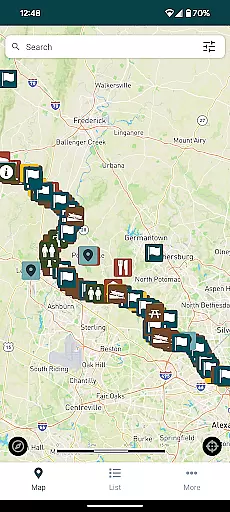
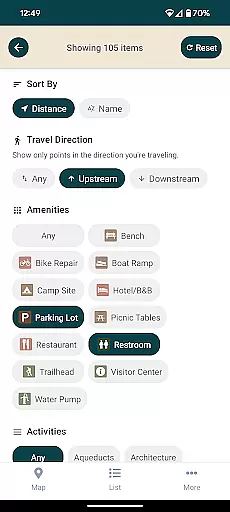
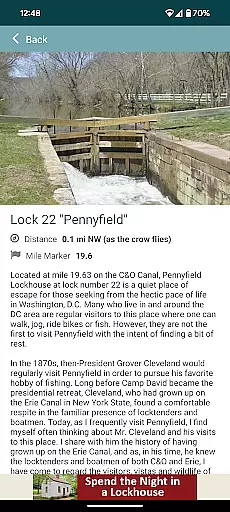
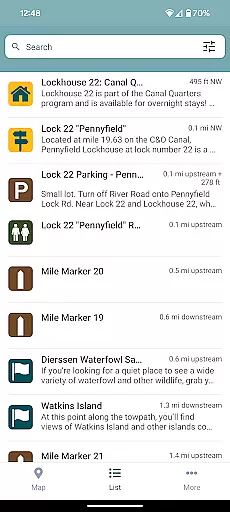
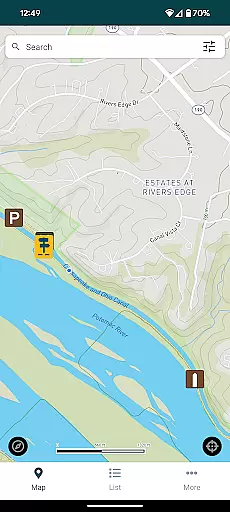
C&O Canal Explorer is a comprehensive navigation app designed to help users explore the entire 184.5 miles of the C&O Canal National Historical Park. The app features over 800 meticulously mapped points of interest, providing detailed information on hiking trails, campgrounds, historical sites, trailheads, parking areas, and more.
One of the standout features is its ability to calculate distances from your current location to nearby amenities and points of interest. Whether you're planning a hike or looking for a place to camp, this app ensures you have all the necessary information at your fingertips. It encourages users to discover new paths and explore different sections of the park, making it an essential tool for outdoor enthusiasts.
The C&O Canal Explorer app offers a rich set of features tailored for explorers and history buffs alike. With over 800 points of interest, users can easily search and find detailed information about various locations within the park. This includes historical landmarks, natural attractions, and essential amenities like parking and camping spots.
A key feature is the app's distance calculator, which provides real-time information on how far you are from any point of interest. This functionality enhances user experience by allowing better trip planning and execution. Additionally, the app's intuitive interface makes navigation seamless, ensuring that users can focus on enjoying their adventure without any hassle.
Map accuracy is essential for any navigation app, and the C&O Canal Explorer excels in this area. The app provides precise mapping of over 800 points of interest along the 184.5 miles of the C&O Canal National Historical Park.
Each location, including hiking trails, campgrounds, historical sites, trailheads, and parking areas, is carefully plotted to ensure users can rely on the information provided. This meticulous attention to detail guarantees that adventurers can explore the park with confidence.
The app's developers have ensured that distances between points are accurately represented, allowing users to plan their trips effectively. Whether you're a casual hiker or an experienced camper, having trustworthy maps enhances your outdoor experience.
By delivering such accurate mapping data, the C&O Canal Explorer app not only helps visitors navigate but also encourages them to discover new parts of the park they might otherwise overlook.
Effective route planning is a cornerstone of the C&O Canal Explorer app, designed to enhance user exploration within the C&O Canal National Historical Park. With its comprehensive database of points of interest, the app allows users to chart efficient paths tailored to their interests.
Users can filter destinations by category, such as history or nature, and receive calculated distances from their current location to nearby amenities. This feature simplifies trip organization, ensuring that explorers spend less time planning and more time enjoying the outdoors.
The app's intuitive interface makes it easy to select starting points and desired stops, generating optimal routes that consider both distance and accessibility. Such thoughtful design empowers adventurers to customize their journeys while maximizing their time in the park.
Ultimately, the route planning capabilities of the C&O Canal Explorer transform how visitors interact with the park, making every excursion both seamless and enriching.
User-friendly interface
Comprehensive mapping
Real-time distance calculation
Rich historical content
Encourages exploration
Limited to specific park
No offline maps
Occasional bugs
Requires internet
Few customization options

Offline maps & GPS for hiking, travel, fieldwork & outdoor adventures
 4.70
4.70
Navigate with your watch and keep the phone in your pocket!
4.60
Number locator, real connection map
4.10
Order a cab online. An affordable taxi ride and driver in no time. What a bolt!
4.80
Phone Tracker and GPS Location Sharing
4.20
Explore with GPS Navigation with GPS offline, voice GPS, speed camera radar
4.60
GPS navigation offers route finder, compass, translator, currency converter, etc
4.30
Lets explore the world's famous places by using Live Cams, GPS & Satellite View.
4.20
Avoid delays. Get real-time GPS navigation, safety alerts and live traffic.
4.10
Find AI powered cameras, ALPRs, and other surveillance infrastructure near you
4.70
Find EV & Tesla charging stations with PlugShare
4.70
Easy, Moderate and difficult offroad adventures.
4.00
Navigation, weather, offline maps & tools for smarter, safer travel planning.
4.00
MapQuest is your go-to app for maps, GPS, voice navigation & live traffic.
3.80
Navigate via GPS Maps of GPS Voice Navigation, driving directions to find routes
3.60
Explore offline maps with radar, satellite view, and real-time alerts.
3.60
Your guide to the recreational opportunities of the Bureau of Land Management!
3.40
Your real-time window to the world. Explore anywhere, anytime.
3.30
Ride CTA, Metra & Pace: Manage your fares, buy Metra tickets, get arrivals.
3.00


User Reviews