
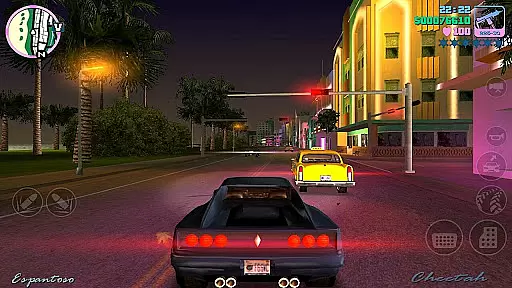
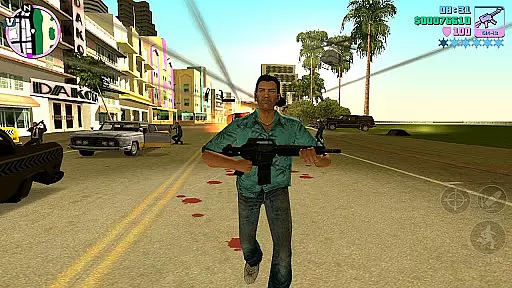
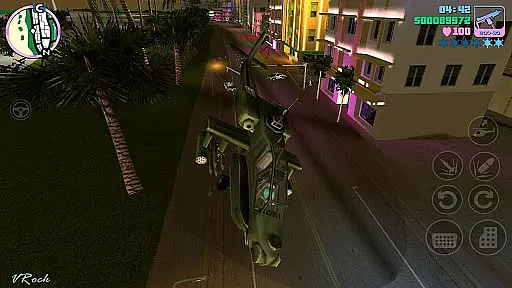
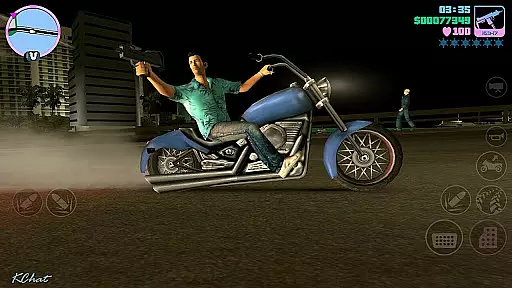
Grand Theft Auto: Vice City is an iconic open-world action game set in the 1980s. The game follows a character-driven narrative as players navigate through Vice City, a sprawling digital urban environment filled with diverse locations and opportunities. With its engaging storyline and criminal empire-building gameplay, it offers countless hours of entertainment.
This mobile version brings enhanced graphics, updated controls, and new features like customizable layouts, compatibility with game controllers, and adjustable graphic settings. These improvements make the classic experience more accessible to modern gamers while maintaining the original's charm.
Whether you're reliving the past or experiencing it for the first time, Vice City provides a rich, immersive world that allows players to explore, complete missions, and rise through the ranks of organized crime. Its appeal lies in its combination of nostalgia, freedom, and engaging gameplay.
Grand Theft Auto: Vice City boasts several standout features that enhance the overall gaming experience. The beautifully updated graphics include improved character models and lighting effects, bringing the vibrant 1980s setting to life. Players can enjoy precise firing and targeting options, making combat more intuitive and satisfying.
The game offers custom controls with fully customizable layouts, allowing users to tailor their interface for optimal performance. Supporting devices like the MoGa Wireless Game Controller and select USB gamepads, it caters to both touch and physical input preferences. Additionally, Immersion tactile effects provide a more realistic feel during gameplay.
With a massive campaign offering countless hours of gameplay, players can dive deep into Vice City's expansive world. Adjustable graphic settings ensure the game runs smoothly across various devices, providing flexibility for different hardware capabilities. This blend of features ensures an engaging and personalized experience for every player.
Arcade authenticity in gaming refers to how closely a game can replicate the classic arcade experience that many players remember fondly. Grand Theft Auto: Vice City, with its 10-year anniversary edition on mobile devices, brings back the nostalgia of the iconic open-world gameplay that originally defined an era. The game's narrative-driven approach and the vast urban sprawl of Vice City itself evoke memories of classic arcade-style exploration and adventure.
The mobile version of Vice City has been updated with high-resolution graphics and precisely tailored firing and targeting options, which enhance the original arcade feel while bringing it into the modern gaming age. Players can expect the same level of depth and engagement as they navigate through a digital city teeming with opportunities for both delight and mischief. This blend of old-school gaming charm with new-school technology is what makes the arcade authenticity of Vice City truly stand out.
For users, this means reliving the excitement of the 1980s with improved controls and customizable layout options. The ability to tailor your visual experience with adjustable graphic settings adds another layer of personalization, ensuring that the nostalgia factor is preserved without compromising on contemporary gaming standards. This fusion creates an immersive environment where players can fully engage with the retro vibe while enjoying the perks of current-gen gaming.
Control responsiveness is a critical aspect of any game, referring to how accurately and swiftly a player's inputs are translated into in-game actions. In Grand Theft Auto: Vice City, the developers have implemented new firing and targeting options alongside custom controls with a fully customizable layout. These enhancements ensure that every movement and action within the game feels precise and immediate, providing players with a seamless and engaging experience.
The compatibility with the MoGa Wireless Game Controller and select USB gamepads further amplifies control responsiveness by allowing players to use physical controllers they are comfortable with. This feature caters to different play styles and preferences, making sure that whether you're using touch controls or a gamepad, your commands are executed with minimal latency. Such attention to input methods demonstrates Rockstar Games' commitment to delivering a responsive and intuitive control scheme.
Ultimately, the tight integration of Immersion tactile effects enhances the overall feedback loop between the player and the game. Every action taken is met with immediate and satisfying responses, heightening the sense of immersion. For gamers, this means a more enjoyable and captivating experience as they navigate the expansive world of Vice City, knowing their inputs will be accurately reflected in real-time, thus maintaining the fast-paced nature of arcade gaming.
Engaging storyline
Customizable controls
Vibrant 1980s setting
High-quality graphics
Supports game controllers
Large file size
Device compatibility issues
Requires significant storage
No cloud saves
Occasional bugs

Genesis, Mega Drive, Mega CD, Master System, Game Gear Emulator!
 4.20
4.20
Gameboy Color Emulator
4.60
Antistress & relaxing games,stress relief; Antistress toys, calming games.
4.20
Fast reflexes, glowing obstacles, endless action.
4.0
Nostalgia.GBA Pro is a high quality GBA emulator.
4.40
Infinite Arcade
4.2
Stack the blocks as high as you can!
4.30
Dad doesn’t let you go out, can you outwit your parents and escape?
4.00
Challenge your friends in this game! Two players on one device!
4.70
*Try for free.* Survive alone in a Roguelike Reverse Bullet Hell.
4.80
Create your restaurant story & make food on a crazy kitchen in this cooking game
4.70
Jump and fly your way through danger in this rythm-based action platformer!
4.50
Enter Double Dragon Trilogy, a compilation of the beloved arcade series
4.10
NEOGEO's masterpiece game is now available in the app!
4.10
A fast, full-featured GB/GBC emulator with link cable emulation.
3.80
Play retro games with ease – NES, SNES, PSX, PSP & more supported
4.3
Machine Gun Fire Rumbles in the Jungle
4.5
BallStack is a vibrant match-3 game where you stack and match colorful balls!
4.3
M64Pro FZX Classic Emulator for Android
4.4


User Reviews