

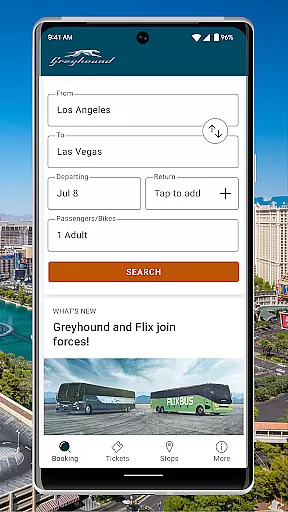
Greyhound is a premier travel application designed for booking low-fare bus tickets with enhanced flexibility and options. The app provides users with access to an extensive network of over 1900 bus routes across North America, including popular routes like Boston to New York and Los Angeles to Phoenix. With its refreshed interface, Greyhound now offers more scheduling options by integrating both Greyhound and FlixBus carrier schedules, ensuring competitive pricing on all trips.
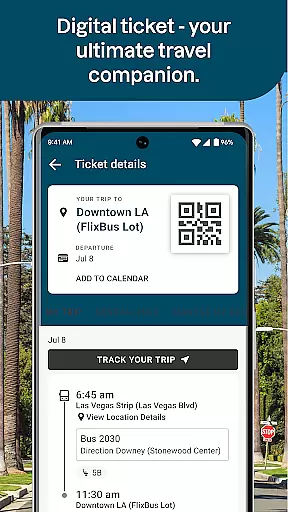
A standout feature of the app is the ability to choose your preferred seat on the bus, whether it's a window or aisle seat, for a small fee. Additionally, users can enjoy seamless convenience by displaying their tickets directly from the app via QR codes, eliminating the need for printing. Real-time trip updates and exclusive app-only discounts further enhance the travel experience, making Greyhound a reliable choice for modern bus travelers.
The Greyhound app boasts several innovative features that cater to the needs of today's travelers. One of the key highlights is the integration of multiple carrier schedules, including both Greyhound and FlixBus, which expands the range of available travel options. This ensures that users can find the most suitable and economical travel times. Another notable feature is the seat selection capability, allowing passengers to pick their preferred seat type—be it window or aisle—for added comfort during long journeys.
Convenience is at the forefront of the Greyhound app's design. Travelers can effortlessly manage their bookings through live trip updates and display their tickets directly within the app using QR codes, streamlining the boarding process. Moreover, Greyhound rewards app users with exclusive email discount offers, incentivizing continued use. These features collectively create a comprehensive and user-friendly travel solution that simplifies the entire bus travel experience.
Ensuring booking authenticity is crucial for any travel application, and Greyhound excels in this area. The app provides verified schedules for both Greyhound and FlixBus carriers, giving users confidence in the reliability of their bookings.
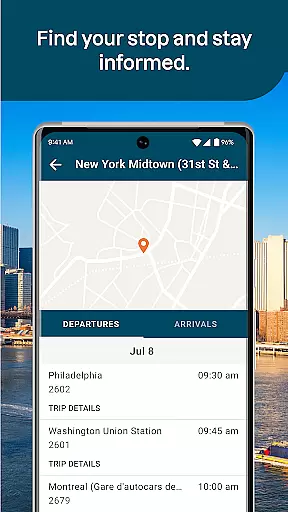
With features like live trip updates directly accessible from the app, passengers can stay informed about their journey's status, enhancing trust in the reservation process. This real-time information ensures that customers are always aware of any changes or updates to their travel plans.
The ability to show tickets directly through the app, using a QR code, further solidifies the authenticity of the booking. By eliminating the need for physical tickets, Greyhound reduces the risk of loss or fraud, offering a seamless boarding experience.
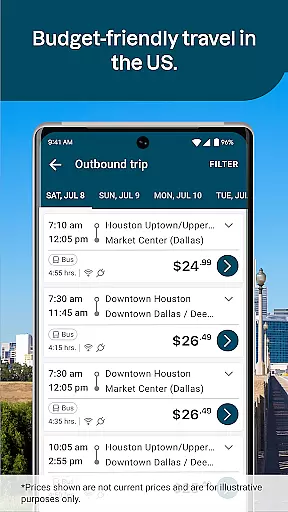
Price transparency is a key feature of the Greyhound app, ensuring that customers have a clear understanding of their bus ticket costs. The app displays various fare options, allowing users to choose the most suitable one for their budget without hidden fees.
Additionally, Greyhound offers app-exclusive discount offers via email, providing opportunities for savings that are only available to app users. These targeted promotions contribute to an honest pricing strategy that benefits loyal customers.
While seat selection comes with an additional fee, the app clearly communicates this upfront, maintaining transparency. Users can opt for automatic seat assignment at no extra cost, ensuring that all pricing aspects are open and straightforward.
User-friendly interface
Extensive route options
QR code ticketing
Live trip updates
Exclusive app discounts
Seat selection fee
Limited international routes
Occasional app glitches
Ads in free version
Internet required

OFFLINE detailed information about the Florida National and State Parks
 4.3
4.3
Learn about one of the most famous Victorian cemeteries in the world
2.80
All-in-one delivery and taxi app. Ride, food, & grocery delivery app.
4.80
Replace your car trips with the world’s largest shared electric vehicle company.
4.90
Streamline your U.S. entry
4.90
Download now and start earning rewards on hotels, tours, and everything travel.
4.50
Get real-time traffic, directions, search and find places
4.10
The best way to book travel
4.60
Earn hotel and travel rewards, find hotel offers, and access your Digital Key.
4.50
Book your whole trip in one app.
4.80
Book flight, car or packages. Instant access to hotel discounts & travel deals
4.80
Stay at Motel 6 for less - book fast, save more with MY6 app!
4.70
Easily rent a car at over 9,500 locations with the Enterprise car rental app.
4.60
The mobile panorama panel. Works offline - worldwide!
4.40
Travel light with our easy-to-use mobile app, the perfect flying companion.
4.40
Real-time flight tracking with live maps and flight status updates.
3.70
Maps Speedometer shows your current speed in any app
3.60
Find the best prices, pay for the cheapest gas, and save on every fill up
3.30
The official app of Allegiant Travel & Allegiant Airlines
3.30


User Reviews