




Groundwire by Acrobits is a premier SIP softphone client designed for both personal and professional communication needs. This application elevates voice and video call experiences with crystal-clear clarity, supporting multiple audio formats like Opus and G.729, as well as HD video calls up to 720p using H.264 and VP8 codecs.
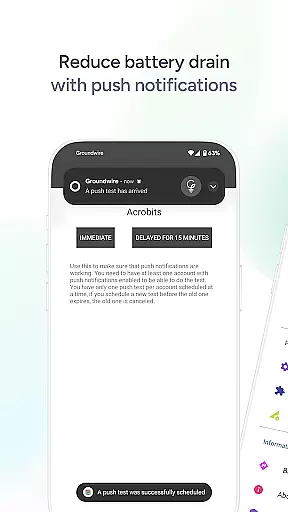
Beyond basic calling, Groundwire offers robust features including military-grade encryption for secure conversations, efficient push notifications that conserve battery life, and seamless call transitions between Wi-Fi and cellular data. The app also supports instant messaging, call transfers, group calls, voicemail, and extensive customization options for SIP accounts.
Ideal for users seeking reliable communication tools, Groundwire is perfect for staying connected with friends, family, and colleagues while maximizing the VoIP experience. Its intuitive interface and comprehensive feature set make it an excellent choice for those looking to enhance their daily communication.
Groundwire stands out with its exceptional audio and video quality. The app supports crystal-clear voice calls through multiple audio codecs and enables HD video calls up to 720p resolution. These features ensure users experience top-tier communication quality regardless of their location or network conditions.
Security is a top priority for Groundwire, offering military-grade encryption to protect user conversations. Additionally, the app's efficient push notification system minimizes battery consumption, allowing users to stay connected longer without worrying about device performance. The seamless transition between Wi-Fi and mobile data ensures uninterrupted calling, even when switching networks.
Customization options abound in Groundwire, from SIP settings and UI preferences to personalized ringtones. The app also supports multi-device usage and is future-ready with 5G compatibility. With additional features such as instant messaging, attended and unattended transfers, group calls, and voicemail, Groundwire provides a complete communication solution tailored to individual needs.
Real-time messaging speed and reliability are crucial for maintaining seamless communication in any environment. Groundwire, developed by Acrobits, excels in this area by providing a robust SIP softphone client that ensures messages are delivered instantly and consistently.
The application leverages advanced SIP technology to facilitate high-quality voice and video calls, alongside instant messaging capabilities. This means users can expect not only clear audio and video but also swift text-based exchanges without worrying about delays or message failures.
Groundwire's architecture is designed to minimize latency while maximizing the dependability of communications. Whether you're connecting with colleagues in a professional setting or keeping in touch with family and friends, the app's efficient push notifications and seamless call transition features ensure that you remain connected with minimal disruptions.
By choosing Groundwire, users benefit from an intuitive interface that supports secure, private conversations with military-grade encryption. This makes it an ideal choice for those who prioritize both speed and security in their real-time messaging experiences.
Media sharing support is an essential feature for modern communication apps, allowing users to exchange various types of content effortlessly. Groundwire stands out by offering comprehensive media sharing capabilities within its SIP softphone framework, enhancing the way individuals and businesses interact.
This softphone app supports multiple formats including Opus and G.729 for audio, as well as H.264 and VP8 for video calls up to 720p HD quality. Such versatility ensures that whether you're sending voice notes, documents, images, or engaging in video conferences, the shared media retains its original clarity and impact.
In addition to traditional calling features, Groundwire includes functionalities like attended and unattended transfers, group calls, voicemail, and extensive customization options for each SIP account. These features collectively create a rich ecosystem where media sharing becomes an integral part of daily communication routines.
With compatibility across most mobile operating systems and readiness for future technologies like 5G, Groundwire provides a reliable platform for all your media sharing needs. Its one-time cost model with no hidden fees further enhances its appeal as a dependable solution for both personal and professional use.
Crystal clear audio
HD video calls
Military-grade security
Efficient battery use
Seamless network switching
Requires SIP provider
No free version
Complex setup
Limited customer support
High cost

Pure modern IRC experience for Android
 3.70
3.70
Browse fast on Opera Mini, with Data Saving, News, Football Scores, and Download
4.60
SMS & MMS Messaging App to easily send messages or schedule SMS on Chat
4.10
Message and video call your family and friends in HD!
3.80
Welcome to the future of phone service.
4.60
2nd Phone Number Line for Anonymous Texting, Calling, and Picture Messages
4.30
Stay in touch with the people who matter most.
4.60
BE PRIVATE
Anonymous. No Trace. Fast.
4.20
Enhance browsing with AI-powered features and Copilot.
4.70
Messenger for SMS - texting message app, faster, simpler & safer, for you.
4.70
Manage your data, talk & text - affordable phone plans & data usage made simple
4.30
Our Black Friday sale is here. Unlock special discounts on Proton Mail now.
4.30
Block spam calls & scam - no more annoying calls with the call blocker function
4.30
SMS Messenger is a lightning-fast messaging app.
4.20
Measure BHP, Torque & 0-60 Clear car OBD faults View engine data in Google Earth
4.00
Telegram is a messaging app with a focus on speed and security.
4.00 3.90
3.90
Call & Text Anywhere With A Canadian Number.
3.60
Radio communication simulator for gaming communities
4.1


User Reviews