
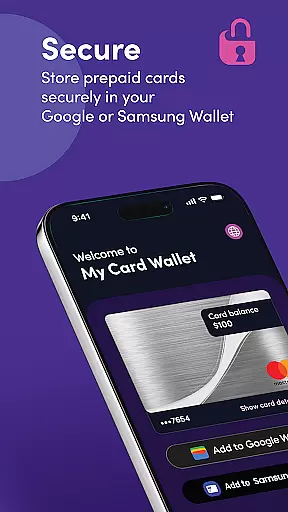
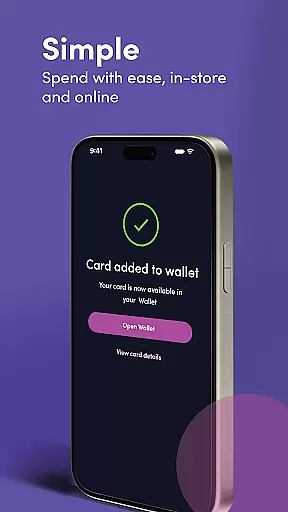
My Card Wallet is a comprehensive financial management application designed to simplify the way users handle their prepaid cards. The app allows you to securely store your cards, check balances, and make payments both in-store and online with ease. By integrating with Google or Samsung Wallet, it offers a seamless contactless payment experience at any retailer that accepts your card. Additionally, users can access full card details for transactions where digital wallets aren't supported.
The app's intuitive interface ensures that managing multiple cards is straightforward and efficient. Whether you're looking to set a primary payment method or simply want an easy way to monitor spending, My Card Wallet provides all necessary tools within a few taps. This makes it particularly useful for individuals who frequently use prepaid cards and seek convenience without compromising security.
With its robust features tailored towards enhancing user experience, My Card Wallet stands out as an essential tool for modern finance management. It not only streamlines everyday transactions but also empowers users by providing them constant access to their financial information, ensuring they are always informed about their spending capacity.
One of the standout features of My Card Wallet is its seamless integration with Google and Samsung Wallets, enabling users to make contactless payments effortlessly. This functionality extends to both in-store purchases and online transactions, eliminating the need to manually enter card details during checkout. Users can designate a preferred card as their default payment option, streamlining the purchasing process when multiple cards are stored.
Security is paramount in My Card Wallet's design; it employs advanced encryption methods to safeguard sensitive card information. Furthermore, the app provides real-time balance updates, ensuring users are always aware of their available funds before making a transaction. For scenarios where digital wallet support might be lacking, the app facilitates easy retrieval of complete card information, thus maintaining flexibility in payment methods.
Additional functionalities include customizable settings that allow personalization according to individual preferences, such as notification alerts for low balances or transaction confirmations. These thoughtful additions enhance user engagement while promoting responsible financial behavior through timely reminders and transparent tracking mechanisms.
In the realm of digital finance, securing user accounts and funds is paramount. My Card Wallet ensures top-tier security by employing advanced encryption protocols to safeguard your card information. Every transaction made through the app is protected, ensuring that your financial data remains confidential and secure from unauthorized access.
Beyond encryption, the app incorporates multi-factor authentication processes. This additional layer of security ensures that only you can access your account, even if your password is compromised. By verifying your identity through multiple methods before granting access, My Card Wallet significantly reduces the risk of unauthorized transactions and enhances overall account protection.
Furthermore, the app provides real-time alerts for all transactions. This feature not only keeps you informed about your spending but also allows you to quickly identify and report any suspicious activity. With these comprehensive security measures in place, My Card Wallet offers peace of mind, knowing that both your account and funds are well-protected against potential threats.
A seamless transaction experience is at the heart of My Card Wallet's design. The app simplifies the payment process by allowing users to add their prepaid cards directly to their Google or Samsung Wallet. This integration enables swift, contactless payments in any retailer that accepts your card, streamlining the shopping experience without the need to carry physical cards.
To further enhance convenience, My Card Wallet supports online payments. Users can add their prepaid card details to their digital wallets for quick and easy checkout processes on websites and apps. For retailers that do not support digital wallet payments, the app provides easy access to full card details, ensuring a smooth transaction experience across all platforms.
Additionally, the app displays your current card balance prominently within the interface. This visibility empowers users to manage their finances effectively, always knowing how much they have available to spend. Coupled with the ability to swiftly access card details when needed, My Card Wallet delivers an efficient, user-friendly transaction experience that meets the demands of todayu2019s fast-paced digital world.
User-friendly interface
Secure card storage
Real-time balance updates
Seamless payment integration
Customizable notifications
Limited to prepaid cards
No budgeting tools
Dependent on network connectivity
Requires compatible device
Occasional sync issues

Manage your account, make a payment, and redeem your rewards on the go.
 4.50
4.50
Over 180 currencies conversion rates with live exchange rates and offline mode.
4.60
Expenses, Bills, Budget and Accounts - All seamlessly integrated in one app!
3.80
Currency Converter, Exchange Rates, Widgets
4.90
Earn cash & save money daily. Access instant cash advances* - no credit check!
4.50
Need help before payday? Get cash advances with no interest or credit checks.
4.60
Managing your money just got easier. Get the new Mobile app.
4.70
Invest, bank & save in one app. Trade stocks, earn high APY & budget smarter.
4.00
Money App - Earn Cash back, Fast Cash Advance, Personal Loan Offers, Banking
4.70
Check EBT, SNAP, WIC balances, manage food stamps, and save money with benefits
4.80
The DailyPay app lets you access earned wages before your next payday.
4.70
Download the MySynchrony App to manage your accounts securely and conveniently!
4.60
Payday cash advance & Instant cash advance: Borrow money instantly, Get cash now
4.60
Car Insurance Made For You.
4.50
Save, spend & get paid faster²
4.50
All your crypto & stocks in one secure and trusted app.
4.40
Registration of your debts and Mdionatk and assembled, as well as a significant reports
4.30
NFC mobile payment app Use your phone as a contactless bank card
4.00
StockTiles lets you view prices & charts of your favorite stock assets
2.30


User Reviews