
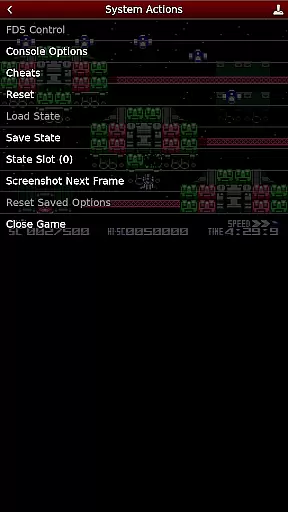
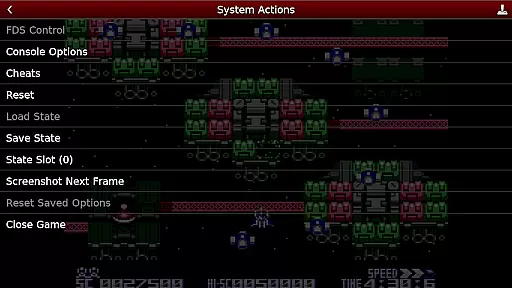
NES.emu is an advanced open-source NES emulator that brings the classic gaming experience to modern devices. Known as Famicom in Japan, this emulator focuses on delivering low audio and video latency while maintaining a minimalist user interface. It supports a wide range of devices from older models like the Xperia Play to contemporary ones such as the Nvidia Shield and Pixel phones.
With its compatibility with various file formats including .nes, .unf, and .fds, NES.emu offers users flexibility in game selection. The app also features Famicom Disk System emulation and VS UniSystem support, enhancing the retro gaming experience. Users can enjoy configurable on-screen controls or connect Bluetooth/USB gamepads for a more authentic feel.
This emulator is ideal for gamers who wish to relive the nostalgia of NES games on their mobile devices without compromising on performance or usability. Its dedication to low latency ensures responsive gameplay, making it suitable for both casual play and serious gaming sessions.
NES.emu stands out with its comprehensive feature set tailored for NES enthusiasts. One of its key strengths is the support for multiple file formats such as .nes, .unf, and optionally compressed files using ZIP, RAR, or 7Z. This versatility allows users to load games from different sources easily. Additionally, the inclusion of Famicom Disk System emulation using .fds files caters to fans of this specific system.
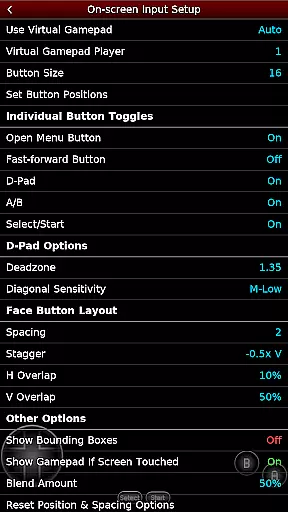
The app provides an immersive experience through its Zapper/Gun support, where users can touch the screen to fire, simulating the original gun accessory. Configurable on-screen controls offer customization options to suit individual preferences. Moreover, NES.emu supports external controllers via Bluetooth or USB, ensuring compatibility with popular HID devices like Xbox and PS4 controllers.
For those interested in enhancing their gameplay, NES.emu includes cheat file support with editing capabilities. These features collectively create a robust platform that not only emulates classic games but also enhances them with modern functionalities, providing a seamless blend of nostalgia and innovation.
Arcade authenticity and nostalgia are essential elements in any arcade emulator, providing users with an experience that closely mirrors the original gaming systems. NES.emu, as an advanced open-source NES emulator, excels in this area by offering precise emulation of classic games that many grew up playing in arcades.
This application supports a wide array of devices, from older models like the Xperia Play to modern ones such as the Nvidia Shield and Pixel phones. By including features like Famicom Disk System emulation using .fds files and VS UniSystem support, NES.emu ensures that users can relive their favorite arcade experiences with accuracy.
Moreover, NES.emu incorporates FCEU-compatible cheat files (.cht extension) with editing features, allowing for customization that enhances the nostalgic experience without compromising the integrity of gameplay. This attention to detail extends to supporting peripherals like Zapper/Gun, where touch controls simulate the original arcade feel.
The result is an immersive trip down memory lane, where users can enjoy the same level of engagement and excitement as they did with the original arcade machines. The authentic experience provided by NES.emu makes it a standout choice for enthusiasts looking to recapture the magic of classic arcade gaming.
Control responsiveness is crucial in delivering a seamless and enjoyable gaming experience, particularly in arcade emulators where precision and timing are key. NES.emu addresses this need by ensuring that its on-screen controls are not only configurable but also highly responsive, catering to the fast-paced nature of arcade games.
In addition to customizable on-screen controls, NES.emu supports Bluetooth and USB gamepads, including popular models like Xbox and PS4 controllers. This compatibility with HID devices recognized by the OS guarantees that inputs are registered accurately and without delay, maintaining the pace and fluidity of gameplay.
The emulator's minimalist UI further enhances control responsiveness by reducing latency and focusing on delivering low audio/video delay. This design choice ensures that user inputs translate immediately into actions within the game, preserving the immediacy and interactivity expected from arcade classics.
By prioritizing control responsiveness, NES.emu provides gamers with a reliable and engaging way to enjoy their favorite titles. Whether through touch controls or external gamepads, users can expect a consistently responsive experience that captures the essence of arcade gaming.
Low latency performance
Versatile file format support
Authentic controller compatibility
Customizable control layout
Active development and support
No included ROMs
Complex setup for beginners
Limited touchscreen optimization
Occasional device-specific issues
Requires manual updates

Genesis, Mega Drive, Mega CD, Master System, Game Gear Emulator!
 4.20
4.20
Play retro games with ease – NES, SNES, PSX, PSP & more supported
4.0
Antistress & relaxing games,stress relief; Antistress toys, calming games.
4.20
Try this unique restaurant sim and enjoy the fun of cooking in busy kitchens!
4.70
Playing venom RPG alien games? Set spider alien isolation base, with no survivor
4.30
Infinite Arcade
4.1
Restore peace and order in the city
3.20
Running game: dance in a twerk battle and become the twerk hero in our fun race!
4.30
Play all your favorite Playstation games in your android device!!
4.50
Amid the vastness of the universe, you are a Black Hole about to be swallowed!
5.00
Punch your way through the Streets of Rage once again!
4.80
This is an emulator for a certain 64 bit console with online cloud backup.
4.80
Full featured version of Pizza Boy A (GBA emulator)
4.80
Ready… Set… DASH! Play now!
4.70
Meet Snake Run Race! Slither through an obstacle course in our fun running game!
4.70
Merge bowmasters to win the bow and arrow war! Play the fun archery game!
4.60
GBA Emulator
4.40
Slice up a juicy storm!
4.20
A fast, full-featured GBA emulator with link cable emulation.
3.90


User Reviews