
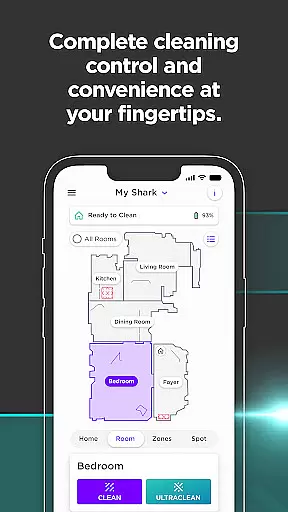


SharkClean is a comprehensive lifestyle application designed to enhance the functionality of Shark® Connected Robotic Vacuums. The app serves as a central control hub, allowing users to unlock advanced cleaning performance from anywhere in the world.
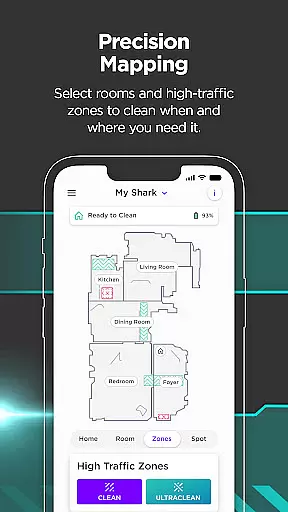
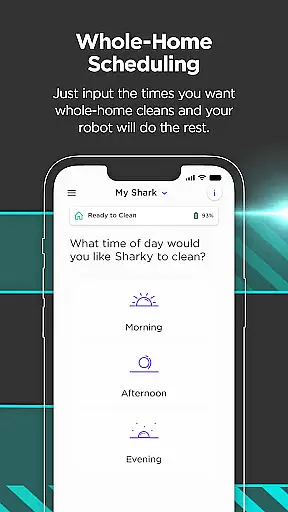
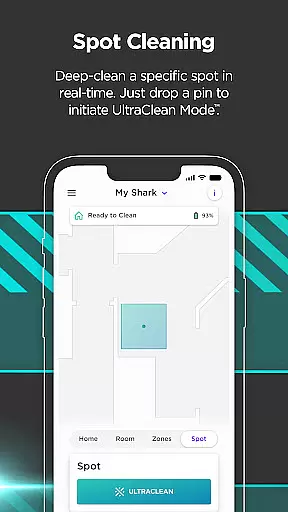
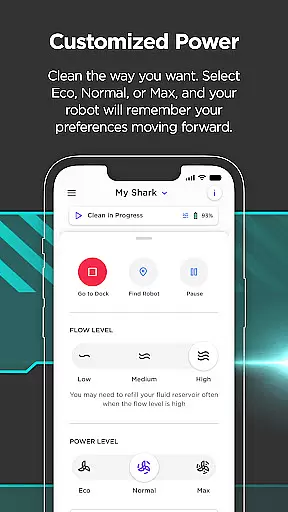
Through the SharkClean app, users can schedule cleanings, create customizable home maps, and clean specific rooms or zones immediately. The application supports various models, offering features like voice controls with Amazon Alexa and Google Home integration, Recharge & Resume functionality for better coverage, and VacMop™ mode for simultaneous vacuuming and mopping.
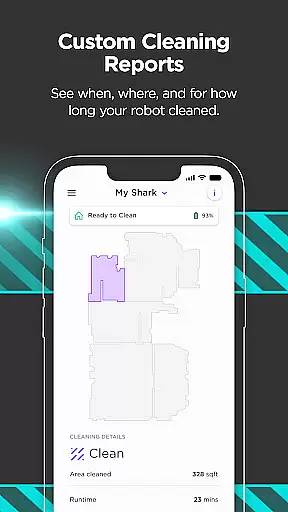
This versatile app provides detailed Cleaning Reports, quick access to troubleshooting tips, and notifications, making it an essential tool for maintaining a spotless home environment while maximizing the efficiency of your robotic vacuum.
The SharkClean app boasts an array of sophisticated features tailored to optimize the performance of Shark® robotic vacuums. One of its standout capabilities is the scheduling function, which allows users to program cleaning sessions at their convenience across all models.
For enhanced user interaction, the app supports voice commands through Amazon Alexa and Google Assistant, enabling hands-free control. Models 1000 and 2000 benefit from the Recharge & Resume feature, ensuring complete cleaning coverage by allowing the robot to return to base, recharge, and continue where it left off.
Advanced mapping technology lets users create and edit virtual maps of their homes, customize cleaning zones, and target specific areas for immediate cleaning. Additionally, the RV2000WD model offers VacMop™ mode, combining vacuuming with mopping capabilities that skillfully avoid carpets while scrubbing floors.
In today's fast-paced world, managing household chores efficiently is more important than ever. The SharkClean app addresses this need by offering comprehensive lifestyle category coverage that transforms the way you maintain your home. With functionalities ranging from scheduling cleans to creating detailed home maps, the app ensures that all aspects of home cleaning are covered.
The application provides a diverse set of features tailored to different models of Sharku00ae Connected Robotic Vacuums. Users can schedule cleanings at their convenience, control their devices with voice commands through Amazon Alexa and Google Home integration, and enable advanced functions like Recharge & Resume for uninterrupted cleaning sessions. These capabilities ensure that whether you're handling routine maintenance or tackling specific cleaning challenges, the app has appropriate solutions.
By leveraging the SharkClean app, users gain access to specialized tools such as room-specific cleaning options and VacMopu2122 mode for simultaneous vacuuming and mopping. This extensive feature set not only simplifies daily tasks but also enhances overall home hygiene and organization. As a result, users experience increased convenience and time savings, allowing them to focus on other important aspects of their lives.
When it comes to home management applications, content authenticity and expert credibility are crucial factors that determine user trust and satisfaction. The SharkClean app excels in these areas by providing verified and reliable information supported by industry experts. Each feature within the app is meticulously designed based on proven cleaning methodologies and technological advancements.
For instance, the app offers detailed Cleaning Reports and troubleshooting tips developed in collaboration with cleaning professionals. These resources empower users with accurate insights into their cleaning routines and help troubleshoot any issues effectively. Additionally, compatibility requirements such as Wi-Fi with 2.4GHz band support ensure optimal performance across various environments, reflecting the brand's commitment to quality assurance.
Moreover, users can rely on dedicated support channels both in the U.S. and E.U., where they can access further information or contact expert support teams via sharkclean.com and sharkclean.eu respectively. This robust support network underscores the app's dedication to maintaining high standards of service and reliability, ultimately enhancing user confidence in managing their homes efficiently.
User-friendly interface
Comprehensive scheduling options
Voice command compatibility
Advanced mapping and zoning
Recharge and resume functionality
Limited to Shark® vacuums
Requires Wi-Fi connection
Feature availability varies by model
No iOS version available
Occasional connectivity issues

Paranormal EVP, Ghost Box, Spirit box, ITC, Haunted, Spirit communication device
 3.70
3.70
This minimalist yet classic board design brings a futuristic twist to your wrist
4.20
Good magnifier app to see tiny things bigger and more clearly!
4.80
Get the news, events and savings that matter to you with AARP Now.
4.80
Crochet made easy: step-by-step tutorials, beginner patterns & projects
4.60
My Diary - Daily Journal with lock: Diary journal app and secret diary with lock
4.80
An Eerie Musical Trigger Toy for Spirits to Play with!
3.50
DailyGift can help you record your habits and get rewards along the way!
4.60
No more juggling multiple apps, now you can control everything in one place!
4.60
The all-new Cync app. The simple, connected app for Cync and C by GE.
4.50
Cute Adorable Animals now on your wrist with our Wear OS watch face!
4.40
Get your life organized with My Agenda!
4.30
SmartHQ: Your Connected Home Command Center
4.10
Spirit Communicator is a real paranormal ghost hunting app with many fun modes.
3.90
Unique BIG BOLD TIME with amazing colors and customisations.
3.70
Design and brew great homebrewing beer, mead, cider and wine recipes on the go!
3.60
Bring the warm colors of fall directly to your wrist with Autumn Leaves!
4.2
Big bold hybrid watch face with 30 colors, 5 fonts & 5 complications.
4.0
A uniquely designed isometric digital watch face made for Wear OS
4.2


User Reviews