
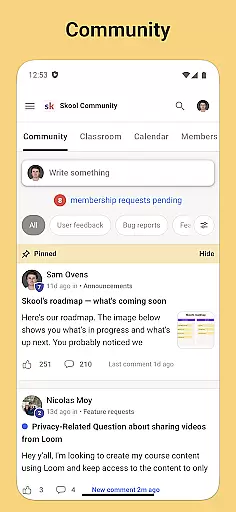
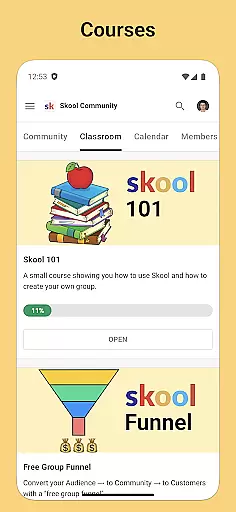
Skool is a dynamic social application designed to keep users engaged with their online communities while on the move. The app serves as a comprehensive platform for community interaction, offering features such as group discussions through posts and comments, which foster a collaborative environment among members. Additionally, Skool provides an avenue for learning with its courses feature, allowing users to gain knowledge via video and text-based lessons directly from their mobile devices.
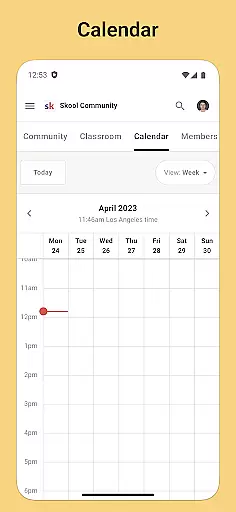
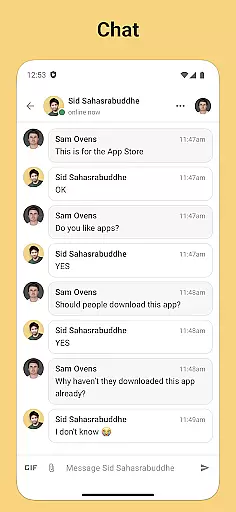
Beyond just discussion and learning, Skool ensures that users stay informed about community events with its integrated calendar feature. This allows individuals to plan their schedules around these happenings, ensuring they never miss out on important gatherings. Moreover, the chat functionality enables direct messaging within communities, enhancing personal connections and networking opportunities. With real-time push notifications, Skool keeps its users constantly updated and engaged with their communities, making it an indispensable tool for anyone looking to maintain active participation in online groups.
Skool stands out with its diverse set of features tailored to enrich community engagement. One of the core functionalities includes the ability to participate in community discussions through posts and comments, creating a lively forum for exchange and collaboration. This interactive platform not only encourages sharing of ideas but also facilitates meaningful conversations among like-minded individuals who are keen on similar topics or interests.
Another significant aspect of Skool is its educational component, where users can enroll in courses comprising both video and text-based lessons. This feature supports continuous learning and development, catering to those who seek to expand their knowledge base or acquire new skills conveniently from their mobile devices. Furthermore, the inclusion of a calendar feature enhances organizational capabilities by keeping users abreast of upcoming community events, thus promoting active involvement and attendance.
The chat function within Skool further augments user experience by enabling direct messaging between community members. This fosters closer relationships and facilitates networking opportunities that might not be possible through public forums alone. Coupled with push notifications, these features ensure that users remain connected and informed at all times, significantly contributing to a vibrant and cohesive online community atmosphere.
User profile customization is a crucial aspect of any social platform, allowing users to express their individuality and establish their digital identity. Skool offers a comprehensive profile setup where users can input various personal details, showcase their interests, and even highlight their community contributions.
The authenticity verification process in Skool ensures that users are who they claim to be, which fosters trust within communities. This is achieved through a systematic approach that may include email confirmation, phone verification, or linking to established social media accounts.
By providing these features, Skool not only enhances user engagement but also creates a safer environment for interaction. Members can connect with confidence, knowing that the individuals they interact with have been verified to some degree.
This dual focus on customization and verification brings immense value to users by enhancing both personal expression and community integrity, making Skool a reliable platform for staying connected with like-minded individuals.
Connection discovery is an essential feature in social applications, enabling users to find and connect with others who share similar interests or belong to the same communities. Skool facilitates this process through intelligent algorithms that suggest potential connections based on shared courses, community memberships, and active discussions.
The app's sophisticated search functionality allows users to look for specific members or browse through recommended profiles. Filters and sorting options make it easier to pinpoint individuals who align with one's professional or personal interests.
Skool's emphasis on meaningful connections extends beyond mere suggestions. The platform encourages interactions by notifying users about mutual friends, common discussion topics, or upcoming events where they might meet new people.
These connection discovery features significantly enhance the user experience by creating opportunities for networking, collaboration, and knowledge sharing. They transform Skool from just another social app into a vibrant ecosystem for building valuable relationships within educational and professional contexts.
User-friendly interface
Comprehensive community tools
Integrated learning resources
Real-time event updates
Direct messaging capabilities
Limited customization options
Occasional notification delays
Requires constant internet access
Some features may need subscription
Interface can be overwhelming for new users

Global short video platform: epic effects, trending videos & vibrant community!
 4.40
4.40
Looking for a date or a friend? Swipe to match and meet open-minded singles.
4.20
Meet local people, make friends & network: Join a community, group, host events
4.00
Honest dating app where real people find genuine love and real matches.
4.20
Date single & make friend
4.60
Live pics from your friends - Only the photos you want to see
4.60
FREE calling and texting (SMS texts + MMS) in US & Canada with FREE phone number
4.30
Build Your Team With One App
4.30
live inside your fandom
4.60
Raise cute Pengus with friends
4.70
The hottest live chat app so far. Video chat and meet great people...
4.60
Video call and chat, live stream and making friends around the world!
4.60
A video app from OpenAI - AI video generation by the maker of ChatGPT
4.60
Unlimited calls & texts | WiFi voice line plus group txt | Call & text now
4.50
Social App Used By Millions
4.40
Free texting (SMS) to US, Canada & more. Free new number. Call free & Text free.
4.30
A warm, simple dating app for adults seeking real connection.
4.20
Sell unwanted items and buy preloved stuff in your local community.
4.10
Message and video call your family and friends!
2.60


User Reviews