


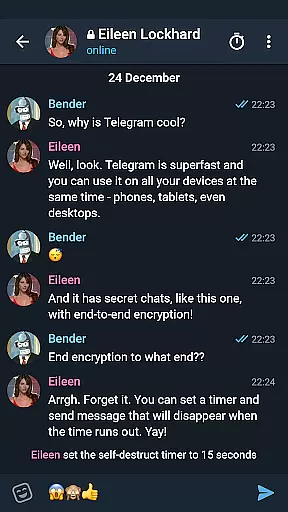

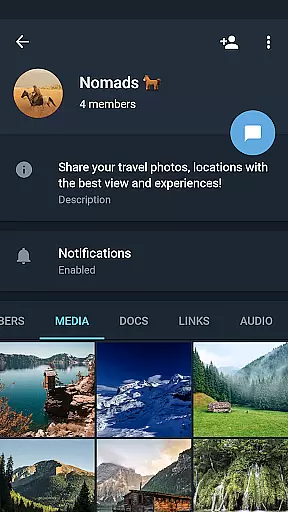
Telegram X represents a streamlined alternative client for the popular Telegram messaging platform, leveraging the TDLib library to deliver enhanced performance. This application is specifically optimized for speed and smoothness, offering users faster message delivery and slicker animations compared to its predecessor. With an array of experimental features, it caters to those who desire cutting-edge functionalities in their social interactions.
The app's design emphasizes efficiency without compromising on aesthetics, making it suitable for both casual users and power users alike. Whether you're engaging in one-on-one conversations or participating in large group chats, Telegram X ensures that your experience remains seamless and enjoyable. Its lightweight architecture also means reduced battery consumption, which is crucial for maintaining device performance throughout the day.
One of the standout characteristics of Telegram X is its integration with TDLib, enabling superior speed and reliability when sending and receiving messages. The application boasts a modern interface with fluid animations that enhance user interaction without detracting from functionality. Users can expect a more responsive experience as they navigate through chats, channels, and media content.
In addition to its performance improvements, Telegram X introduces several experimental features not yet available in the standard Telegram app. These include customizable themes, advanced privacy settings, and innovative chat management tools. Such enhancements allow users to tailor their messaging environment according to personal preferences while maintaining control over their data and communications.
User profile customization is a crucial aspect of any social application, allowing users to express their identity and preferences. Telegram X offers a comprehensive set of tools for personalizing user profiles.
The app enables users to customize various elements such as profile pictures, status messages, and contact information with ease. This flexibility empowers individuals to create a unique digital presence that reflects their personality.
Authenticity verification is another key feature in Telegram X. The platform employs robust mechanisms to ensure the legitimacy of user profiles, enhancing trust within the community. Verified badges are provided for notable public figures and organizations.
These combined features not only enhance user engagement but also contribute to building a more reliable and trustworthy social network environment.
Connection discovery plays a vital role in expanding one's social network by helping users find and connect with others who share similar interests or backgrounds. Telegram X excels in this area through its advanced discovery algorithms.
The application utilizes sophisticated recommendation systems that analyze user behavior, preferences, and interactions to suggest potential connections. These suggestions go beyond simple contact lists, offering meaningful matches based on shared groups or interests.
Additionally, Telegram X provides various methods for discovering new contacts, including QR code scanning, username searches, and proximity-based recommendations. Such diverse options cater to different user preferences and scenarios.
By facilitating efficient connection discovery, Telegram X enhances overall user experience and fosters the growth of vibrant communities within the platform.
Fast and efficient messaging
Sleek and modern UI design
Advanced privacy options
Customizable user experience
Lightweight and energy-saving
Limited official support
Potential instability due to experimental features
Smaller user base compared to main app
Some features may change or be removed
Occasional sync issues with main Telegram app

Looking for a date or a friend? Swipe to match and meet open-minded singles.
 4.20
4.20
Dive into diverse fandoms. Connect, create, reblog.
3.90
The video chat to meet people in the blink of an eye!
3.90
Social calendar for friends to make plans, group chat, share events & schedules
4.60
Live pics from your friends - Only the photos you want to see
4.60
Find your next obsession.
3.50
Build Your Team With One App
4.30
A little connection can go a long way
4.60
Create & share photos, stories, & reels with friends you love
3.90
SuperLive is a super popular video-streaming social network
4.60
Video call and chat, live stream and making friends around the world!
4.60
This version of Facebook uses less data and works in all network conditions.
4.60
A video app from OpenAI - AI video generation by the maker of ChatGPT
4.60
TikTok Lite - Designed for speed, simplicity, and saving your phone’s space!
4.40
A gathering place for 300 million people's life interests and hobbies
4.30
Honest dating app where real people find genuine love and real matches.
4.20
Chill and Chat with Tagged Live Video with millions of peeps
4.10
Chat and make new friends around the world!
3.90
Random chat & meet online. Find your soulmate or someone special and have fun!
3.90


User Reviews