
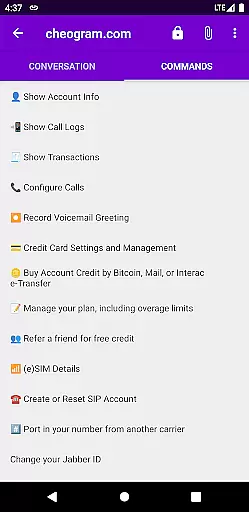
Cheogram is a communication app that connects users to a global network, emphasizing cross-platform interaction. It supports SMS-enabled phone numbers and integrates with various messaging gateways.
Key features include multimedia messaging, contact tagging, and native phone app integration. The app also offers a free one-month trial of the JMP.chat service, enhancing its value for users seeking versatile communication tools.
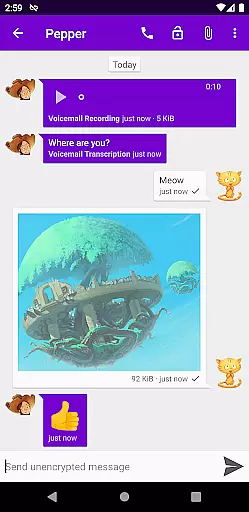
Cheogram stands out with its comprehensive feature set tailored for seamless communication. The app supports rich media messages, including animated content, ensuring dynamic interactions.
It provides practical functionalities such as address book integration, threaded conversations, and sticker packs. Additionally, Cheogram's ability to integrate with external services like the Android Phone app and various gateways makes it a powerful tool for users wanting interconnected communication options.
Real-time messaging speed and reliability are crucial for any communication app, and Cheogram excels in this area. The app ensures that messages are delivered instantly across its worldwide network, maintaining a seamless flow of communication.
Cheogram's architecture is designed to handle high volumes of messages without delay. This means users can send text and media, including animated content, with the assurance that their communications will be received promptly by contacts on various networks, including SMS-enabled phone numbers.
The benefits for users include an uninterrupted conversation experience, whether they are chatting with friends or conducting business communications. The reliable delivery system ensures that every message counts, enhancing both personal and professional interactions.
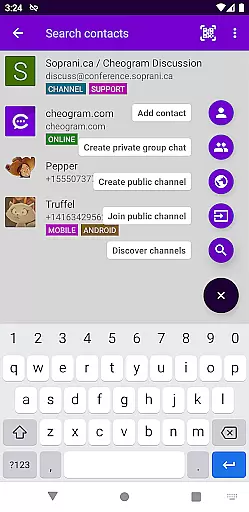
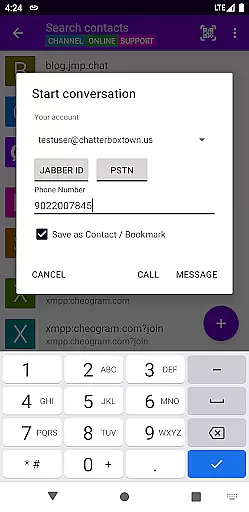
Moreover, the integration with gateways' add contact flows and native Android Phone app when using a gateway to the phone network further solidifies Cheogram's commitment to providing a dependable messaging platform. Users can trust that their connections will be as stable as they are swift.
Media sharing support is a vital feature for modern communication apps, allowing users to express themselves beyond plain text. Cheogram offers robust capabilities in this domain, enabling users to share various forms of media effortlessly.
The app supports messages that combine both media and text, accommodating diverse communication styles. Whether it's photos, videos, or animated media, Cheogram ensures that these files are shared with ease and displayed unobtrusively within conversations.
For users, this means an enriched messaging experience where they can convey emotions and information through multimedia. The ability to integrate stickers packs adds another layer of personalization and fun to interactions.
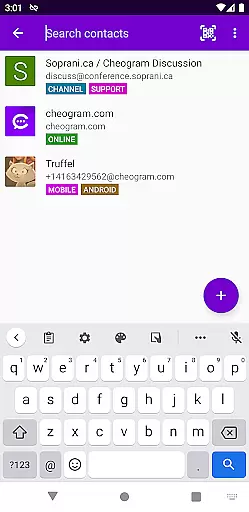
Furthermore, Cheogram's address book integration and tagging features facilitate organized media sharing by allowing users to browse contacts and channels by tags. This enhances the overall user engagement by making it simple to find and share content with the right people at the right time.
User-friendly interface
Rich media support
Address book integration
Threaded conversations
Free service trial
Limited to Jabber accounts
No standalone service
Dependent on third-party art
Complex setup for new users
Requires external service

Manage your data, talk & text - affordable phone plans & data usage made simple
 4.30
4.30
فیلتر شکن قوی پرسرعت کلید جدید برای اندرویدسریع ترین وی پی ان برای همه اپراتورها
4.70
Secure Messaging App to Enhance Messenger Texting Experience and Organize SMS.
3.50
Use this Dialer app alone or as a TREK: Total Interface companion.
4.70
Messenger app for faster and simpler SMS text messaging, and personalized themes
4.10
A Browser with powerful ad blocker to help focus on what really matters.
3.00
Auto Reply SMS, Text Messaging, Away SMS Response, Busy SMS messages, Block Text
3.10
Use this SMS app standalone or as a TREK: Total Interface companion.
4.30
Manage your mobile phone plan, check unlimited 5g data usage and track rewards
4.50
Save 10% automatically on your first international mobile top up.
4.60
Browse fast on Opera Mini, with Data Saving, News, Football Scores, and Download
4.60
Faster version of Messages. Messenger for your contacts.
4.50
Phone Dialer with Caller ID, Address Book & Contacts Manager.
4.30
Block spam calls & scam - no more annoying calls with the call blocker function
4.30
Messages: Fast, simple SMS app with scheduling and smart features.
4.00
Threema is the messenger with the most consistent focus on security and privacy.
4.00
Tether to Windows, OS X, Linux PCs or Android tablets. No root. No tether fees.
3.90
Call & Text Anywhere With A Canadian Number.
3.60
Bringing the functionality of Winlink to your Android device
4.4


User Reviews