
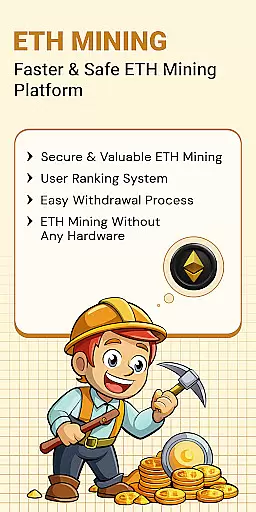
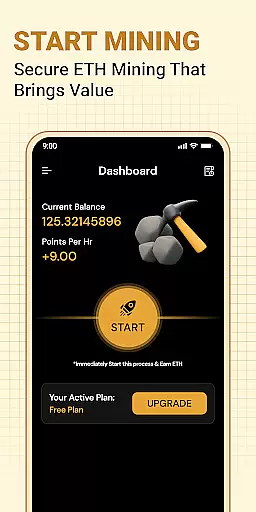
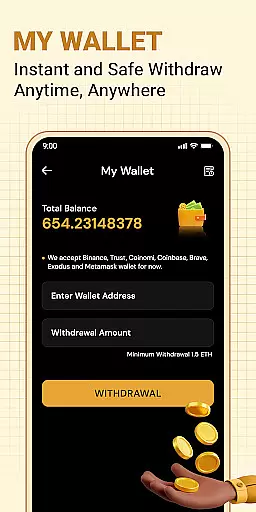


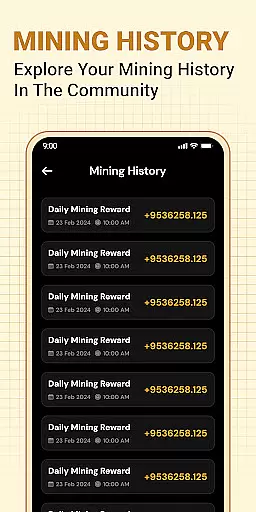
ETH Cloud Miner is a convenient mobile application designed for users who participate in cloud-based Ethereum mining. The app allows you to monitor your mining performance, including essential metrics like hashrate, uptime, and estimated daily rewards, all from your mobile device. With real-time updates, it provides an accessible way to stay on top of your mining activities without needing physical hardware.
This app does not perform any mining directly on your phone; instead, it connects to third-party cloud mining services where the actual mining occurs. By offering a simple dashboard interface, ETH Cloud Miner makes it easy for both beginners and experienced crypto enthusiasts to track their Ethereum earnings and session data while on the go.
Whether you're managing multiple mining operations or just getting started with cryptocurrency, this app offers valuable insights into your cloud mining investments, helping you make informed decisions about your Ethereum mining strategy.
One of the standout features of ETH Cloud Miner is its ability to display live mining statistics from your cloud mining provider. This includes detailed information such as your current hashrate, mining session duration, and estimated earnings, all presented in an intuitive dashboard format. The app ensures that you can access these stats anytime, anywhere, without requiring high-end hardware or consuming your device's resources.
Another key feature is its seamless integration with supported cloud mining platforms. Users simply need to log in to their existing accounts, and the app will automatically sync with their mining data. This eliminates the need for manual input and ensures accuracy in tracking your mining performance. Additionally, the app is lightweight and optimized for both Android devices, ensuring smooth performance without draining battery life.
For those new to Ethereum mining, the app also provides educational value by presenting complex blockchain data in an easily digestible format. This empowers users to better understand how cloud mining works and what factors influence their mining rewards.
Task creation and detail customization are essential features for users who need to manage their Ethereum mining activities effectively. The ETH Cloud Miner app allows users to create specific tasks related to their cloud mining operations, ensuring that each mining session is optimized and tracked efficiently.
The app provides a detailed dashboard where users can customize various aspects of their mining tasks. This includes setting up notifications for changes in hashrate, configuring alerts for downtime, and adjusting monitoring parameters based on individual preferences. Such customization ensures that users stay informed about critical changes in their mining performance.
By leveraging these capabilities, users can tailor their monitoring experience to match their unique requirements. Whether it's tracking daily rewards or analyzing uptime statistics, the ability to customize task details empowers users to focus on the metrics that matter most to them.
Ultimately, this level of personalization enhances user engagement by providing a more relevant and insightful mining management experience. Users can optimize their cloud mining strategies with precision, leading to potentially higher returns on investment and better resource allocation.
Reminder settings play a crucial role in keeping users updated about their Ethereum mining activities without constant manual checks. With ETH Cloud Miner, users can configure reminder settings that alert them to important events or changes in their mining status, ensuring they never miss critical updates.
The app offers flexible options for setting reminders, such as notifications for drops in hashrate, completion of mining sessions, or significant fluctuations in estimated daily rewards. These reminders can be customized to appear at specific times or triggered by particular events, offering a proactive approach to mining management.
By utilizing these reminder features, users can maintain optimal mining efficiency. Timely alerts help in quickly addressing issues like server downtimes or performance drops, minimizing potential losses and maximizing mining output.
This functionality not only saves time but also enhances the overall user experience by providing peace of mind. Users can rely on ETH Cloud Miner to keep them informed, allowing them to focus on other important aspects of their cryptocurrency investments while ensuring their mining operations run smoothly.
User-friendly interface
Real-time mining stats
No device resource usage
Easy account integration
Ideal for beginners
Relies on third-party services
Limited to cloud miners
No direct mining capability
Premium features may cost extra
Dependent on internet connection

PheedLoop Go! is the mobile event app for events powered by PheedLoop.
 4.40
4.40
CUE Live utilizes ultrasonic sound waves to sync devices at CUE enabled events
4.80
Purchase line-skip passes, drinks, cover, and more at bars and clubs
3.50
Invitation card maker for birthday party & Wedding. Digital greeting card editor
4.90
The KRUU app - plan, celebrate, remember
4.80
Fast Scans. Happy Fans. For Every Hometown!
4.60
Discover events, experiences, and things to do near you - Anytime, Anywhere!
4.70
Freebie Games for Epic Games, Steam, Amazon, Rockstar etc.
4.40
Buy tickets for any event!
3.90
Birthday Greetings provides Birthday Card, Frames, Gifs & Father's day Wishes
4.80
Plan your wedding for free on the go: vendors, budget, website and checklists!
4.80
Discover events & experiences in NYC, LA, Chicago, DC, Miami and more!
4.70
Greeting card maker with photos best app| Birthday cards| All wishes eCards FREE
4.50
Connect with an ecosystem of 5M+ eventgoers and organizers.
4.50
Invitation Card Maker, Design & share wedding, birthday & party invites fast
4.40
Manage all your events, leads, ticketing, payments and check-ins.
4.30
Buy and sell tickets to sports, concerts, theater, festivals, and comedy events
4.10
The Official App
3.70
RAISE-365 makes fundraising easy and fun!
3.20


User Reviews