
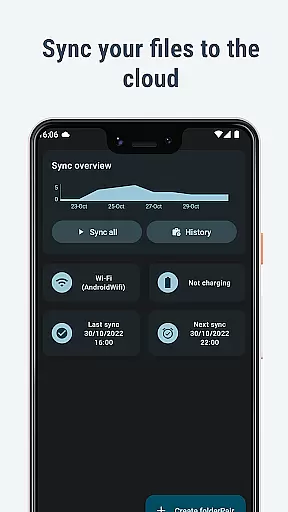
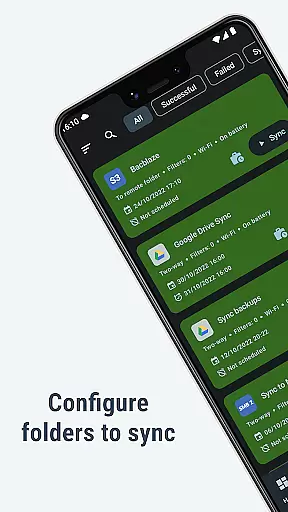
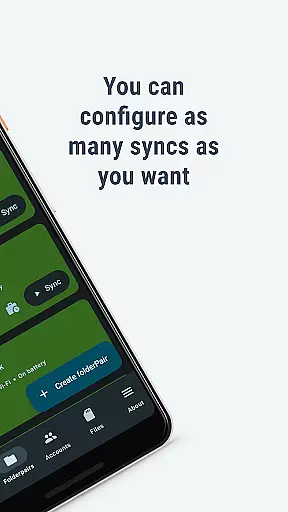
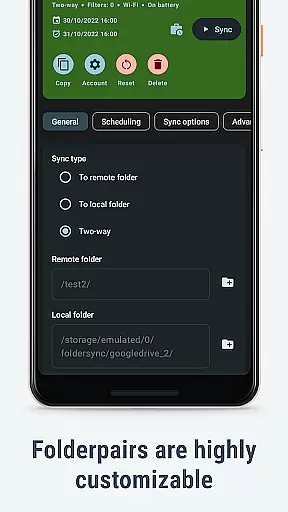
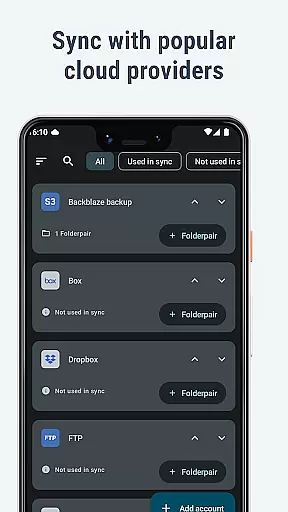
FolderSync Pro is a powerful communication and file management application designed to seamlessly sync files between cloud storage services and local folders on your device. With support for a wide range of cloud providers like Google Drive, Dropbox, and OneDrive, as well as various protocols such as FTP, SFTP, and WebDAV, it ensures comprehensive compatibility. The app allows users to effortlessly back up important files, including music and photos, from their device to the cloud or vice versa.
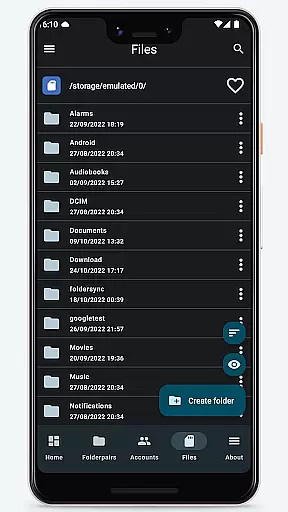
In addition to its syncing capabilities, FolderSync Pro features a full-fledged file manager that enables users to manage files both locally and in the cloud. You can copy, move, delete, and organize files across multiple cloud accounts. Automation support through Tasker integration provides fine-grained control over when and how your files are synced, making it ideal for both personal and professional use.
This app is particularly useful for individuals who need to maintain backups of critical data while ensuring easy access across devices. Its intuitive interface and robust functionality make it an essential tool for anyone looking to streamline their digital life.
FolderSync Pro stands out with its extensive feature set tailored for efficient file management and synchronization. One of its key strengths is the ability to connect with numerous cloud storage platforms, including Google Drive, Dropbox, and Amazon S3, allowing users to centralize their data management. Additionally, the app supports a variety of file transfer protocols such as FTP, SFTP, and WebDAV, catering to different user needs and technical environments.
The built-in file manager is another highlight, offering advanced capabilities like bucket creation and deletion in Amazon S3, as well as comprehensive file operations (copy, move, delete) within cloud accounts. Automation features, powered by Tasker integration, enable users to schedule and automate sync tasks based on specific triggers or conditions, enhancing productivity. Furthermore, FolderSync Pro supports root file access on rooted devices, providing power users with even greater control over their file systems.
These features collectively ensure that FolderSync Pro delivers a reliable, flexible, and user-friendly experience, making it a top choice for managing and syncing files across multiple platforms.
Real-time messaging speed and reliability are crucial for any communication app, ensuring that messages are delivered instantly and without fail. FolderSync Pro excels in this area by providing seamless synchronization between cloud storage and local folders on your device.
The application supports a wide range of cloud providers and file protocols, making it versatile for different user needs. Whether you're syncing documents from Google Drive or uploading photos to Dropbox, the process is swift and dependable. This ensures that your files are always up-to-date across all devices.
Moreover, FolderSync Pro offers automation support using Tasker and similar programs. This feature allows users to set up fine-grained control over their syncs, ensuring that important data is backed up regularly without manual intervention. The reliability of these automated processes means peace of mind for users who need consistent access to their latest files.
Media sharing support is an essential feature for apps in the Communication category, enabling users to easily share various types of media files. FolderSync Pro stands out with its robust capabilities for managing and transferring media files between cloud services and local storage.
With support for numerous cloud providers like Amazon S3, OneDrive, and Google Drive, FolderSync Pro allows users to upload, download, and manage their media files effortlessly. Whether it's backing up music playlists or sharing vacation photos, the app handles large files efficiently, maintaining quality and integrity during transfers.
In addition to cloud services, FolderSync Pro also supports multiple file protocols such as FTP, SFTP, and WebDAV. This versatility ensures that regardless of the source or destination, users can rely on FolderSync Pro for smooth and efficient media sharing. By integrating these comprehensive features, FolderSync Pro enhances user experience through reliable and flexible media management solutions.
Wide cloud support
Advanced automation
Root file access
Comprehensive protocols
Full file manager
Paid version only
Complex for beginners
No free trial
Requires setup time
Limited UI customization

BiP is a fast, secure, free messaging and HD video calling app!
 4.10
4.10
The ultimate productivity solution for all your email communication needs.
4.40
Phone Dialer with Caller ID, Address Book & Contacts Manager.
4.30
WazzapMigrator: transfer your WhatsApp history from iPhone to Android
4.00
Quickly and easily identify and block unknown callers
3.70
Fast Dialer & Contact Manager with Caller ID and Spam Protection
4.00
Caller ID App! Add names & photos to unknown calls & Call Recording
4.40
An agentic AI browser for Android, built by Perplexity
4.50
SMS Messenger is a lightning-fast messaging app.
4.20
Manage BoostMobile Account
4.60
A web browser that respects your privacy.
4.30
2nd Phone Number Line for Anonymous Texting, Calling, and Picture Messages
4.30
HD Video Meeting app is a fast & unlimited video conferencing app across world.
4.30
Chill zone on your phone: relax with fun reels & hype shorts!
4.20
SMS & MMS Messaging App to easily send messages or schedule SMS on Chat
4.10 3.90
3.90
Call Forwarding is easy and simple application to use.
3.80
A Browser with powerful ad blocker to help focus on what really matters.
3.00
Enables Plus features of Quick Search.
4.1


User Reviews