




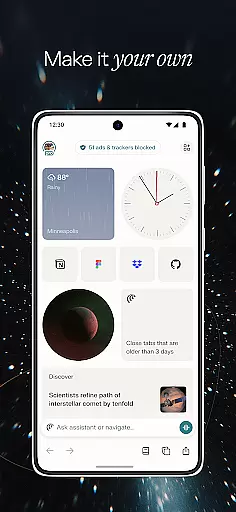
Comet is an innovative communication app designed to revolutionize mobile browsing with its AI-driven features. As the first agentic AI browser built for Android, it brings powerful capabilities right to your pocket. The app's core function is to serve as a personal AI assistant that helps users navigate the web more efficiently while providing advanced tools for information processing and task management.
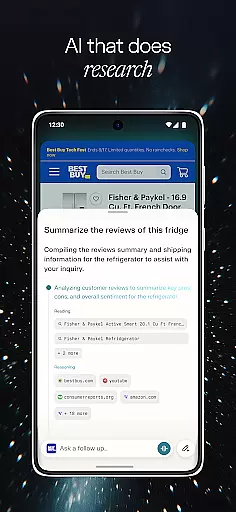
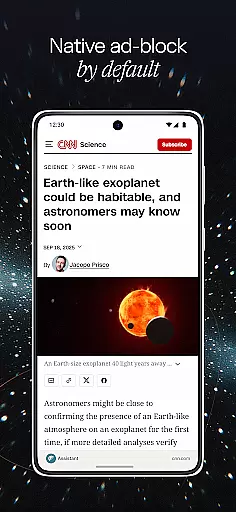
One of Comet's standout features is its ability to work across multiple tabs, synthesizing information and providing smart summaries of content. This makes it particularly useful for professionals and students who need to process large amounts of information quickly. Additionally, the built-in ad blocker helps users focus on relevant content by eliminating distracting ads and pop-ups, creating a cleaner browsing experience.
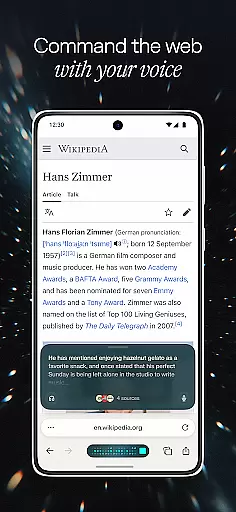
Comet distinguishes itself through several remarkable features that enhance mobile browsing. The AI assistant provides expanded reasoning capabilities, allowing users to track its actions in real-time while maintaining control over the browsing process. This feature is complemented by advanced voice recognition technology, enabling users to interact with their tabs through natural language commands.
The app's summarization function works across all open tabs, offering comprehensive synthesis of information rather than limiting itself to single pages. This capability is further enhanced by the chat-with-tabs functionality, which lets users engage in meaningful dialogue with their content. Moreover, Comet includes a robust ad-blocking system that can be customized with whitelists for trusted sites, ensuring a balance between clean browsing and access to necessary resources.
Real-time messaging speed and reliability are crucial for effective communication applications like Comet. This feature ensures that messages are delivered instantly and consistently, providing users with a seamless interaction experience.
Comet achieves this through its advanced AI assistant, which is available at the tap of a button. The assistant not only facilitates quick responses but also takes actions on assigned tasks, ensuring that conversations flow without unnecessary delays.
Users benefit from seeing exactly what actions the Comet Assistant is taking, allowing them to intervene if needed. This transparency in operations enhances user trust and engagement, making every interaction count.
The ability to chat with your tabs using voice recognition technology further augments real-time messaging by enabling hands-free operation. This comprehensive approach to communication ensures that Comet remains reliable and fast, meeting the demands of today's mobile users.
Media sharing support is an essential aspect of modern communication apps, allowing users to exchange various types of content effortlessly. For Comet, this means integrating features that go beyond simple text-based interactions.
One standout feature is the app's capability to summarize searches across all open tabs. This smart summarization tool allows users to share synthesized information rather than sending multiple links or pieces of data separately, streamlining the sharing process.
Additionally, Comet includes a built-in ad blocker that helps users focus on what matters by avoiding spam and pop-up ads. By whitelisting trusted sites, users can ensure that shared media is both relevant and safe, enhancing overall communication quality.
With these robust media sharing capabilities, Comet provides a comprehensive platform where users can exchange information efficiently while maintaining high standards of security and relevance.
User-friendly interface
Advanced AI capabilities
Multi-tab summarization
Effective ad blocking
Voice command support
Limited iOS availability
Higher system requirements
Learning curve for new users
Occasional AI errors
Privacy concerns

Manage your data, talk & text - affordable phone plans & data usage made simple
 4.30
4.30
SMS & MMS Messaging App to easily send messages or schedule SMS on Chat
4.10
Block spam calls & scam - no more annoying calls with the call blocker function
4.30
WazzapMigrator: transfer your WhatsApp history from iPhone to Android
4.00
Simplify texting with Messages SMS, offline messaging, themes & smart tools!
4.30
Faster version of Messages. Messenger for your contacts.
4.50
A softphone app with seamless SIP calling and an intuitive VoIP dialer
3.50
Threema is the messenger with the most consistent focus on security and privacy.
4.00
Fast internet with AI, Adblock & VPN. Browse on a safe, incognito web browser.
4.70
A browser that does more than load page, like keeping your privacy safe.
4.70
Stay in touch with the people who matter most.
4.60
Browse fast on Opera Mini, with Data Saving, News, Football Scores, and Download
4.60
Talk & text free with a second phone number plus unlimited 5G data, no fees.
4.50
Get through your inbox faster with the mail app designed to simplify your life.
4.40
Messages is Private SMS Messenger 2023 with text message, instant messaging.
4.00
Measure BHP, Torque & 0-60 Clear car OBD faults View engine data in Google Earth
4.00
SMS Messenger ensures that communication become effortless and accessible.
3.80
Call & Text Anywhere With A Canadian Number.
3.60
Official NDI app: turn your phone into a professional live-streaming IP camera.
3.20


User Reviews