
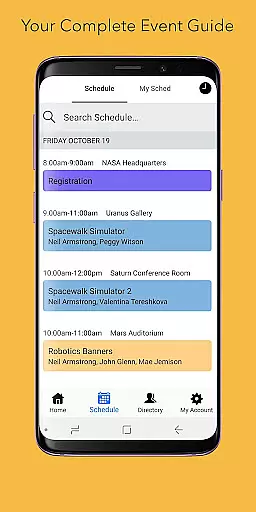
Sched is a comprehensive event management platform designed to streamline session registration and attendance tracking for complex multitrack events. The app serves as an all-in-one solution, allowing event organizers and attendees to manage every aspect of the event experience efficiently.
Key features include a complete schedule overview, customizable personal schedules, detailed speaker directories, and reliable offline caching. Whether you're organizing a large conference or attending an industry workshop, Sched ensures you have the necessary tools to maximize your event participation and engagement.
The platform's vision is to transform how people experience events by providing intuitive tools that make events more enjoyable and productive. With its robust functionality, Sched is particularly beneficial for professional conferences, academic symposiums, and industry conventions where efficient scheduling is crucial.
Sched offers an impressive array of features that cater to both event organizers and attendees. One of its standout capabilities is the full schedule view, which provides users with instant access to all event details without needing a physical program guide.
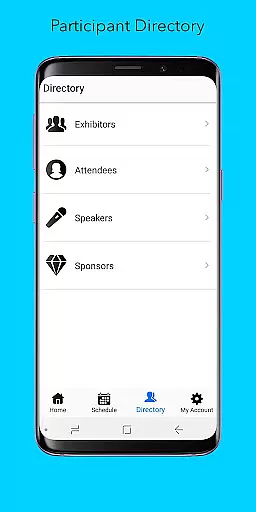
The app excels in personalization options, allowing users to create and modify their schedules on-the-go through a web or mobile interface. This feature is complemented by a comprehensive directory of speakers and exhibitors, complete with detailed professional profiles that help attendees make informed decisions about session participation.
Particularly noteworthy is Sched's offline caching functionality, which ensures users can access their schedules even without internet connectivity. This feature, combined with its cross-platform availability and integration capabilities, makes Sched a reliable choice for managing complex event logistics while maintaining participant engagement throughout the event duration.
Task creation and detail customization are essential features for managing complex events effectively. Sched offers a comprehensive platform where users can create detailed sessions, workshops, or meetings with ease.
The app allows event organizers to input extensive information about each session, including time, location, speaker details, and session descriptions. This level of detail ensures that attendees have all the necessary information at their fingertips, enhancing their overall event experience.
For users, this means they can tailor their schedules according to their preferences and needs. Whether it's choosing sessions based on interest or availability, Sched provides the tools needed to customize an event schedule down to the smallest detail.
Ultimately, the ability to create and customize tasks within Sched translates into a more organized and engaging event experience. Attendees can maximize their time and participation, ensuring they get the most value out of every session they attend.
Reminder settings play a crucial role in ensuring that attendees do not miss out on important sessions during an event. With Sched, users can set up personalized reminders tailored to their schedules.
The app offers flexible options for setting reminders, allowing users to choose when and how they receive notifications. Whether it's a push notification 15 minutes before a session starts or an email reminder the day before, Sched has got it covered.
This feature is particularly beneficial for attendees juggling multiple sessions across different tracks. By providing timely reminders, Sched helps users manage their time efficiently and reduces the risk of missing key events.
In summary, Sched's robust reminder settings empower users to stay on top of their busy schedules without the stress of manual tracking. This functionality enhances user engagement and satisfaction, making every event a memorable one.
User-friendly interface
Comprehensive event management
Offline functionality
Real-time updates
Customizable schedules
Limited free features
Occasional sync issues
Premium pricing
Steep learning curve
Basic analytics

Create Birthday Cards in Birthday Invitation Maker and Birthday Card Creator App
 3.00
3.00
The Ultimate Tournament Hub
4.70
Mobile Event Guide for Greater NY Dental Meeting
4.4
CUE Live utilizes ultrasonic sound waves to sync devices at CUE enabled events
4.80
Track birthdays, habits & goals. Unlimited countdowns and count-ups
4.20
No invest, Easy way to earn USDT through crypto cloud mining
3.80
Beautiful invitation cards + easy RSVP tracking for any event. Design Invites.
4.80
Soft Proxy for Your Online World
4.1
Meet people over dinner
4.40
Birthday Greetings provides Birthday Card, Frames, Gifs & Father's day Wishes
4.80
For weddings, parties & events
4.60
PheedLoop Go! is the mobile event app for events powered by PheedLoop.
4.40
Get live football here
4.30
Microsoft Ignite is an event that showcases latest advancements in technology
4.00
Manages display and transfer of tickets from the Mundo Tickets platform
3.80
Audio guide companion APP for SEE's Michelangelo's Sistine Chapel
3.50
TV.Garden is a video player to play your own TV streams from around the world!
3.40
TV Garden is a video player to play your own TV streams from around the world!
4.1
The official app of the Carmel Christkindlmarkt!
4.0


User Reviews