

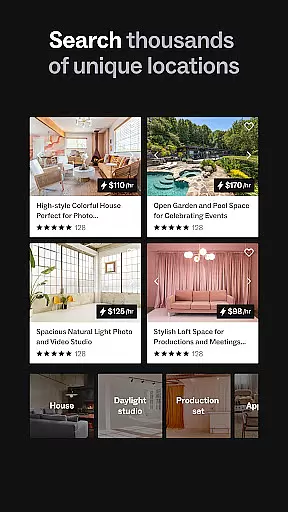
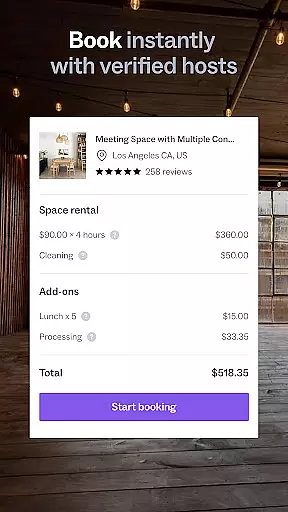
Peerspace is a leading platform for booking unique and inspiring spaces by the hour, designed specifically for events, meetings, and creative projects. With an extensive network of venues ranging from professional photo studios and modern meeting rooms to picturesque backyards and vibrant bars, Peerspace caters to both personal and professional needs. The app provides users with the convenience of discovering and securing extraordinary locations in cities worldwide, ensuring that every event is memorable.
The true value of Peerspace lies in its dual-purpose functionality. For guests, it offers access to distinctive spaces that elevate any occasion, while hosts benefit from an additional income stream by simply opening their doors. Whether you're planning a corporate meeting, organizing a social gathering, or setting up a photoshoot, Peerspace simplifies the process by connecting you with local hosts and enabling seamless bookings directly through the app.
Peerspace stands out with its diverse range of features tailored to enhance user experience. One of its core functionalities is the ability to browse through a wide variety of unique spaces including homes, studios, lofts, and galleries. This feature allows users to find the perfect venue that matches their specific requirements, whether they need a creative studio for a photoshoot or a charming backyard for a private event.
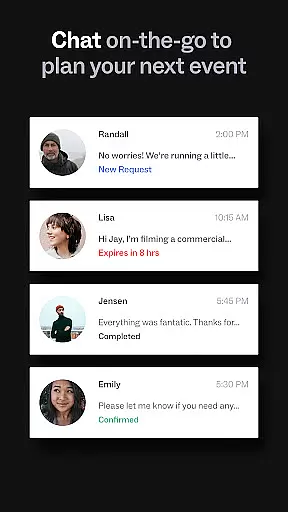
Another key aspect is the streamlined communication and booking system. Users can connect directly with local hosts, discuss details, and book spaces conveniently by the hour all within the app. Additionally, Peerspace supports hosts by offering tools to manage listings, set pricing, and choose acceptable activities in their space. Hosts also enjoy direct bank deposits, making the earning process hassle-free. These comprehensive features ensure that both guests and hosts have a smooth and efficient experience on the platform.
Creating and customizing tasks within an application is crucial for effective event planning. Peerspace allows users to effortlessly browse a variety of unique spaces, from photo studios to meeting rooms, tailoring each booking to their specific needs.
The app's interface provides intuitive controls for setting up events with detailed descriptions, including the type of activity, expected number of guests, and special requirements. This ensures that every booking is perfectly aligned with the user's vision.
Users benefit from the ability to customize every aspect of their booking, ensuring that the space they choose not only meets their logistical needs but also enhances the overall experience of their event.
This level of customization empowers users to execute their events with precision, knowing that all details are accounted for and that they have full control over the planning process.
Setting reminders is essential for staying on top of upcoming bookings and managing events efficiently. Peerspace offers automatic notifications for new messages and booking requests, ensuring users never miss an important update.
The reminder system is designed to keep hosts and guests informed about all stages of the booking process, from initial inquiries to confirmed reservations. Users can manage these notifications directly from their phones, providing convenience and peace of mind.
With timely alerts and updates, users can focus on other aspects of their events, confident that they will be reminded of key actions and deadlines. This feature significantly enhances the reliability and responsiveness of event management.
Ultimately, Peerspace's reminder settings contribute to a seamless user experience by keeping everyone engaged and well-informed throughout the entire booking journey.
User-friendly interface
Wide variety of spaces
Seamless booking process
Direct host communication
Flexible hosting options
Limited rural availability
Variable pricing structure
Service fees apply
Dependent on host responsiveness
Location-specific offerings

Manages display and transfer of tickets from the Mundo Tickets platform
 3.80
3.80
The calendar app in this 2026 year see all dates.
4.20
The Ultimate Tournament Hub
4.70
Some connections are better kept private
4.2
Fantasy of Lights Event App
5.00
For weddings, parties & events
4.60
Microsoft Ignite is an event that showcases latest advancements in technology
4.00
Buy and Sell Tickets for Concerts, Sports, and Theater.
4.70
Find Live Event Ticket Deals to Sports, Concerts, Festivals, & Comedy For Less!
4.80
Find EDM shows near you! See your favorite artists live, and discover new music.
4.90
Plan your wedding for free on the go: vendors, budget, website and checklists!
4.80
Save money on concert, sport, and theater tickets, and discover upcoming events.
4.80
Create Wedding Invitation and Wedding Anniversary Cards using our app
4.60
Listen Full Quran MP3 Offline - Qibla Compass, Salah Timing & 99 Names of Allah
4.60
Microsoft Build is an annual developer conference hosted by Microsoft
4.20
Track birthdays, habits & goals. Unlimited countdowns and count-ups
4.20
ETH Mining provides secure way to mine Ethereum & earn ETH in Cloud mining app
3.50
Mobile Event Guide for Greater NY Dental Meeting
4.3
Digital Income Wallet of the Final Libertadores 2025
4.4


User Reviews