
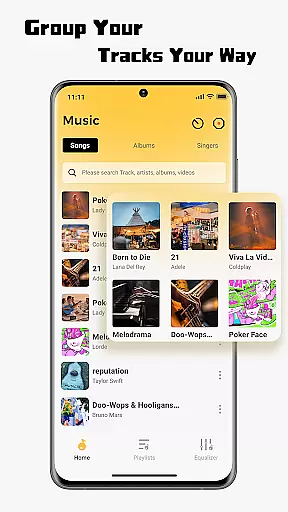
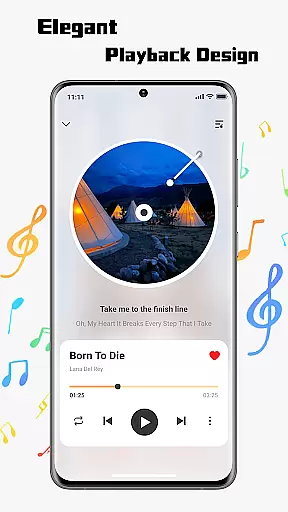
SonicNest is a premium music player app designed to enhance your audio experience through advanced features and an intuitive interface. The app allows seamless import of local music files, making it easy to consolidate your entire music library in one place. With smart management tools, users can organize tracks by album, artist, or custom folders, ensuring quick access to desired content.
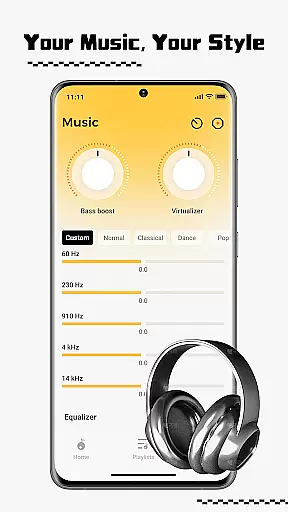
One standout feature is the built-in equalizer, which offers both presets and manual customization options. This allows users to fine-tune audio output according to their preferences, whether for workouts, relaxation, or focused listening. SonicNest combines powerful functionality with a sleek design, delivering a rich and immersive listening experience that audiophiles and casual listeners alike will appreciate.
SonicNest stands out with its comprehensive suite of features tailored for music enthusiasts. At its core, the app provides effortless local music import capabilities, enabling users to browse device storage and add tracks directly into the app's unified library. This eliminates the need to switch between multiple apps, streamlining the listening process.
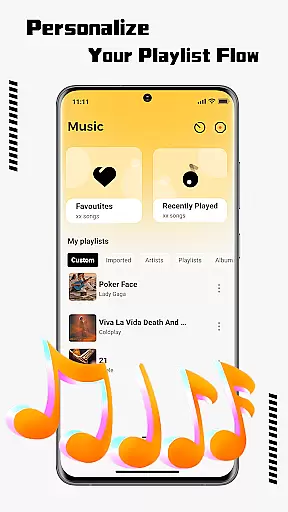
The app also excels in music management, offering tools to edit track details, sort libraries, and create custom playlists. These organizational features ensure that users can tailor their collections to fit specific moods or activities. Additionally, SonicNest includes an advanced equalizer with expertly crafted presets and precise manual controls, empowering users to adjust sound profiles for optimal playback quality.
With its combination of smart organization tools and precision audio controls, SonicNest delivers a personalized and high-quality music experience that caters to diverse listening preferences.
When it comes to music applications, the size and authenticity of the music library are crucial factors. SonicNest offers a seamless local music import feature that allows users to effortlessly bring their personal music collections into the app. This ensures that all your tracks are centralized in one location, eliminating the need to switch between multiple apps.
The app supports extensive music file compatibility, ensuring that tracks from various sources and formats can be imported without issues. By focusing on local music management, SonicNest sidesteps copyright complications while still delivering a vast and personalized music library experience.
Users benefit from having their entire music collection at their fingertips, neatly organized and ready for playback. The ability to browse device storage and instantly add tracks enhances accessibility and convenience, making SonicNest a reliable choice for managing extensive music libraries.
Audio quality is paramount for an immersive listening experience, and SonicNest excels in this area with its precision sound capabilities. The built-in equalizer allows users to fine-tune every track to perfection, catering to individual preferences and audio needs.
Whether you want to boost bass for energetic workout sessions or enhance vocals for focused lyrical appreciation, SonicNest provides expertly crafted presets and manual customization options. Audiophiles will appreciate the granular control over sound profiles, ensuring an optimal auditory experience tailored to their exact specifications.
This focus on high-quality audio output elevates SonicNest above standard music players, offering rich, immersive sound that transforms how users experience their favorite tracks. With SonicNest, every note is heard as the artist intended, providing unparalleled audio fidelity.
User-friendly interface
Advanced equalizer
Smart library management
Seamless music import
Customizable playlists
Limited streaming options
No cloud sync
Few social features
Heavy on storage
Ads in free version

Visualize the guitar fretboard, master scales & play through changes like a pro!
 4.50
4.50
Bass Booster & Volume Equalizer Pro improves your music and video sound quality
4.60
Recording studio w/ 10k beats, pro vocal FX and a network of 20M rappers & fans!
4.60
Unleash your creativity! Turn simple prompts into full fledged songs.
4.70
A sleek, no-frills player designed for true music lovers.
4.20
Offline Music Player&MP3 Player with themes, equalizer, lyrics, music play mode
4.60
Simple mp3 and mp4 player with advanced features.
3.40
Be a true music maker: create beats, mix and make music like a real DJ!
4.30
Melody Beat: Great for travel, workouts, offline vibes, play your tunes anytime.
4.10
Tune in to the greatest hits on UK Radio | The home of Capital, Smooth & Heart.
4.90
More downloads than any other metronome. Includes drum machine & tempo trainer.
4.80 4.70
4.70
Listen radio AM / FM Stations. Live AM / FM Radio App Station. Radio Com.
4.70
AI Music Maker: Generate And Compose AI Tunes & AI Songs & AI Music & AI Melody!
4.60
Help you quickly get started with Shokz headphones
4.40
Bass Booster Pro takes auto-equalizing to the next level!
4.30
Powerful 10-Band equalizer pro with sound booster improves Android audio quality
4.30
Permanently backup Now Playing. Maps, filters & listening stats.
4.00
The only true audiophile music player with Hi-Fi audio rendering and DSP engine
3.90


User Reviews