
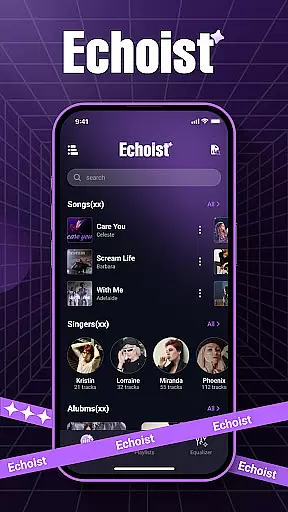
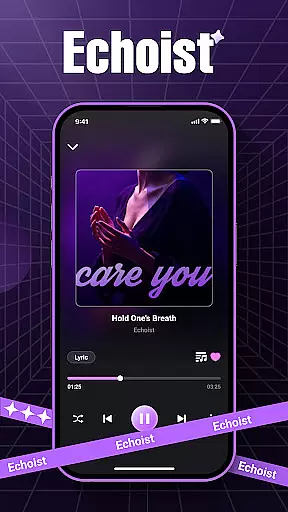
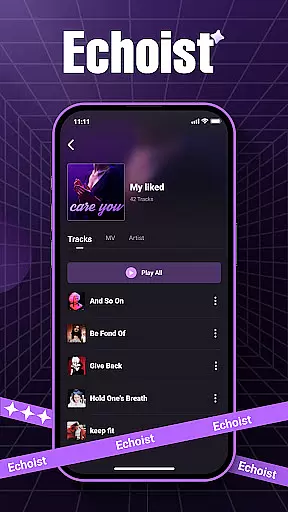
Echoist is a premium offline music player designed to enhance your local music experience. This app allows you to access and organize your entire music library effortlessly, supporting multiple formats like MP3, FLAC, WAV, and AAC. With its powerful offline capabilities, you can enjoy your favorite tracks anytime without an internet connection.
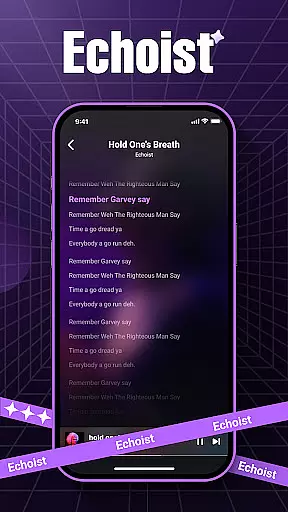
The app features an intelligent library management system that automatically sorts songs by artist, album, or genre. You can create custom playlists, use the advanced search function, and personalize your listening experience with a customizable equalizer and lyrics display. Whether you're commuting or relaxing at home, Echoist ensures uninterrupted music playback.
Echoist stands out with its comprehensive feature set tailored for music enthusiasts. The app provides instant access to your local music files, scanning and loading them quickly for immediate playback. Its smart organization tools allow you to manage large music libraries with ease, sorting tracks automatically and enabling powerful search functionality.
User experience is at the core of Echoist's design. The sleek player interface supports background playback, includes a sleep timer for bedtime listening, and offers customizable sound settings. These features ensure you can tailor the audio output to your preferences while enjoying seamless navigation and control over your music collection.
When it comes to music applications like Echoist, the size and authenticity of the music library are crucial factors for users. Echoist allows you to access your entire offline music collection, supporting a wide range of formats including MP3, FLAC, WAV, and AAC.
The application does not provide streaming services but focuses on local playback, ensuring that all content is legally owned by the user. This approach guarantees copyright compliance while offering flexibility in managing personal audio files.
With Echoist, users can organize their extensive music libraries with ease. The app automatically sorts tracks by artist, album, or genre, making it simple to find and play any song instantly. This feature-rich organization ensures that even those with large collections can maintain a structured and accessible music database.
Audio quality is a key consideration for any music enthusiast, and Echoist delivers an exceptional listening experience through its advanced features. The app includes a customizable equalizer, allowing users to fine-tune audio output according to their preferences or audio equipment specifications.
Whether you're using high-end headphones or standard speakers, Echoist ensures optimal sound performance. The equalizer offers multiple presets and manual adjustment options, catering to audiophiles who demand precise control over their listening experience.
In addition to superior audio settings, Echoist supports lossless audio formats like FLAC, preserving the original quality of your music files. This commitment to high-fidelity playback makes Echoist an excellent choice for users who prioritize audio excellence in their offline music player.
Fast offline playback
Intuitive user interface
Advanced library management
Customizable equalizer
Cross-format compatibility
Limited online features
No cloud syncing
Basic lyrics support
Ads in free version
Occasional bugs

Fun & Easy Voice Changer – Record, Edit & Add Hilarious Effects!
 4.50
4.50 4.70
4.70
Equalizer, Bass Booster and Volume Booster (Eq & Bass) improve sound quality
4.30
Permanently backup Now Playing. Maps, filters & listening stats.
4.00
Advanced 10-Band Audio Graphic Equalizer Sound Booster Pro
4.30
Music Streaming suite for Ampache, Nextcloud Music and compatible backends.
4.0
Offline Tunes, Unlimited Vibes
3.90
Get alarms that fit your lifestyle and wake up to the sounds you love.
4.80
Be a true music maker: create beats, mix and make music like a real DJ!
4.30
Brian Eno and Peter Chilvers’ acclaimed music app Bloom, radically reinvented.
4.80
Gorgeous UI, Powerful music Search and Equalizer, the great choice for you!
4.70
Most Advanced AI Song Generator and Music Creator. Rap, Pop, Rock, Gospel & more
4.70
Pay Once, no monthly payment
4.60
AI Music Maker: Generate And Compose AI Tunes & AI Songs & AI Music & AI Melody!
4.60
A synth that really lets you shape your sounds!
4.50
Ringtone Maker is free app create ringtone from music files or your recording.
4.40
Full featured mp3 and audio player with Chromecast and Android Auto support.
4.40
Sing, record, and create music together — enhanced by smart voice tools.
4.00
Remove ads permanently from Music Visualizer
4.0


User Reviews