







Homes.com Real Estate Search is a comprehensive homebuying platform designed to simplify the property search process for both homebuyers and real estate agents. The app provides access to an extensive database of homes for sale and rent across the U.S., complete with detailed neighborhood insights, school data, and historical property photos.
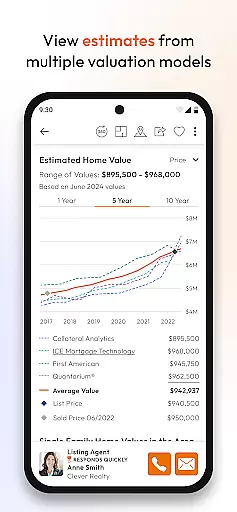
For homebuyers, the app offers advanced collaboration tools that allow seamless co-shopping with family, friends, and agents. It includes mortgage calculators, home value estimates from multiple sources, and a robust directory of qualified buyer agents. Agents benefit from Homes Pro, a suite of free tools that streamline client management, lead generation, and social media sharing capabilities.
This app is particularly useful for those looking to buy or rent properties while wanting to stay informed about neighborhood specifics such as walk scores, nearby schools, and local amenities. Its intuitive design and rich feature set make it an invaluable tool in today's competitive real estate market.
Homes.com stands out with its array of features tailored for both homebuyers and agents. For buyers, the app provides a GPS-driven map search function, allowing users to find nearby homes quickly. Detailed neighborhood overviews include information on parks, restaurants, public transit, and more, curated by in-house researchers and trusted sources.
The app also includes exclusive agent features through Homes Pro, enabling agents to collaborate with clients in one central location. They can manage leads, create Comparative Market Analyses (CMAs), and share listings directly on social media platforms. Enhanced agent profiles showcase listing history, awards, and videos, helping agents build their brand and attract new clients.
One of the standout features is the ability to collaborate in real time, freeing users from the chaos of emails and missed calls. This functionality allows agents and homebuyers to review feedback instantly, trade notes on properties, and involve co-shoppers in the decision-making process, making homebuying more efficient and engaging.
Property listing authenticity is a cornerstone of any reliable real estate application. Homes.com ensures the accuracy and legitimacy of its listings by sourcing data directly from MLSs and their official data providers. This guarantees that users are viewing current, verified properties for sale or rent across the U.S.
The app provides detailed property information, including current and historical listing photos when available. This feature allows users to track changes in a property's condition over time, further enhancing transparency and trust in the home-buying process.
For agents, Homes.com offers an enhanced Agent Directory where they can showcase their expertise, listing history, and areas of focus. This not only builds credibility with potential clients but also helps them stand out in a competitive market.
By prioritizing authentic listings and comprehensive agent profiles, Homes.com fosters a trustworthy environment for both homebuyers and real estate professionals, ensuring that every interaction on the platform is based on accurate, up-to-date information.
Home management features within real estate apps provide essential tools for both buyers and agents to streamline the home-buying process. Homes.com offers robust collaboration tools that allow users to co-shop with friends, family, or agents seamlessly. These tools eliminate the chaos of traditional communication methods like emails and texts, enabling real-time feedback and note-sharing.
Agents using Homes.com gain access to Homes Pro, a suite of free tools designed to enhance client-agent collaboration. Agents can manage leads, review client feedback instantly, and share listings directly on social media platforms. They can also create Comparative Market Analyses (CMAs) quickly, empowering them to offer more responsive and informed service.
The app includes comprehensive neighborhood and school data, curated by a dedicated team of researchers. This information covers nearby schools, parks, walk scores, restaurants, and local events, helping users make well-informed decisions about their potential new communities.
With integrated mortgage calculators and home value estimates from multiple sources, Homes.com equips users with everything needed to manage their home search effectively. These features collectively ensure that both homebuyers and agents have the resources necessary to navigate the complexities of real estate efficiently.
User-friendly interface
Comprehensive property listings
Advanced collaboration tools
Detailed neighborhood insights
Robust agent support features
Limited international listings
Occasional data delays
Premium features require subscription
High learning curve for new users
Some areas lack detailed info

For all of your Airthings devices
 4.30
4.30
AI-powered home design, interior design, home decor, and room design solutions
4.50
Rent on-the-go with TurboTenant’s app made just for renters
4.50
Convert your Phone to HiSense Smart TV Remote Control
4.70
Resident Center, powered by Buildium, is designed with simplicity in mind.
4.50
View houses and apartments for rent, updated daily.
4.80
Security App with HD Video, 2-way Audio, and event detection for Home monitoring
4.40
Connect with reliable pros for maintenance services, plumbing, and home design!
4.80
Houses for Sale & Homes for Rent: Buy Homes, Rent Apartments & Sell Real Estate
4.80
B-hyve Pro App for landscape irrigation professionals
4.70
Download today to join the community to help bring lost pets home faster.
4.70
Turn old phones into security cameras, baby monitors, pet cams, and more.
4.70
A Smarter Home in Seconds
4.70
Parcel Pending Resident App
4.50
Find contractors for all home renovation projects. Remodeling, repair, and more.
4.20
Use Home by ShowingTime to easily manage showings, tours, feedback and more
3.60
Find paints using a Color Muse & ColorSnap® Match
3.60
Control Fire TV & mirror your phone screen instantly over Wi-Fi.
3.30
Calculate baluster spacing with ease and precision.
4.2


User Reviews