
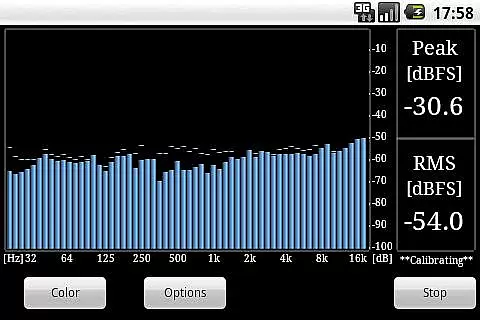
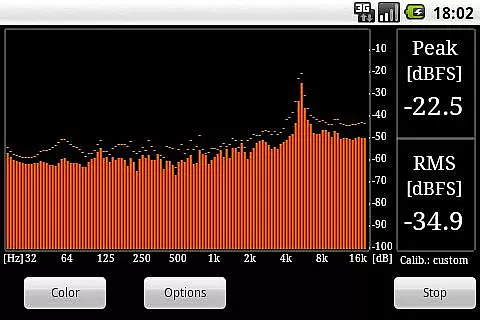
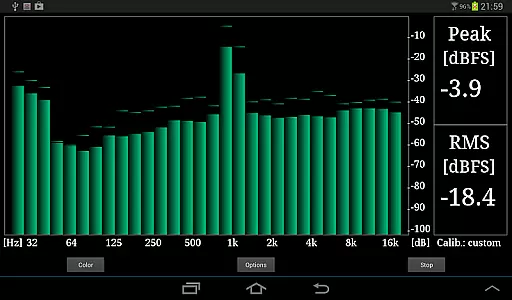
RTA Pro Analyzer is a sophisticated audio analysis tool designed for music and audio professionals. This application provides advanced features such as 1/4, 1/6, and 1/12 octave band analysis with up to 120 bands, allowing users to perform detailed sound assessments. The app's scalable peak holds and multiple color schemes enhance the user experience by offering customizable visualization options.
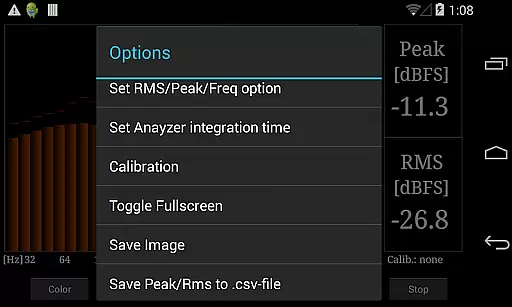
In addition to its core analytical capabilities, RTA Pro Analyzer offers practical functionalities like permanent storage of calibration data, making it an invaluable tool for consistent and reliable audio evaluations. Users can save screenshots and export peak/RMS values to CSV files, facilitating further analysis and documentation. Whether you're an audio engineer or a music enthusiast, this app equips you with the tools needed for professional-grade audio analysis.
One of the standout features of RTA Pro Analyzer is its ability to provide precise audio analysis through various band spacing options. With support for 1/4, 1/6, and 1/12 octave bands, users can achieve highly granular insights into their audio signals. The app supports up to 120 bands, ensuring comprehensive coverage and detailed frequency response visualization.
RTA Pro Analyzer also excels in customization and usability. It includes scalable peak holds that allow users to monitor audio peaks effectively, along with multiple color schemes to suit individual preferences. Furthermore, the app enables the permanent storage of calibration data, ensuring that your settings remain intact over time. Additional features like screenshot saving and exporting peak/RMS values to CSV files make this app a versatile choice for anyone involved in audio analysis.
When evaluating professional audio analysis tools like RTA Pro Analyzer, the depth and breadth of its music library support is crucial. This application provides extensive compatibility with various audio formats, ensuring users can work with a wide range of music files without limitations.
The app's ability to permanently store calibration data demonstrates its commitment to maintaining accurate and reliable music analysis over time. This feature is particularly valuable for professionals who require consistent performance across multiple sessions.
With advanced functionalities such as 1/4, 1/6, and 1/12 band spacing analysis, RTA Pro Analyzer offers precise control over how audio content is processed and examined. These capabilities ensure that users can achieve detailed insights into their music library's characteristics.
Furthermore, the option to export peak and RMS values to a CSV file enhances the app's utility by allowing users to document and analyze their music collection's technical aspects systematically.
RTA Pro Analyzer stands out in the realm of audio quality options by providing users with up to 120 bands of analysis, scalable peak holds, and multiple color schemes. These features collectively enhance the clarity and precision with which audio quality can be assessed and visualized.
The inclusion of various band spacing options (1/4, 1/6, 1/12) allows users to customize their analysis approach based on specific needs or preferences. Such flexibility ensures that whether you're analyzing full mixes or isolating particular frequencies, the tool adapts seamlessly.
Moreover, the capability to save screenshots directly from the application adds another layer of convenience for professionals who need to document their findings or share them with collaborators. This functionality supports both qualitative and quantitative assessments of audio quality.
Lastly, the provision for exporting detailed data such as peak and RMS values not only underscores the app's dedication to high-quality audio processing but also facilitates further external analysis, making it an indispensable tool for serious audiophiles and industry experts alike.
Advanced audio analysis
Customizable visualization
Permanent calibration storage
Export functionality
User-friendly interface
Paid version only
Complex for beginners
Limited free support
No real-time collaboration
High system requirements

The Cubase remote control app
 3.60
3.60
A synth that really lets you shape your sounds!
4.50
Save hundreds of dollars for a physical strobe tuner and instead use this app.
4.50
Guzheng Master supports many playing techniques as an acoustic Guzheng
4.50
Enjoy singing any song, no matter how high or low it is
4.30
No wifi music app. Mp3 offline. Tuner radio, young radio music. Music downloader
4.20
The iconic iOS metronome app is now on Android.
3.70
Full featured mp3 and audio player with Chromecast and Android Auto support.
4.40
Customize Your Favorite Songs and Videos with booster.
4.70
Play your hearts out on TouchTunes jukeboxes & connect with fellow music lovers.
4.80
Listen to live FM radio stations, sports, music and news on global radios online
4.70
Bass Booster & Volume Equalizer Pro improves your music and video sound quality
4.60
Recording studio w/ 10k beats, pro vocal FX and a network of 20M rappers & fans!
4.60
DJ Music Mixer Pro is a real DJ controllers and DJ Music Studio to remix DJ.
4.40
Time Guru will strengthen your internal sense of musical time via random muting.
4.30
Equalizer, Bass Booster and Volume Booster (Eq & Bass) improve sound quality
4.30
A sleek, no-frills player designed for true music lovers.
4.20
Permanently backup Now Playing. Maps, filters & listening stats.
4.00
Control your MIDI USB or Bluetooth devices in app and avoid some trampling
3.30


User Reviews