
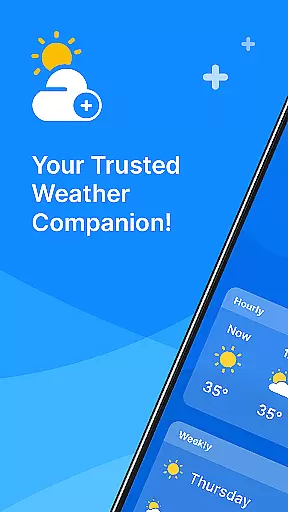
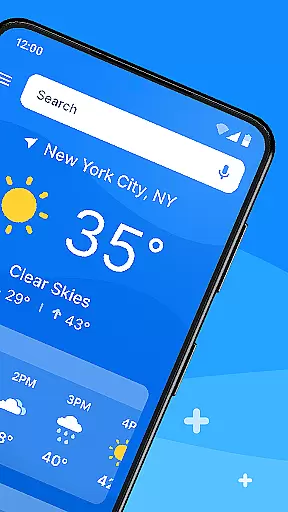
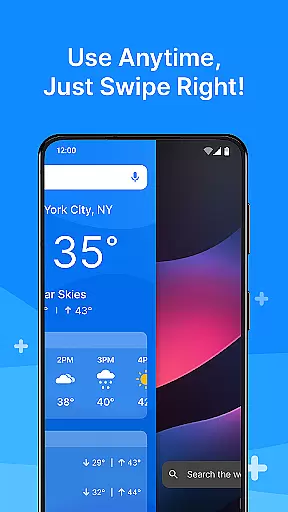
All Weather Mode is a comprehensive weather application designed to keep users informed about current and forecasted weather conditions. The app provides real-time updates, detailed forecasts, and location-based reporting, ensuring you're always prepared for the day ahead. With its intuitive home screen layout, it offers quick access to essential weather information through easy swipe shortcuts.
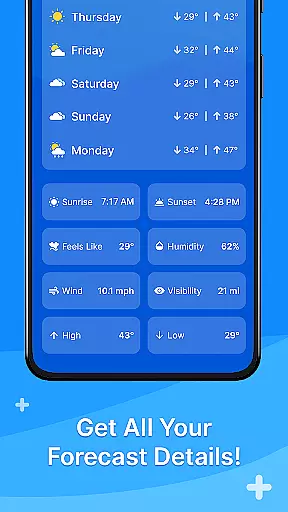
One of the standout features of All Weather Mode is its robust reporting system that includes temperature, sunrise, sunset, feels-like temperatures, humidity levels, wind speed, visibility, and more. Whether you're planning your daily activities or preparing for an outdoor adventure, this app delivers timely weather data to help you make informed decisions. Additionally, the 7-day forecast with hourly updates ensures you can plan your week with confidence.
All Weather Mode stands out with its array of practical features tailored to meet the needs of weather-conscious individuals. The app's intuitive home screen layout transforms the way users interact with weather data by providing a clean and accessible interface. This design allows users to effortlessly swipe through their most-needed weather information without having to navigate deep into the app.
Another remarkable feature is the real-time weather reporting that covers multiple locations. Users can get accurate and up-to-the-minute weather details such as temperature highs and lows, precipitation percentages, and sunrise and sunset times. These capabilities ensure that whether you're at home or traveling, you'll have reliable weather insights at your fingertips. Furthermore, the app's integration with Yahoo-powered search enhances its functionality, making it a versatile tool for both casual users and outdoor enthusiasts.
Weather Mode: Weather Launcher offers a rich array of customization options that allow users to tailor their weather experience according to their preferences. The app provides an intuitive home screen layout, which can be personalized for easy access to essential weather information.
Users can customize their home screen with quick-swipe shortcuts, ensuring that the most relevant weather data is just a swipe away. This level of personalization ensures that whether you are checking the current temperature or looking at the forecast for the week, the information is presented in a way that suits your lifestyle and needs.
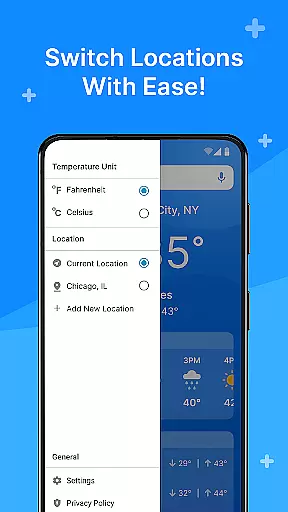
The ability to add multiple locations means you can stay informed about the weather in various places important to you. Whether it's your hometown, a travel destination, or a loved one's location, Weather Mode allows you to keep track effortlessly.
This customization extends to detailed forecasts and real-time reporting, giving you control over how you receive and interact with weather updates. With such a high degree of personalization, Weather Mode: Weather Launcher becomes not just a tool but a personalized weather assistant.
Theme compatibility is a crucial aspect of Weather Mode: Weather Launcher, ensuring that the visual presentation of weather data aligns seamlessly with various themes. The app boasts a clean and intuitive design that maintains its functionality and aesthetic appeal across different themes.
Regardless of whether you prefer a light or dark theme, the app's interface remains consistent and visually pleasing. This compatibility enhances readability and user experience, making sure that all weather information is accessible without compromising on style.
Moreover, the robust search powered by Yahoo integrates smoothly within the chosen theme, providing accurate weather information without disrupting the visual harmony. Quick-swipe shortcuts also adhere to the selected theme, offering a cohesive look and feel throughout the app.
By prioritizing theme compatibility, Weather Mode: Weather Launcher ensures that users enjoy a seamless and engaging experience, no matter their preferred visual settings. This attention to detail underscores the app's commitment to delivering both form and function in equal measure.
User-friendly interface
Accurate real-time data
Comprehensive weather reports
Customizable location settings
Quick access shortcuts
Limited advanced analytics
No offline functionality
Occasional update delays
Ads in free version
Location add limit

Classic analogue watch face. For wear os devices.
 4.60
4.60
Wear Os Watch Face - Seasonal - Animated Snow Effect - 9 Animals
4.20
Prank your friends with realistic broken screen and cracked HD effects!
4.3
Ultimate widget creator. Design custom widgets for a truly unique home screen!
3.90 4.50
4.50
Unleash Your Creativity and Connect with Loved Ones with Lockscreen Drawing!
4.20
350+ widgets with a premium glass-style finish, perfect for home & lock screens.
4.70
Your home screen, just the way you like it.
3.80
Cool custom fonts & keyboard themes! Symbols & font changer for Instagram
4.50
Only for Wear OS devices!
4.90
Winter's Journey: digital watch face for Galaxy Watch & Wear OS
4.80
Personalize your phone with stunning HD and 4K wallpapers!
4.70
Nothing Icon pack with more than 3750+ highly crafted icons.
4.70
Ultimate Gallery Lock App - Hide Pictures, Videos and Lock Apps Instantly!
4.60
300+ widgets inspired by Material You and Material 3 expressive design.
4.60
Vibrant Adaptive Icons with Material You and Enhanced Monet Colors.
4.50
Magic fluids wallpaper 4D: Relax with stunning fluid simulation wallpaper app
4.20 4.10
4.10
Customizable flower power digital watch face for Wear OS watches.
4.00
Wallpaper Engine Android review—PC sync setup, crash issues, sound reactive limitations, and whether this free companion app is actually good.



User Reviews