
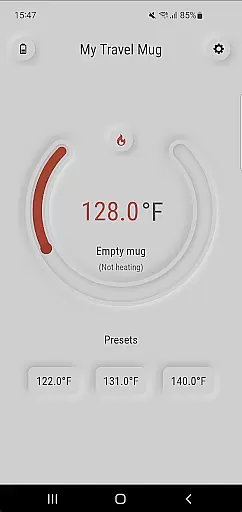
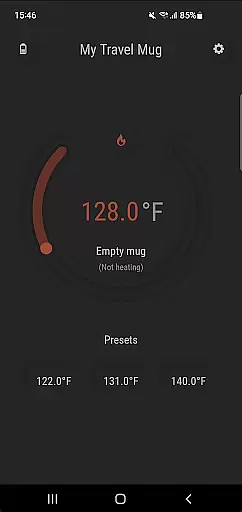
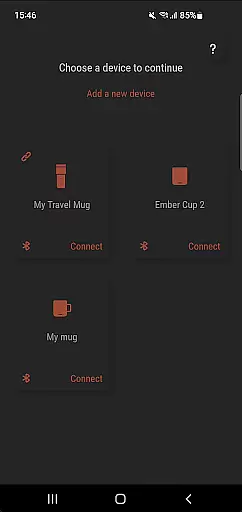
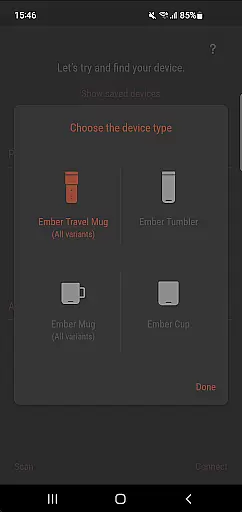
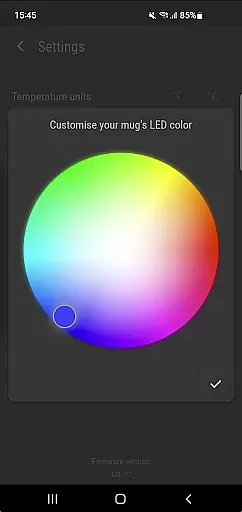
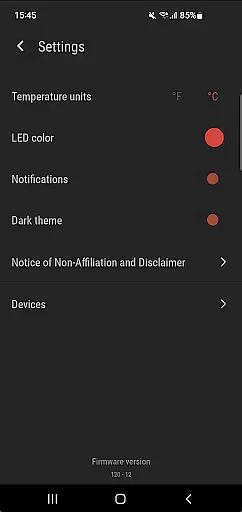
Ember Supreme is a feature-rich companion app designed specifically for users of Ember smart mugs. This application allows you to control and customize various settings of your Ember mug, including setting the target temperature in your preferred unit, adjusting the LED color, and even naming your mug. The app supports multiple versions of Ember products, such as Ember Mug 1 & 2, Ember Cup 1 & 2, Ember Travel Mugs, and Ember Tumblers.
The intuitive interface ensures that users can easily manage their smart mugs, providing a seamless experience whether at home or on the go. With Ember Supreme, maintaining your ideal beverage temperature has never been easier, ensuring that every sip is as warm as desired.
One of the standout features of Ember Supreme is its ability to precisely set the target temperature for your beverage. Users can choose between Fahrenheit and Celsius, catering to personal preferences and regional standards. Additionally, the app offers customization options such as changing the LED color and naming your mug, allowing for a personalized touch.
Ember Supreme also provides comprehensive support for a range of Ember products, ensuring compatibility across different models. Whether you own an Ember Mug, Cup, Travel Mug, or Tumbler, this app delivers consistent performance and reliability, making it an essential tool for enhancing your smart mug experience.
In today's fast-paced world, managing lifestyle essentials can be challenging. Ember Supreme addresses this by offering comprehensive features tailored to enhance your daily routine with smart mug technology. The app provides essential controls for temperature settings, unit preferences, and customization options.
With support for various Ember mug models including Mug 1 & 2, Cup 1 & 2, Travel Mugs, and Tumblers, the application ensures that all your beverage needs are covered. This extensive compatibility makes it a versatile tool for different lifestyles and preferences.
Users benefit from the ability to personalize their experience by adjusting LED colors and naming their mugs. Such features not only add a personal touch but also make it easier to identify individual mugs in shared environments, enhancing convenience and user satisfaction.
The credibility of an application is crucial for user trust and satisfaction. Ember Supreme stands out by ensuring that all content and features are developed based on genuine user needs and expert insights in smart home technology. Every function, from setting the target temperature to changing LED colors, is designed with precision and care.
Expert engineers and designers have collaborated to create a reliable and feature-rich companion app. Their expertise guarantees that each aspect of the app, including its seamless integration with Ember smart mugs, meets high standards of quality and performance.
By choosing Ember Supreme, users can be confident in the authenticity and reliability of the app's offerings. This assurance not only enhances the overall user experience but also fosters long-term engagement and loyalty, knowing they are using a product backed by expert knowledge and dedication.
User-friendly interface
Wide device compatibility
Precise temperature control
Customizable LED colors
Personalized mug naming
Limited to Ember products
No advanced analytics
Basic design aesthetics
Requires constant connectivity
Subscription fees may apply

Get roadside help, discounts, travel tools & more — AAA is with you everywhere.
 4.80
4.80
Earn points with every purchase with Moe Rewards.
4.20
Paranormal EVP, Ghost Box, Spirit box, ITC, Haunted, Spirit communication device
3.70
Big bold hybrid watch face with 30 colors, 5 fonts & 5 complications.
4.0
Do you want to communicate with spirits?
3.80
Customize your Wear OS watch with festive Christmas figures and colors!
4.1
My Diary - Daily Journal with lock: Diary journal app and secret diary with lock
4.80
The cutest Autumn watchface featuring the adorable Mr. Squirrel
4.2
Vehicle ownership simplified. Get the myChevrolet® app today.
4.60
Retro animated weather with hourly forecast Watch Face for Wear OS
4.60
Get your life organized with My Agenda!
4.30
Use your device sensors to detect energy and convert it into spoken words.
4.10
Your home in your hand
3.80
Unique BIG BOLD TIME with amazing colors and customisations.
3.70
Connect to your Shark ROBOT™ from anywhere using the SharkClean™ App.
3.60
Going above and beyond known spirit communication
3.60
Turn your watch into a key fob for your Tesla
2.90
Immerse yourself in the serenity of lavender fields and white butterflies
4.5
Futuristic watchface inspired by Back to the Future: sleek, retro, timeless
4.4


User Reviews