
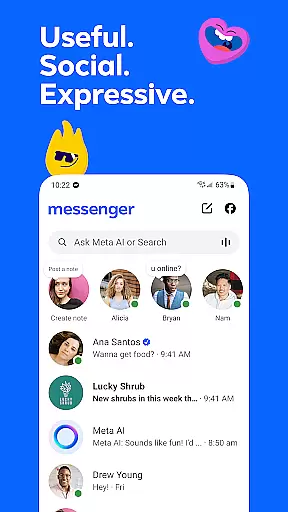






Messenger is a versatile communication app that allows users to connect with friends and family effortlessly. The app supports instant messaging, voice calls, and video calls, making it easy to stay in touch regardless of location. With features like Meta AI assistant, users can get instant answers to questions or receive help with various tasks.
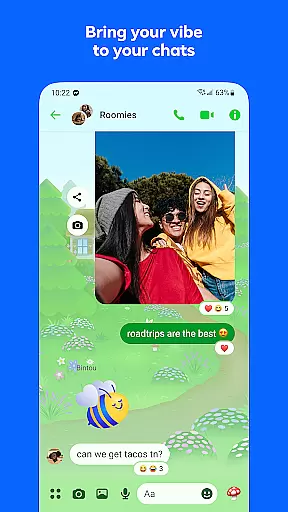
One standout feature is the ability to send high-definition photos and create shared albums, perfect for preserving memories from special occasions. Messenger also enables users to share large files directly within chats and offers disappearing messages for more private conversations. Whether you're part of a community or following creators, Messenger provides tools to engage meaningfully while allowing creative expression through stickers, GIFs, and customizable chat themes.
Messenger stands out with its robust set of features designed to enhance user interaction. The app includes an AI assistant that helps with tasks such as answering questions, offering advice, and assisting with homework. Users can send high-definition images and create shared albums, which are ideal for organizing group memories.
The app also supports file sharing up to 100MB, including Word, PDF, and Excel documents. Disappearing messages add a layer of privacy by allowing users to control how long their chats remain visible. Additionally, Messenger offers broadcast channels for creators and communities, enabling deeper engagement. Customizable themes and animated stickers provide fun ways to express individuality, while Stories let users capture fleeting moments that disappear after 24 hours.
Real-time messaging speed and reliability are crucial for maintaining seamless communication in any messaging app. Messenger excels in this area by providing instantaneous message delivery across the globe.
The app ensures that messages are delivered promptly, regardless of the recipient's location. This is achieved through optimized data transmission protocols and robust server infrastructure.
Users benefit from knowing their messages will reach the intended recipients without delay, enhancing the overall communication experience. This reliability fosters trust and encourages more frequent interactions among users.
Messenger's commitment to real-time messaging ensures that conversations flow naturally, mimicking face-to-face interactions. This feature is particularly beneficial for personal and professional communications where timing is essential.
Media sharing support in a messaging app allows users to exchange various types of media seamlessly. Messenger offers comprehensive media sharing capabilities, enabling users to send photos, videos, and large files effortlessly.
The app supports high-definition image sharing, ensuring that users can share clearer and crisper pictures. Additionally, Messenger allows the transmission of large files up to 100MB within chats, accommodating documents like Word, PDFs, and Excel sheets.
This extensive media sharing support enhances user interaction by allowing richer content exchanges. Whether it's sharing memorable moments or important documents, Messenger provides the tools necessary for effective communication.
By integrating advanced media sharing features, Messenger not only meets but exceeds user expectations, making it a versatile platform for diverse communication needs.
Instant messaging and calling
High-definition photo sharing
AI-powered assistant
Disappearing messages
Customizable chat themes
Limited Meta AI availability
Privacy concerns with data
Occasional bugs in updates
Heavy on storage
Requires Facebook account

Manage your data, talk & text - affordable phone plans & data usage made simple
 4.30
4.30
Phone Dialer with Caller ID, Address Book & Contacts Manager.
4.30
Caller ID App! Add names & photos to unknown calls & Call Recording
4.40
2nd Phone Number Line for Anonymous Texting, Calling, and Picture Messages
4.30
Chill zone on your phone: relax with fun reels & hype shorts!
4.20
An agentic AI browser for Android, built by Perplexity
4.50
An app dedicated solely to marriage, not dating, and supported by a rigorous verification mechanism to ensure seriousness.
4.2
FolderSync enables easy sync of files between cloud storage and Android devices.
4.60
Measure BHP, Torque & 0-60 Clear car OBD faults View engine data in Google Earth
4.00
A browser that does more than load page, like keeping your privacy safe.
4.70
We’re taking the yada yada out of wireless—now we’ve taken it out of your app.
4.70
Fast internet with AI, Adblock & VPN. Browse on a safe, incognito web browser.
4.70
Messages: Fast, simple SMS app with scheduling and smart features.
4.00
Call Forwarding is easy and simple application to use.
3.80
This app enables the phone to receive and send FT8 traffic!
3.80
Message and video call your family and friends in HD!
3.80
Call & Text Anywhere With A Canadian Number.
3.60
Secure Messaging App to Enhance Messenger Texting Experience and Organize SMS.
3.50
TeamSpeak - Secure Chat for Gaming & Business
3.10


User Reviews