
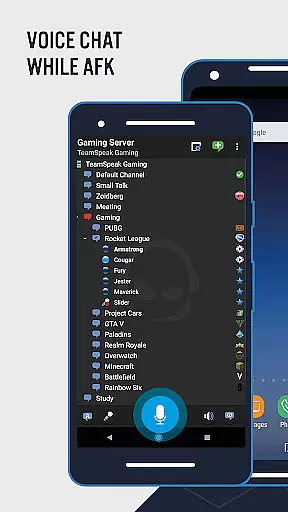

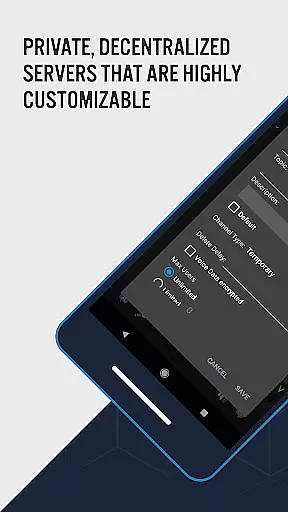

TeamSpeak 3 is a premier communication application designed for seamless voice chat and information sharing across various platforms including Android, PC, MacOS, iOS, and Linux. The app excels in providing real-time communication solutions tailored for online gamers, families, friends, and small businesses. With its robust server-based architecture, users can connect securely to private servers or explore numerous public channels.
What sets TeamSpeak apart is its optimization for mobile devices, ensuring that users remain connected even when they are on the move. The app supports essential features like synchronized bookmarks, multi-server connectivity, and both Push-To-Talk (PTT) and voice activation options. These capabilities make it an ideal tool for coordinating team strategies, hosting online events, or simply staying in touch with loved ones.
The true value of TeamSpeak lies in its ability to offer spam-free, high-quality communication. Whether you're managing a guild, clan, or professional team, this app ensures that your conversations remain private and efficient. Regular updates and ongoing improvements by the development team further enhance user experience, making TeamSpeak a reliable choice for all your communication needs.
TeamSpeak 3 boasts an impressive array of features that cater to diverse communication requirements. One of its standout functionalities is the support for synchronized bookmarks, allowing users to maintain consistency across multiple devices. This feature is particularly beneficial for those who switch between their mobile phones and desktops frequently.
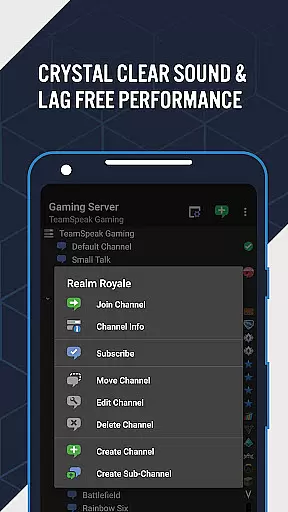
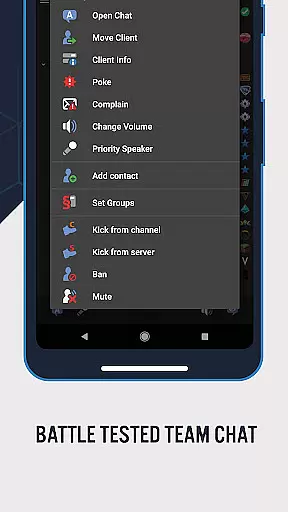
In addition to synchronized bookmarks, the app offers multi-server connectivity, enabling users to connect to different servers simultaneously. This is complemented by flexible communication options such as Push-To-Talk (PTT) and voice activation, which provide users with control over when they transmit audio. Administrators will appreciate the inclusion of common admin functions, text messaging capabilities, and comprehensive identity and contact management.
TeamSpeak also provides detailed channel and player information, along with player status notifications, ensuring that users are always informed about the activities within their network. Continuous updates and enhancements by the dedicated development team ensure that the app remains at the forefront of communication technology, offering users an ever-improving experience.
Real-time messaging speed and reliability are crucial for effective communication in any platform. TeamSpeak 3 excels in this area by providing users with an advanced voice chat solution that ensures messages are delivered instantly and accurately.
The app supports both Push-To-Talk (PTT) and voice activation, allowing users to communicate seamlessly without delays or interruptions. This feature is particularly beneficial for online gamers who require quick and precise communication during gameplay.
Moreover, the multi-server connectivity option enhances the reliability of message delivery. Users can connect to various servers, ensuring they remain in touch with their teammates regardless of server issues or maintenance downtimes.
By maintaining a robust infrastructure and continuously updating the app, TeamSpeak guarantees that users experience minimal latency and maximum uptime, making it a trusted choice for real-time communication needs.
Media sharing support is an essential feature for modern communication apps, enabling users to exchange more than just text or voice messages. TeamSpeak 3 offers comprehensive media sharing capabilities that enhance user interaction and collaboration.
Users can send and receive text messages, which serve as the foundation for basic communication. However, the app goes beyond simple text by supporting identity and contacts management, allowing users to organize and maintain their connections efficiently.
In addition to text-based interactions, TeamSpeak provides detailed channel and player information, enriching the media-sharing experience. This feature helps users stay informed about ongoing activities within channels and among participants, fostering a more engaging environment.
Furthermore, regular updates and new features introduced by the development team ensure that media sharing remains dynamic and versatile. By continuously improving these functionalities, TeamSpeak maintains its position as a leading communication tool for diverse user groups worldwide.
High-quality voice chat
Multi-platform support
Secure private servers
Regular free updates
Real-time communication
Requires server connection
No direct user connection
Limited mobile functionality
Complex setup process
Dependent on third-party servers

Enables Plus features of Quick Search.
 4.0
4.0
فیلتر شکن قوی پرسرعت کلید جدید برای اندرویدسریع ترین وی پی ان برای همه اپراتورها
4.70
A web browser that respects your privacy.
4.30
The ultimate productivity solution for all your email communication needs.
4.40
At select facilities, you now have an easy way to video visit your loved ones!
3.30
Create a secure hotspot on-the-go with Portable WiFi - Mobile hotspot.
4.40
An app dedicated solely to marriage, not dating, and supported by a rigorous verification mechanism to ensure seriousness.
4.3
Read OBD2 data and DTCs Create custom dashboards Enhanced diagnostics available
4.70
Group Chat That’s Fun & Games
4.30
We’re taking the yada yada out of wireless—now we’ve taken it out of your app.
4.70
FolderSync enables easy sync of files between cloud storage and Android devices.
4.60
Stay in touch with the people who matter most.
4.60
Fast and mini browser with Ad Blocker,Video Downloader and Video Player
4.40
Call Blocker app: Identify unknown callers, block spam calls, fraud & robocalls
4.30
HD Video Meeting app is a fast & unlimited video conferencing app across world.
4.30
RemoteHams.com Android RCForb Client Pre-Release
4.30
SMS Messenger is a lightning-fast messaging app.
4.20
A Browser with powerful ad blocker to help focus on what really matters.
3.00
Chat on the Jabber network (XMPP protocol); support for SMS and other gateways
2.10


User Reviews