
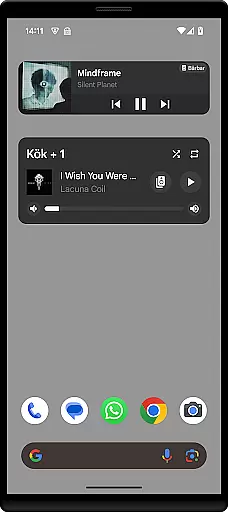
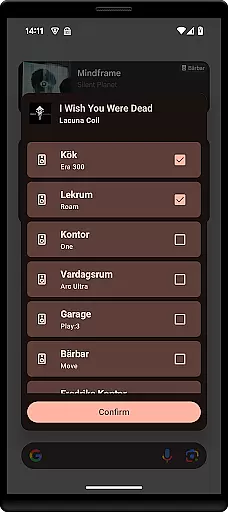
Sonos Widget is a powerful tool designed for music enthusiasts who want seamless control over their Sonos system directly from their home screen. This app offers two distinct widget options - Compact and Enhanced, allowing users to customize their experience based on their needs.
With features like volume control, grouping, playback controls (Play, Pause, Next, Previous), and support for modes such as Shuffle and Repeat, Sonos Widget ensures that you have complete control over your audio environment without needing to open the main Sonos app.
Whether you're setting the mood for a party or simply enjoying some quiet time at home, Sonos Widget provides an intuitive interface that enhances your listening experience by keeping all essential controls within easy reach.
The standout feature of Sonos Widget is its dual-widget system. The Compact widget offers a streamlined set of controls perfect for quick adjustments, while the Enhanced widget provides more detailed information and additional functionalities.
Users can view relevant metadata about the currently playing track, adjust the volume, manage speaker groups, and control playback with ease. Additionally, the widget supports various playback modes including Shuffle and Repeat, giving users flexibility in how they enjoy their music.
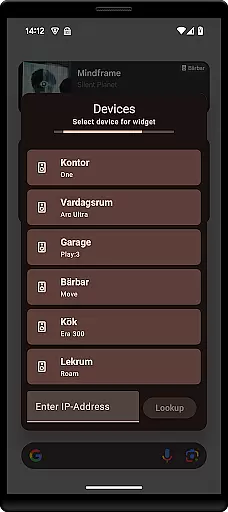
Setting up Sonos Widget is straightforward; simply select it from your 'Widget' drawer and follow the on-screen instructions to connect it to your Sonos system. For any issues or feedback, users can reach out via email to contact@freddroid.com.
When it comes to managing your music library, the Sonos Widget ensures a comprehensive experience. This application allows users to access an extensive range of music directly from their home screen. The widget supports various music sources, ensuring that users can enjoy both personal and streaming libraries without any hitches.
The app provides volume control, grouping, and playback functionalities including play, pause, next, and previous options. These features are crucial for seamless music management. Additionally, the widget supports modes such as shuffle and repeat, enhancing user interaction with their music collection.
One of the key benefits of using the Sonos Widget is its ability to display relevant metadata. This feature enriches the user's experience by providing detailed information about the tracks being played. Users can easily identify song titles, artist names, and album details, making their music exploration more informative and engaging.
Audio quality is paramount when enjoying music, and the Sonos Widget excels in delivering top-notch sound. By integrating directly with your Sonos system, this widget ensures that audio settings are optimized for the best possible listening experience. Whether you're playing local files or streaming services, the sound quality remains consistently high.
The setup process is straightforward, allowing users to select a Sonos Widget from their 'Widget'-drawer and add it to their home screen. Following the on-screen instructions connects the widget to the Sonos system effortlessly. This ease of setup ensures that users can quickly start enjoying high-quality audio without technical difficulties.
For those who encounter issues or have questions, support is readily available via email at contact@freddroid.com. This direct line of communication ensures that any concerns regarding audio quality or functionality can be promptly addressed. Overall, the Sonos Widget offers a reliable and high-quality solution for managing your music experience right from your home screen.
User-friendly interface
Customizable widgets
Comprehensive control options
Quick access to essential features
Seamless integration with Sonos
Limited to Sonos systems
No official endorsement from Sonos
Requires separate Sonos app
Basic design aesthetics
Occasional connectivity issues

Taal player that lets you sing any Indian & Western song with Tabla & Tanpura
 4.60
4.60
Walkout Song DJ is the most intuitive app to manage your sports music.
4.70
More downloads than any other metronome. Includes drum machine & tempo trainer.
4.80
Bass Booster Pro takes auto-equalizing to the next level!
4.30
Learn to play the piano using falling notes!
3.80
A sleek, no-frills player designed for true music lovers.
4.20
Offline Music Player & MP3 Player.Powerful equalizer, Lyrics, Themes, Tag Editor
4.80
The original SP-1200 experience on your iPad
4.20
Sing, record, and create music together — enhanced by smart voice tools.
4.00
Full-featured, High-Quality Groovebox Workstation, perfect for Live Performance!
4.80
Over 100 million tracks available for high quality streaming and download
4.60
Learn the notes on the guitar fretboard fast with this easy and fun app
4.60
Enhance the sound quality of your devices, listen to what you want
4.50
Full featured mp3 and audio player with Chromecast and Android Auto support.
4.40
Learn and play 2M+ music tabs & chords on guitar, ukulele, bass, and more
4.30
Master Salsa Rhythm quickly and with a lot of fun!
4.30
Sheet music reader, piano & music note player. Play music score & learn to read.
3.90
MilkDrop for Android TV
3.00
Remove ads permanently from Music Visualizer
4.1


User Reviews